 Sign in
Best VPS for AI Agents: What Specs You Need in 2026
The best VPS for AI agents is the one sized for your actual workload, with root access, a dedicated IPv4 address and a location close to the APIs your agent calls. This guide shows how to size CPU, RAM and storage for n8n, coding agents and browser automation, and ends with a checklist for choosing a host.
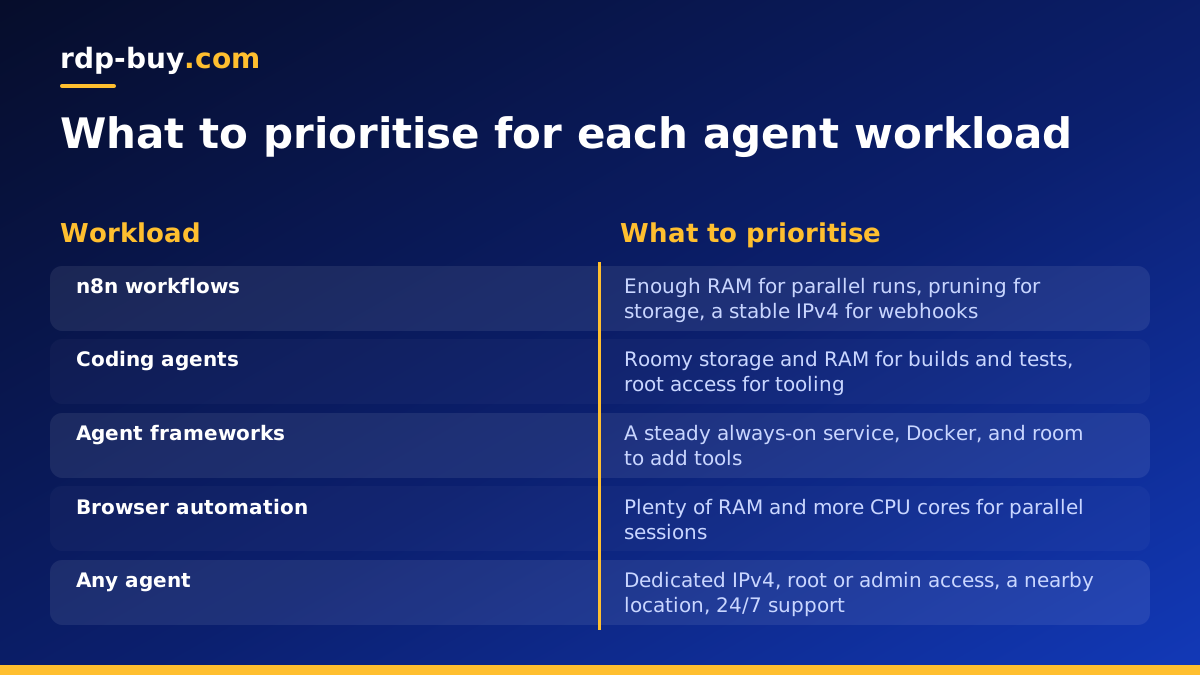
What an AI agent actually asks of a server
Most AI agents are not heavy on raw compute. When your agent calls a hosted model through an API, the expensive thinking happens on someone else's hardware. Your server mostly waits for responses, runs scheduled jobs, stores state and keeps connections open. What it needs is to be on all the time, reachable and stable.
That is why a VPS suits agents better than a laptop. A laptop sleeps, changes networks, and gets closed at the end of the day. A VPS server for AI agents stays up, keeps the same address and lets a long-running process finish at 3 a.m. without you. If you want the wider picture, the AI agent hosting hub covers how the pieces fit together.
The sizing question therefore is not "how powerful must it be?" but "what does my particular agent keep in memory, and what does it spawn?" Three workloads cover most cases: workflow automation, coding agents and browser automation. Each stresses a different resource.
Sizing by workload
Below, the tiers are described in relative terms on purpose. Exact requirements change between versions of each tool, so treat these as a starting point and confirm against the official documentation, then measure on your own server (the last section shows how).
- Workflow automation (n8n and similar): a small to modest server is usually enough for a handful of workflows that call APIs and move data. Memory is the first limit you will meet, especially when workflows handle large payloads or run in parallel. Storage grows slowly through execution history, so set a pruning policy. See VPS for n8n and the n8n documentation for current guidance.
- Coding agents (Claude Code (by Anthropic), and similar CLI agents): the agent itself is light, but it runs your project's tools: package installs, test suites, compilers and linters. Size the server for your build and test workload, not for the agent. A medium tier with comfortable RAM and fast, roomy storage is a sensible target. See VPS for Claude Code.
- Self-hosted agent frameworks (OpenClaw, Hermes Agent): these run as long-lived services that keep sessions, memory and tool state. A modest server often works while you test, and you can grow it once you connect more tools and channels. See VPS for OpenClaw and VPS for Hermes Agent.
- Browser automation: this is the hungriest of the common workloads. A real browser, even headless, uses a lot of memory per instance, and several parallel tabs or sessions add up quickly. Plan for a larger tier with generous RAM and more CPU cores if you run many sessions at once.
- Running a model locally: this is a different category. Local language models want far more memory and usually a GPU. For most agent setups, calling a hosted model API from a modest VPS is the more practical route.
RAM, CPU and storage: which one to spend on
If your budget is limited, spend in this order for most agent workloads: RAM first, storage second, CPU third. Here is why.
- RAM: running out of memory is the most common way an agent server fails. The operating system starts killing processes, and your agent or database disappears without warning. Containers, browsers and databases all compete for the same pool. Leave headroom instead of sizing to the exact average.
- CPU: more cores help when you run tasks in parallel, such as several workflows at once, several browser sessions, or a build alongside the agent. A single, sequential agent that mostly waits on API calls rarely needs many cores.
- Storage: logs, execution history, Docker images, package caches and project checkouts accumulate. Choose enough space for the first few months of growth, and schedule cleanup so it does not fill silently. A full disk stops databases and containers abruptly.
- Swap: a small swap file can soften short memory spikes, but it is a safety net, not a substitute for enough RAM.
Why root access matters for agents
Agents are tools you install, configure and update often. With full root access on a Linux VPS, you can install Docker, open the ports you need, set up a reverse proxy, add a firewall, create a separate user for the agent and schedule maintenance. Without it you end up fighting a restricted environment.
Root access also lets you run the agent as a managed service, so it restarts after a reboot or crash. On Linux that usually means a systemd unit or a Docker restart policy. The Docker VPS page explains why containers are a convenient way to keep agent stacks reproducible, and the official Docker site has the install and restart policy details.
Root is also a responsibility. Use SSH keys instead of passwords, turn off password login once your key works, keep the system updated, and never run the agent as root unless there is a clear reason. On a Windows RDP server the equivalent is full administrator access, which suits agents and tools that need a desktop. See Windows RDP for AI agents if that is your case.
Why a dedicated IPv4 address matters
Agents talk to other services, and many of those services care who is calling. A dedicated IPv4 address gives you a stable identity that is not shared with unknown neighbours.
- Allowlisting: databases, internal APIs and some SaaS tools let you restrict access to specific addresses. A fixed IPv4 makes that possible.
- Webhooks: n8n and other agents often receive inbound calls. A stable address makes DNS and TLS certificates simple to set up and keep.
- Reputation: on a shared address, another user's behaviour can affect how services treat your traffic. A dedicated address keeps that under your control.
- Predictability: an address that does not change after a restart means fewer broken integrations.
Choose a location close to what the agent talks to
Every API call travels from your server to the service and back. For an agent that makes many sequential calls, distance adds up in waiting time. Pick a location near the model API, the database or the users your agent serves most.
If your agent mostly talks to one provider's API, choose a region near that provider. If it serves people, such as a chat bot or a webhook endpoint, choose a region near them. rdp-buy.com offers 33 server locations, and the server locations page lists them so you can match a region to your workload.
Windows RDP or Linux VPS for your agent?
For most agents, Linux is the lighter and more common choice: headless, scriptable and friendly to Docker. Choose Windows when the agent needs a Windows-only application, a full desktop session, or tools that only exist on Windows.
If you are unsure, the guide on RDP vs VPS explains the difference. When you are ready, you can look at Linux VPS plans or Windows RDP plans. On Windows plans the licence is included in the price.
A simple checklist for choosing a host
Use this list when comparing any ai agent hosting platform, including ours. A host that ticks these boxes is a strong candidate for the best AI agent hosting for your needs.
- Full root or administrator access, so you can install anything the agent needs.
- A dedicated IPv4 address, for allowlists, webhooks and stable DNS.
- A location choice that lets you sit near your APIs and users.
- Room to grow: you should be able to move to a larger plan when your measurements say so.
- Flexible billing: monthly, half-yearly or yearly terms let you test first and commit later.
- Fast provisioning: servers that are ready in minutes make testing and rebuilding painless.
- Human support at any hour: agents run overnight, so 24/7 support matters.
- Clear plan details: check the exact CPU, RAM and storage on the plan page before you pay, rather than relying on marketing labels.
How to measure and resize after launch
Guessing is fine for the first day. After that, measure. Follow these steps on a Linux VPS.
- Start with a modest plan and run your real workflow or agent for several days, including your busiest tasks.
- Check memory with free -h and live usage with htop. If available memory stays low or swap grows, you need more RAM.
- With Docker, run docker stats to see which container uses the most memory and CPU.
- Check disk with df -h and find large folders with du -sh. Set log rotation and pruning for old execution data.
- Look at logs for out-of-memory kills. If you see them, size up before adding anything else.
- Upgrade when the numbers show a pattern, not after a single spike. Take a backup or snapshot of your data first.
