 Sign in
Hermes Agent Best Model: Hosted APIs vs Local Models on a VPS
There is no single best model for Hermes Agent. The right pick depends on the task, your budget for API calls and how much hardware your server has. This guide compares hosted API models with local models and shows what a VPS can realistically run.
The short answer: match the model to the job
People searching for the Hermes Agent best model usually want one name. Honestly, that is the wrong question. Hermes Agent, an open-source agent from Nous Research, is the harness: it plans, calls tools, keeps memory and talks to a model. The model is a separate, swappable part. Which one is best depends on what you ask the agent to do.
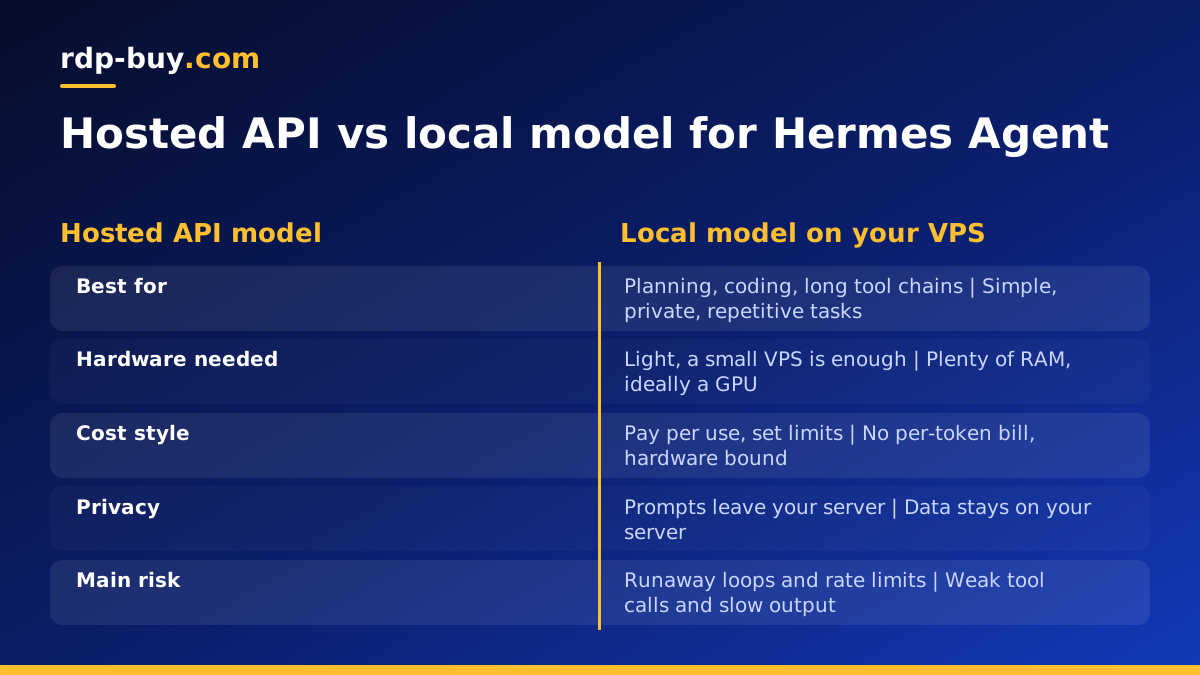
A practical rule works for most people. Use a hosted API model for the hard work: multi-step planning, long tool-calling chains, and coding. Use a small local model only for cheap, private or repetitive jobs where occasional weaker answers are acceptable. Many good setups use both.
Model names and provider support change quickly, so check the Nous Research site and the project pages on GitHub for the current list of supported providers before you commit. This article avoids naming a winner that may be out of date next month and focuses on the criteria that stay stable.
What Hermes Agent actually needs from a model
An agent is much harder on a model than a chat window. A chatbot only has to write a decent reply. An agent has to decide which tool to call, format the call correctly, read the result, and decide what to do next, often many times in a row. A small slip early in the chain gets repeated in every later step.
When you compare models, look at these qualities rather than general reputation:
- Reliable tool calling. The model must produce well-formed calls and arguments, and recover when a tool returns an error.
- Instruction following. Agents carry long system prompts and rules. A model that drifts from them will break your workflow.
- Context length. Agents accumulate logs, file contents and memory. A short context window forces constant trimming and loses information.
- Consistency over long runs. An agent that works for hours needs a model that does not degrade or loop.
- Cost and rate limits. An always-on agent makes many calls. Check how your provider bills and throttles before you leave it running.
Hosted API models: where they win
A hosted API means the model runs in the provider's data centre and your agent sends requests over the internet. For most Hermes Agent users, this is the best starting point.
The main advantage is capability. The strongest models today are hosted, and they are noticeably better at long planning chains and at writing and fixing code. You also need almost no hardware, because your server only runs the agent and sends text. That means a modest VPS is enough.
The trade-offs are real, though. You pay per use, so a runaway loop can cost money. Your prompts and any file contents the agent reads leave your server, which matters for private data. And you depend on the provider's availability and rate limits.
To keep costs predictable, set spending limits in the provider dashboard, give the agent a maximum number of steps per task, and use a cheaper model for simple routing or summarising steps while reserving the expensive one for hard reasoning.
Local models: when they make sense
A local model runs on your own machine, usually through a runtime such as Ollama or llama.cpp that exposes an OpenAI-compatible endpoint. Hermes Agent can then point at that endpoint instead of a hosted provider. Confirm the exact configuration option in the current documentation.
Local models are attractive for three reasons: your data stays on your server, there is no per-token bill, and you are not affected by a provider's outage or policy change. They suit tasks like classifying messages, extracting fields from text, summarising short documents, or drafting simple replies.
They are a weaker fit for the hard jobs. Smaller open-weight models are more likely to fumble tool calls, lose track in long chains, or produce code that needs heavy review. If you are looking for the Hermes Agent best local model, the honest answer is: the largest, best-quantised model your hardware can hold, from a family known for tool use, tested on your own tasks. Open-weight Hermes-family models from Nous Research are a natural place to start, but test before you trust them with anything important.
What a VPS can and cannot run
This is where expectations most often meet reality. A typical VPS gives you virtual CPU cores, RAM and disk, and usually no GPU. That shapes what is realistic. If you need to confirm what a given plan includes, read the plan details on the Linux VPS plans page rather than assuming.
- CPU. Language models can run on CPU only, but generation is slow. For short, non-urgent jobs that can be fine. For an agent that needs many quick calls in a row, it quickly becomes the bottleneck.
- RAM. The model weights have to fit in memory, with room left over for the context, the operating system and the agent itself. Quantised models (compressed weights) need less memory, at some cost to quality. If the model does not fit, the server will swap to disk and crawl, or the process will be killed.
- GPU. A GPU is what makes larger local models fast and usable. Without one, stay with small models and low expectations. If you need a large local model with responsive output, a standard VPS is the wrong tool and you should either use a hosted API or look at dedicated GPU hardware elsewhere.
- Disk. Model files are large. Keep spare space for several models if you plan to experiment, plus logs and agent memory.
Hermes Agent for coding
Coding is the task where the gap between hosted and local models is widest. Writing a function is one thing. Navigating a repository, running tests, reading errors and fixing them across several files is a long chain of tool calls, and that is exactly where weaker models fail.
For serious coding work, use a strong hosted model as the main brain. A reasonable pattern is to let the hosted model plan and edit, then let the agent run tests and linters locally on the server, which costs nothing in tokens. If you also use Claude Code (by Anthropic) for development, see the VPS for Claude Code page for how a server supports that workflow. The two tools do different jobs, and you can run both on the same machine.
A local model can still help with coding on the side: generating commit messages, explaining a snippet, or writing boilerplate. Treat its output as a draft. Whatever model you use, run the agent in a project directory with limited permissions, use version control so every change can be reverted, and review diffs before merging.
A hybrid setup that works for most people
You do not have to choose one side. A hybrid setup routes each kind of task to the cheapest model that can do it well.
Hosted model: planning, coding, multi-step research, anything where a wrong tool call is costly.
Small local model: classification, tagging, simple summaries, private text you prefer not to send out.
Start with a hosted model for everything. Once you see which tasks are repetitive and simple in your logs, move only those to a local model and compare the results. Moving the wrong task first is the most common mistake, because failures in an agent are quiet and show up later.
How to use Hermes Agent on a VPS, step by step
Here is a practical path from an empty server to a running agent. Follow the official installation instructions from the project for exact commands, since they change between versions. The VPS for Hermes Agent page covers the hosting side in more detail.
- 1. Choose a Linux VPS. You get root access and a dedicated IPv4 address, and servers are ready in minutes. See Linux VPS plans. If you are unsure whether you need Windows instead, read Windows or Linux server: which to rent.
- 2. Secure it first. Log in with root, create a normal user, set up SSH keys, and disable password login if you can.
- 3. Install the agent. Follow the current instructions in the project repository linked from nousresearch.com. If you prefer containers, Docker on a VPS keeps the agent and its dependencies isolated.
- 4. Add your model provider. Put the API key in an environment variable or a secrets file with restricted permissions, never in a public repository. For a local model, point the agent at your runtime's endpoint instead.
- 5. Test with a small task. Give the agent a short job with a clear result and read what it did.
- 6. Keep it running. Run it under a service manager such as systemd, or inside a container with a restart policy, so it survives reboots and crashes.
- 7. Watch the logs and costs. Check how many calls it makes and adjust step limits or the model if usage is higher than expected.
Best practices for a reliable always-on agent
These habits matter more than the model choice once the agent runs unattended.
- Limit permissions. Run the agent as a non-root user and give it access only to the folders and tools it needs.
- Set step and spend limits. A loop without a ceiling is the usual cause of a surprise bill.
- Keep a log you actually read. Review failures weekly and tighten prompts where the agent keeps stumbling.
- Pin your model. Changing models silently can change behaviour. Note which model each workflow uses and test before switching.
- Back up memory and config. Snapshot the agent's data directory so you can rebuild the server quickly.
- Require approval for risky actions. Deleting files, sending messages or spending money should not happen without a check.
Pick a server location close to what the agent talks to
With a hosted model, every step of an agent run is a network round trip, so distance adds up across long chains. Pick a location near the API provider's region, or near the services and users your agent works with. rdp-buy.com offers 33 server locations, listed on the server locations page, so you can choose one that suits your setup.
A dedicated IPv4 address helps when a service allows only known IPs, and an always-on server means your agent keeps working when your laptop is closed. For the full picture of what hosting gives an agent, see the AI agent hosting hub.
rdp-buy.com is an independent hosting provider and is not affiliated with or endorsed by Nous Research, Anthropic, Docker or any other vendor named in this guide.
