 Sign in
Hermes Agent vs OpenClaw: Which Self-Hosted Agent to Run
Hermes Agent and OpenClaw are both open-source agents you can run on your own server, but they have different strengths. This guide compares them, covers coding use, and explains how to host either one on a 24/7 VPS.
The short answer
If you want an agent that works as an always-on personal assistant reachable from your chat apps, start by looking at OpenClaw. If you want an agent that builds up memory and reusable skills as it works, and that you can drive from a terminal or a messaging gateway, look at Hermes Agent. Both can run on a small Linux server. Both are more useful when they stay online all day, which is the real reason to host them on a VPS instead of a laptop.
Feature lists for both projects change quickly. Treat this article as a framework for deciding, and confirm current details in the official sources: Nous Research for Hermes Agent and openclaw.ai for OpenClaw. The projects' repositories on GitHub are the best place to check requirements and recent changes.
rdp-buy.com is not affiliated with or endorsed by Nous Research, OpenClaw or any other vendor named here. We rent servers, and the agents are third-party software you install yourself.
What each agent is built for
Hermes Agent is an open-source agent from Nous Research. It is designed around an agent that keeps context between sessions, can learn reusable skills, and can run tasks on a schedule. You can usually talk to it from a command line and connect it to a messaging platform so it can reach you when a job finishes. If you want to try it on a server, our VPS for Hermes Agent page covers the hosting side.
OpenClaw is an open-source personal assistant that runs on hardware you control and talks to you through chat apps you already use. Its focus is being an assistant that is always reachable, with tools and skills that let it act on your behalf. The hosting notes for it are on our VPS for OpenClaw page.
The practical difference is where you spend your time. With OpenClaw you spend it on connecting channels and tools. With Hermes Agent you spend it on shaping the agent's skills and memory over time. Neither is a better fit for everyone.
Side by side: features, models and typical use
Use this as a checklist when you read each project's documentation. Verify every point against the current release before you commit to one.
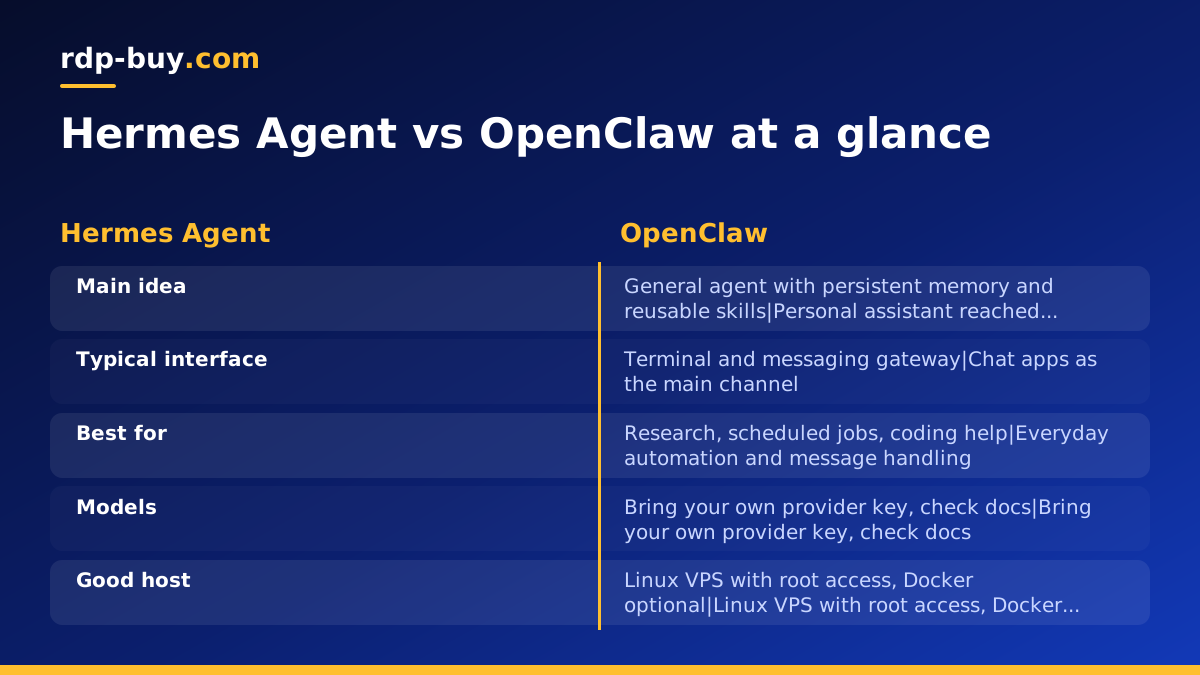
- Interface: Hermes Agent is commonly used from a terminal and a messaging gateway. OpenClaw is centred on chat apps as the main way to reach the assistant.
- Memory and learning: Hermes Agent puts persistent memory and reusable skills at the centre of its design. OpenClaw also supports skills and tools, with an emphasis on being a personal assistant.
- Typical jobs: Hermes Agent suits research, scripted maintenance, scheduled reports and coding help. OpenClaw suits personal automation, reminders, inbox and message handling, and tool use from chat.
- Hosting: both are meant to run on your own machine, which makes a Linux VPS a natural home. Both can also run inside containers, see Docker VPS.
- Maintenance: both are fast-moving open-source projects. Plan to read release notes before updating and keep a backup of your data directory.
Model support
Both agents are model-agnostic to a useful degree. You supply an API key for a hosted model provider, or point the agent at a compatible endpoint, and you can change that choice later. The exact list of supported providers differs by version, so check the configuration section of each project's docs before you pick.
This matters for server location. When your agent calls a hosted model API all day, latency to that API affects how snappy each step feels, especially in agents that make many sequential calls. Rather than guessing, test: deploy in a location near the provider's region, run a few typical tasks, and compare against a second location. rdp-buy.com offers 33 server locations, listed on the server locations page, so moving is a matter of ordering a new server.
If you plan to run models locally on the server itself, that is a different sizing exercise entirely. Local models need far more memory and usually a GPU, so a general-purpose VPS is better used as the always-on agent host that calls out to a hosted model.
Resource needs and which VPS plan fits
I will not quote exact RAM or CPU figures here, because requirements change between versions and depend on what you attach to the agent. Read the install section of each repository for the current minimums, then size up from there based on what the agent will actually do.
A sensible way to think about it:
- Agent only, hosted model: the agent mostly waits on API calls, so a modest Linux plan is usually enough. Start small and upgrade if you see memory pressure.
- Agent plus a headless browser: browsing tools use noticeably more memory and CPU than plain text work. Choose a bigger plan if the agent will open pages, scrape or fill forms.
- Agent plus other services: if you also run n8n, a database or several containers on the same box, size for the sum of everything. Our VPS for n8n page explains how workflow automation sits alongside an agent.
- Agent that needs a desktop: if a tool only works through a graphical app, use a Windows server instead. See Windows RDP for AI agents.
Hermes Agent vs Claude Code and OpenCode for coding
People often ask about Hermes Agent for coding. It can help with code, but the tools you compare it with are built differently. Claude Code (by Anthropic) and OpenCode are coding agents that live inside a repository and a terminal. Their whole design assumes you are working on a codebase. Hermes Agent is a more general agent that can also write and run code as one of many tasks.
A fair way to choose:
- Mostly writing and reviewing code in a repo: a dedicated coding agent such as Claude Code or OpenCode is the closer match. See VPS for Claude Code if you want one running on a server.
- Mixed work, code plus research, reports and scheduled jobs: a general agent like Hermes Agent can cover more ground, with memory that carries between tasks.
- Both: nothing stops you from running a coding agent and a general agent on the same VPS, as long as the plan has room for both.
Why run either agent on a 24/7 server
An agent that lives on your laptop stops when the lid closes, the Wi-Fi drops or the machine sleeps. For a scheduled report, a chat assistant that should answer at any hour, or a long-running task, that is a real problem.
A VPS or RDP server fixes the main points:
- Uptime: the server runs around the clock without your own hardware having to stay on.
- Dedicated IPv4: every server comes with its own IPv4 address, useful when a service wants to allow-list the address your agent calls from.
- Full control: Linux plans give root access and Windows plans give full admin access, so you can install whatever the agent needs.
- Location choice: pick a region close to the APIs and the people your agent talks to.
- Quick start: servers are ready in minutes, and support is available 24/7 if you get stuck.
Hermes Agent best practices on a VPS
These habits apply to both agents, and they are what separate a demo from something you can leave running.
- Use a non-root user. Create a normal user for the agent and give it only the access it needs. Root access is there for you to set the server up, not for the agent to run as.
- Run it as a service. Use systemd or a container restart policy so the agent comes back after a reboot or a crash.
- Keep secrets out of the repo. Store API keys in environment files with tight permissions, never in code or shared chat.
- Limit what it can touch. Give the agent its own working directory and, where possible, its own container. Review any tool that can run shell commands or delete files.
- Set spending limits. Use the usage limits offered by your model provider so a runaway loop cannot surprise you.
- Back up the data directory. Memory, skills and configuration are what make the agent yours. Copy them off the server regularly.
- Lock down access. Use SSH keys, disable password login once keys work, and expose only the ports you need.
- Update deliberately. Read release notes, update in a test container first, then roll out.
How to set up either agent on a Linux VPS
The steps below are the same shape for both projects. Use each project's own install guide for the exact commands, as they change between releases.
- Order a Linux plan from Linux VPS plans in a location near your model provider.
- Log in over SSH as root, create a regular user, add your SSH key and turn off password login.
- Install the basics: updates, a firewall, and Docker if you plan to containerise the agent, following the guides on docker.com.
- Follow the install section of the agent's official repository or website.
- Add your model API key and the first channel or tool, then test with a simple task.
- Set it up to start on boot, then reboot once to confirm it returns on its own.
- Watch memory and CPU for a few days, then resize if needed.
Which should you pick?
Pick OpenClaw if your main goal is an assistant you message from your phone that handles everyday tasks. Pick Hermes Agent if you want a longer-lived agent that accumulates skills and memory and runs scheduled or research-heavy work. Pick a dedicated coding agent if your day is mostly inside a repository.
If you are still deciding on the server itself, the Windows or Linux server guide and the AI agent hosting hub explain the trade-offs. For most self-hosted agents, Linux is the simpler and lighter choice. A Windows RDP from Windows RDP plans makes sense when you need a desktop session or Windows-only software, and the licence is included in Windows prices.
