 Sign in
Best OpenClaw Hosting: How to Pick a Server That Stays Online
The best OpenClaw hosting is a small, always-on server that keeps your assistant's gateway running, its messaging channels connected and its data private. Here is how to choose one, from sizing and location to setup, with a dedicated VPS for OpenClaw as the natural home and the wider AI agent hosting range if you plan to run more.
What OpenClaw is and why hosting matters
OpenClaw is an open-source personal AI assistant that you run yourself. It connects a language model of your choice to the chat apps you already use and to tools on the machine it runs on, so you can message it and have it carry out tasks. The official site is openclaw.ai, and the source is on GitHub.
The part that makes hosting important is the gateway: a long-running process that keeps your channels connected and listens for messages. If the gateway stops, your assistant stops answering. That is why people quickly move OpenClaw off a laptop and onto a server that never sleeps.
Laptop, home server or VPS
There are three common places to run OpenClaw, and each suits a different stage.
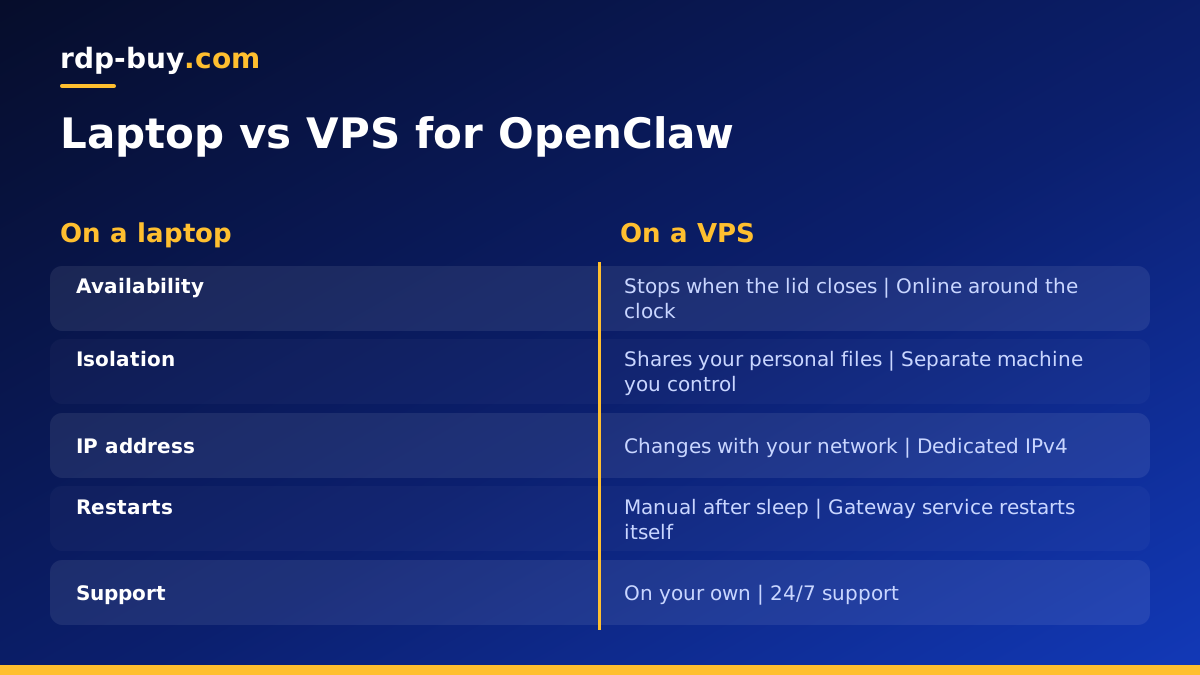
- Your laptop: fine for trying it out. It stops answering when the lid closes, the Wi-Fi drops or you travel, and it gives an always-on agent access to your personal files.
- A home server or spare mini PC: stays on, but depends on your home power and connection, and opening it to the internet safely takes effort.
- A VPS: online around the clock, isolated from your personal machine, with a fixed public IP address and full control over the software. This is the setup most people settle on for daily use.
What to look for in the best OpenClaw hosting
OpenClaw is not a heavy program on its own, because the language model usually runs at the model provider. What it needs is reliability, isolation and enough room for the tools you let it use. When comparing plans, check for:
- Always-on uptime and 24/7 support, so a stuck server gets attention at any hour.
- Full root access, so you can install Node.js, run the gateway as a service and add tools.
- A dedicated IPv4 address, which keeps webhook endpoints and allowlists stable.
- Enough memory for the gateway plus anything it launches, such as a headless browser.
- A location near you or your model provider, so replies feel quick.
- Flexible billing, so you can test monthly before committing to a longer term.
Sizing a server for OpenClaw
Start with what OpenClaw will actually do. If it mostly answers messages and calls model APIs, an entry-level Linux VPS is enough. If you let it browse the web with a headless browser, run scripts, or work with files and repositories, give it more memory, since browsers in particular use a lot. If you plan to run local models on the same server, that is a different and much heavier workload, and a dedicated server is the better fit.
It is common to run OpenClaw alongside other agents or tools on one machine. In that case, add up what each one uses and leave headroom for updates and spikes.
Picking a location
Every message goes from your chat app to the server, from the server to the model provider, and back. Placing the server in the region where you live, or near the provider's API, keeps that loop short. rdp-buy.com has 33 locations to choose from on the server locations page, so you can pick a city in your own region.
Setting up OpenClaw on a VPS
The exact commands change between releases, so follow the current instructions on the official site. The overall shape of a server setup stays the same:
- Order a Linux VPS and log in over SSH as root with the details from your welcome email.
- Update the operating system, create a regular user and set up SSH keys.
- Install a current Node.js version as required by the OpenClaw docs.
- Install OpenClaw and run its onboarding to connect a model provider and your chat channels.
- Install the gateway as a background service so it starts automatically after a reboot.
- Send a test message from your phone and confirm the assistant replies.
Keeping your assistant safe on a server
An assistant that can run commands is powerful, so give it a well-defined space. Run it under its own user rather than root, and only give it access to the folders and tools it needs. Keep model API keys and channel tokens in its configuration, not in shared scripts, and rotate them if you ever suspect a leak.
Limit who can message the assistant. Most chat channels allow you to restrict access to your own account or an allowlist; use that so strangers cannot send it instructions. Keep the server firewall closed except for SSH and any ports you deliberately expose, and apply updates to both the operating system and OpenClaw on a regular rhythm.
Keeping OpenClaw online 24/7
Running the gateway as a system service is the most important step: it restarts the process if it crashes and starts it again after a server reboot. Beyond that, check the logs now and then for channel disconnections, keep an eye on disk space if the assistant writes files, and back up its configuration and memory folder so you can rebuild quickly on a new server if you ever need to.
If you prefer containers, run it in Docker with a restart policy; the Docker VPS plans suit that approach.
Common OpenClaw hosting mistakes
Most problems people hit with a hosted assistant come from a few avoidable choices. Watching for them saves hours of debugging later.
- Running the gateway in an SSH session. It stops when you disconnect. Install it as a service instead.
- Running everything as root. An assistant with root rights can change anything on the server. Give it its own user.
- Leaving the assistant open to anyone. Restrict which accounts can message it on every channel.
- Choosing the smallest plan and adding a browser. Headless browsers need memory; size for them from the start.
- Skipping backups. The configuration and memory folder are what make your assistant yours. Copy them off the server regularly.
- Never updating. Agent software moves quickly. Read release notes and update on a schedule.
Running OpenClaw next to other agents
Once one assistant is running well, people often add more: an n8n instance for scheduled workflows, a coding agent, or a second assistant for a team. Keep each one under its own user or container, give each its own configuration and keys, and watch total memory use as you add them. When one server starts to feel crowded, split the heavier tools onto a second VPS rather than squeezing everything onto one.
Choosing your OpenClaw hosting plan
For a personal assistant, start with the OpenClaw VPS hosting plans: full root access, a dedicated IPv4, servers ready in minutes and billing that can be monthly, half-yearly or yearly. If you want one server for OpenClaw plus other agents, n8n or Claude Code (by Anthropic), compare the larger options on the AI agent hosting page.
Payment is by card, PayPal or crypto, and 24/7 support can help you pick a size before you order.
