 Sign in
VPS Hosting Explained: How It Works and When You Should Buy It
VPS hosting gives you a private slice of a powerful physical server, with its own operating system, resources and IP address, that you control completely. Here is how it works in plain words, who it suits, and how to choose a plan when you are ready to buy VPS hosting.
VPS hosting explained in one paragraph
VPS stands for virtual private server. A hosting company takes a large physical machine and uses virtualisation software, called a hypervisor, to split it into several independent virtual machines. Each one gets its own share of CPU, memory and disk, its own operating system and its own network address. To you it behaves like a separate computer: you can log in, install software, open ports and reboot it without affecting anyone else on the same hardware.
That is the core idea. Everything else, from pricing tiers to Linux or Windows choices, is detail on top of it. If you want the practical version, a VPS is a computer in a data centre that you rent by the month, reach over the internet and run however you like.
How a VPS differs from shared hosting and dedicated servers
It helps to place VPS hosting between the two options people usually compare it with.
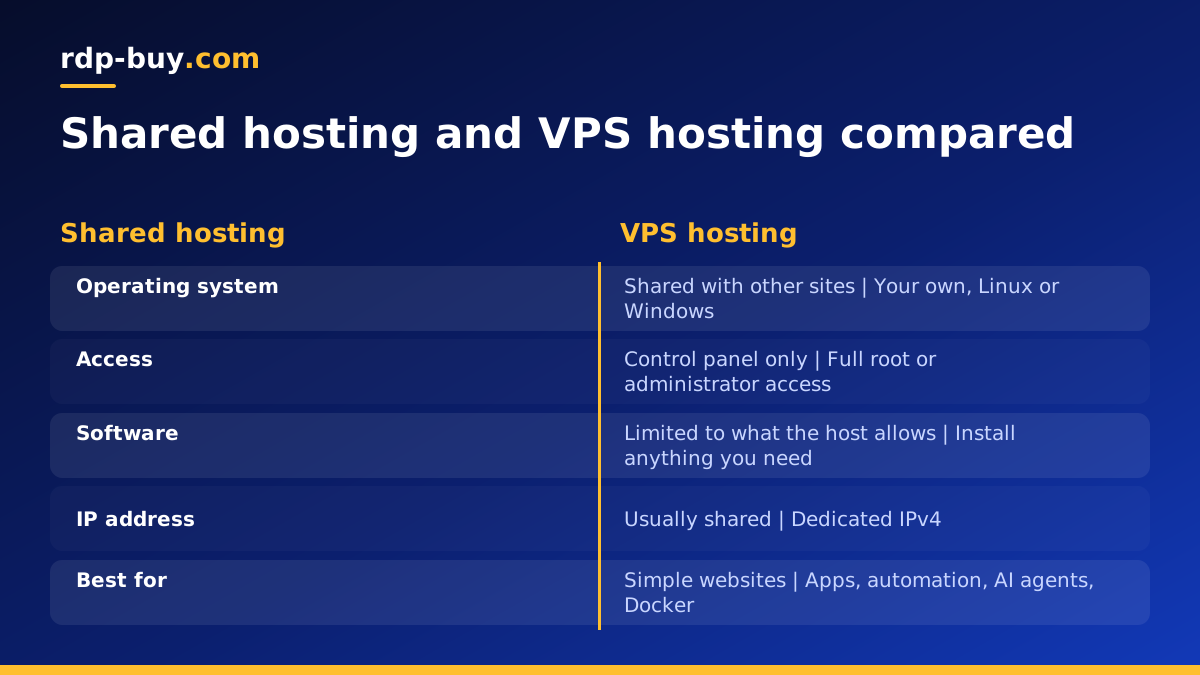
With shared hosting, many websites live inside one operating system and share everything. You get a control panel, but you cannot install system software, run background processes freely or change server settings. It is fine for a simple website and very limiting for anything else.
With a dedicated server, you rent an entire physical machine. You get all of its resources and no neighbours, which suits heavy, steady workloads. It also means more capacity than many projects need.
A VPS sits in the middle. You get root or administrator access and guaranteed resources like a dedicated server, at a size that matches small and medium workloads. When a project outgrows it, you can move up to a larger VPS or to a dedicated server.
What you actually control on a VPS
Control is the main reason people choose VPS hosting. On a Linux VPS you get root access over SSH; on a Windows VPS you get full administrator access over Remote Desktop. In both cases you decide:
- Which operating system version runs, and when it is updated.
- Which software is installed, from web servers and databases to Docker, Python or trading terminals.
- Which ports are open and what the firewall allows.
- Which users can log in and with what permissions.
- How backups, monitoring and scheduled jobs are set up.
What people use VPS hosting for
Because a VPS is always on and has a fixed public address, it suits anything that must run without a laptop staying awake. Common uses include:
- Websites and web apps that have outgrown shared hosting or need custom software.
- Automation tools such as n8n workflows that should fire on schedule day and night. See the VPS for n8n page.
- AI agents that call APIs, watch inboxes or run coding tasks around the clock, covered on the AI agent hosting hub.
- Docker containers for databases, dashboards and internal tools.
- Private VPN servers so your traffic leaves from an IP you control.
- Trading tools that need a steady connection close to a broker, usually on a Windows server.
Linux VPS or Windows VPS
Most VPS hosting runs Linux. It is light, free to license, and the default home for web servers, Docker and developer tools. You manage it from a terminal over SSH.
A Windows VPS runs Windows Server and gives you a full desktop over Remote Desktop. It is the right choice when your software only runs on Windows, such as MetaTrader or many business desktop apps. On rdp-buy.com the Windows licence is included in Windows prices. If you are deciding between the two, the guide on Windows or Linux server is a good next read.
How VPS resources work: CPU, memory and storage
Plans are described by virtual CPU cores, memory and disk. Virtual cores handle work in parallel, so more cores help when several tasks run at once. Memory holds what running programs are using; running out of it is the most common cause of a slow server. Disk holds the operating system, your software, logs and data.
The simplest way to choose is to start from your workload, not the plan list. Write down what will run at the same time, estimate whether it is light, moderate or heavy, and pick a plan with headroom. A single website or a small automation tool is light. A database plus several containers is moderate. Many agents, builds or browser sessions in parallel is heavier. You can move to a larger plan later if you start small.
Location, IP address and why they matter
Every VPS lives in a data centre in a specific city, and every request has to travel there and back. Putting the server close to your users, or to the APIs and services it calls, keeps things responsive. rdp-buy.com offers 33 server locations, listed on the server locations page.
Each server also comes with a dedicated IPv4 address. That matters for allowlists, email reputation, VPN use and any service that treats a fixed address as a sign of trust.
Common myths about VPS hosting
A few misunderstandings put people off a VPS or lead them to buy the wrong thing. Clearing them up makes the decision easier.
- "A VPS is only for developers." Traders, small offices and people running automation tools use them every day, often through a Windows desktop that feels like any PC.
- "Bigger is always better." An oversized plan wastes money. Start from your workload and grow when you see the server is busy.
- "The host keeps my software updated." With full root or administrator access, keeping the operating system and your apps updated is part of your job, which is also what gives you full control.
- "Backups happen automatically." Plan your own backups of important data to a second location so a mistake on the server never costs you work.
- "Location does not matter." Distance adds delay to every request, so pick a city near your users or the services you call.
What to check before you buy VPS hosting
Once the concept is clear, buying is a short checklist.
- Access level: confirm you get full root or administrator access.
- Operating system: Linux for web and automation, Windows for Windows-only software.
- Location: near your users or the services your server talks to.
- Dedicated IPv4: needed for allowlists and steady reputation.
- Billing terms: monthly to test, half-yearly or yearly once you are settled.
- Support hours: 24/7 support matters when your server runs around the clock.
- Payment options: card, PayPal or crypto, whichever you prefer.
Keeping a VPS healthy after you buy it
A VPS rewards a short routine. Apply operating system updates regularly, keep the firewall closed except for the ports you use, use SSH keys or long passphrases, and check disk space now and then so logs do not fill it. Set your main services to start automatically, so a reboot after updates brings everything back without you logging in. These small habits keep a server stable for months at a time.
Choosing your first VPS plan
If your project is a website, an automation tool, Docker or an AI agent, start with the Linux VPS plans and pick a size from the workload checklist above. If you need Windows software, look at Windows VPS hosting instead. Servers are ready in minutes, billing can start monthly, and support is available 24/7 if you want help choosing.
If budget is the main concern, the cheap VPS plans are a sensible place to learn the ropes before you scale up.
