 Sign in
VPS Los Angeles: Choosing a West Coast Linux Server
A VPS Los Angeles server gives you root access to a Linux machine in Southern California, close to West Coast users and a common bridge to Asia Pacific. This guide covers who it suits, how to keep it affordable and how to buy a US VPS with Los Angeles as your location.
Why choose a VPS in Los Angeles
A virtual private server is your own isolated Linux environment with reserved resources and root access. It runs websites, APIs, databases, Docker containers, bots, automation tools and AI agents, and it stays online in a data centre regardless of what your own computer is doing.
Los Angeles is the largest city on the US West Coast and a major point where traffic crosses the Pacific. Hosting there puts your project close to users in California, Nevada and Arizona, and on the natural side of the country for partners and customers in Asia Pacific. Your server gets a dedicated US IPv4 address, so US based services see a US connection.
Every USA VPS from rdp-buy.com includes full root access, a dedicated IPv4 address, 24/7 support and a choice of monthly, half-yearly or yearly billing.
Who a Los Angeles VPS suits
If your audience is mostly on the East Coast or in Europe, another location will usually serve you better.
- Media, entertainment and creative businesses hosting portfolios, client portals, review tools or content sites for a Southern California audience.
- Ecommerce stores whose shoppers are mostly in the western US and who want pages to load close to them.
- Companies working with Asia Pacific that want a US server on the Pacific side for both audiences.
- Developers and agencies running APIs, staging sites and internal tools for West Coast clients.
- Automation and AI users keeping n8n workflows, bots, scrapers or agents online around the clock with a US address.
Los Angeles or another US city?
rdp-buy.com offers 33 locations, with US cities including New York, Los Angeles, Dallas, Chicago, Miami, Atlanta, Seattle, Silicon Valley and Honolulu. The server locations page lists them all.
Los Angeles is the natural pick for Southern California and the Southwest. Silicon Valley is closer for the Bay Area tech scene, Seattle suits the Pacific Northwest and Honolulu serves Hawaii. Central cities such as Dallas and Chicago balance both coasts, while New York, Atlanta and Miami cover the East. When in doubt, choose the city nearest to the users or services you depend on most.
Getting a cheap VPS in Los Angeles without regret
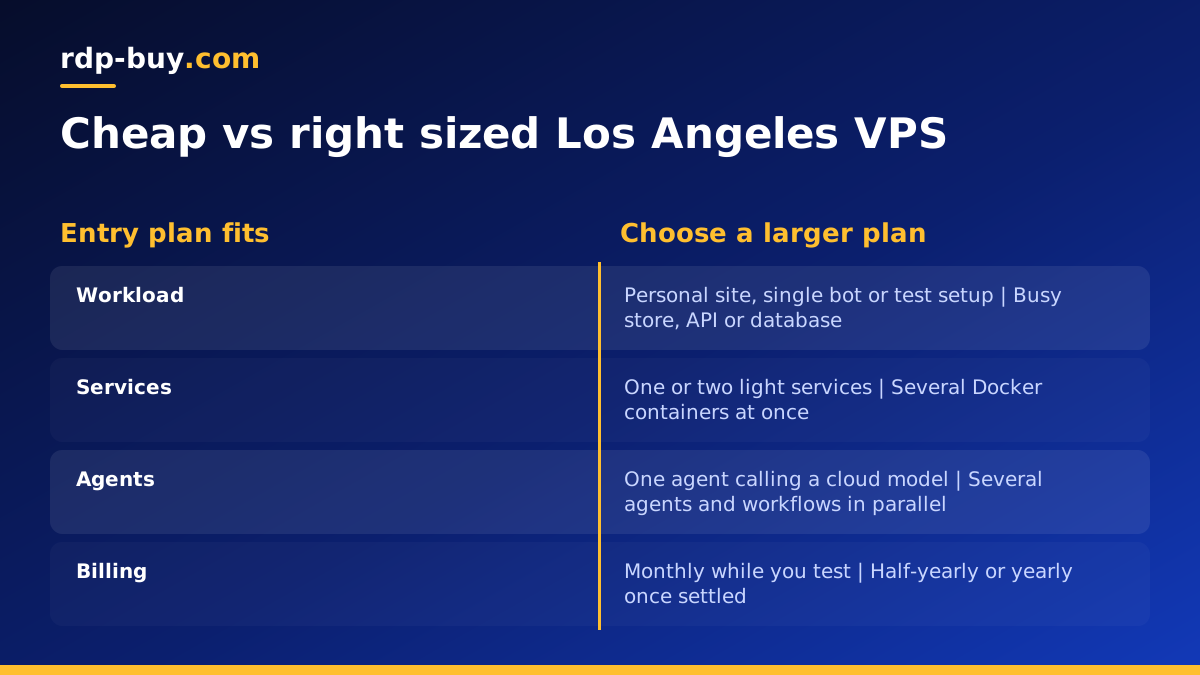
Many buyers search for a cheap VPS in Los Angeles. A low cost plan is a great choice when it matches the job, and a poor one when it does not. The trick is to buy for your real workload, not for the lowest number on the page.
- Start small when the job is small: a personal site, a single bot or a test environment runs comfortably on an entry plan. The cheap VPS plans are built for this.
- Pay for memory before anything else: running out of memory is the most common cause of a slow or crashing server.
- Use monthly billing while testing: once you know the plan is right, a half-yearly or yearly term saves you renewing every month.
- Check what is included: root access, a dedicated IP and round the clock support are all part of every plan here, so there are no surprise add ons for the basics.
- Upgrade instead of over buying: it is easier to move to a bigger plan later than to pay for idle resources from day one.
How to size a VPS in Los Angeles
Write down the services that will run at the same moment, estimate the memory for each, and choose the plan that covers the total with room to spare.
- Static or small dynamic sites: an entry plan.
- Busy stores, forums and APIs: more memory for caching and the database.
- Docker stacks: add the memory each container uses and leave room for the system. See the Docker VPS page.
- AI agents and automation: steady memory and uninterrupted uptime matter more than raw CPU for most agents that call cloud models. The AI agent hosting hub explains the options.
Ordering your Los Angeles VPS
Then open a terminal and connect over SSH with the details you received.
- Open the US VPS plans and pick your size.
- Choose Los Angeles as the location and select a Linux distribution such as Ubuntu or Debian.
- Pick monthly, half-yearly or yearly billing.
- Pay by card, PayPal or crypto. For crypto payments, read buy a VPS with crypto.
- Receive your IP address and root password within minutes.
Securing and deploying on day one
Start with security, then deploy. Update every package, create a regular user with sudo rights, add your SSH key and turn off password login. Enable a firewall that only allows SSH and the ports your app needs. Turn on automatic security updates so critical fixes arrive without you.
For a website, install Nginx or Caddy, point your domain to the server's IPv4 address and add a free SSL certificate. For apps and automation, run each service under systemd or in Docker with a restart policy, keep data on persistent volumes, and put a reverse proxy in front for HTTPS. Keep a short text file of every command you ran so you can rebuild quickly or move to a larger plan without guesswork.
Running AI agents on a Los Angeles VPS
A growing number of buyers want a West Coast server for AI agents and automation rather than websites. Agents such as OpenClaw or Hermes Agent, workflow tools such as n8n, and coding assistants such as Claude Code (by Anthropic) all benefit from a machine that never sleeps and keeps the same IP address. A laptop closes, loses Wi Fi and restarts for updates; a VPS keeps the agent running through the night.
Most agents that call cloud models do not need a large server. They need steady memory, reliable uptime and a way to restart themselves after a reboot. Run each agent in Docker or as a systemd service, store its data and keys on the server with tight file permissions, and log its activity so you can see what it did while you were away. Pages such as VPS for n8n and VPS for OpenClaw describe typical setups.
Keeping your server healthy
Check disk space and memory every few weeks, rotate logs, and keep a copy of your data somewhere other than the server. Test a reboot after big changes so you know every service starts on its own. Schedule heavy jobs for quiet hours on Pacific time. With root access you can solve most issues yourself, and 24/7 support is on hand if the server becomes unreachable.
Choosing your Los Angeles VPS plan
If your users are on the West Coast, or you want a US server that also faces Asia Pacific, a Los Angeles VPS is a practical home for your project. Begin with the smallest plan that comfortably covers your peak load and grow from there.
When you are ready, compare sizes and order a VPS in the USA with Los Angeles as your location. If you are still deciding between a Windows desktop and a Linux server, read RDP vs VPS: the difference.
