 Sign in
VPS Miami: When a Florida Server Is the Right Choice
A VPS Miami server is a Linux machine in Florida with root access, a good fit when your audience is in the southeastern United States, the Caribbean or Latin America. Below you will find who it suits, how to size it and how to buy a VPS in the USA with Miami as the location.
What a VPS in Miami is and why location matters
A virtual private server is your own isolated server environment with its own operating system, its own resources and root access. You can host websites, run Docker containers, keep bots and scripts online, or run automation tools and AI agents. Because it lives in a data centre, it stays online when your laptop is closed.
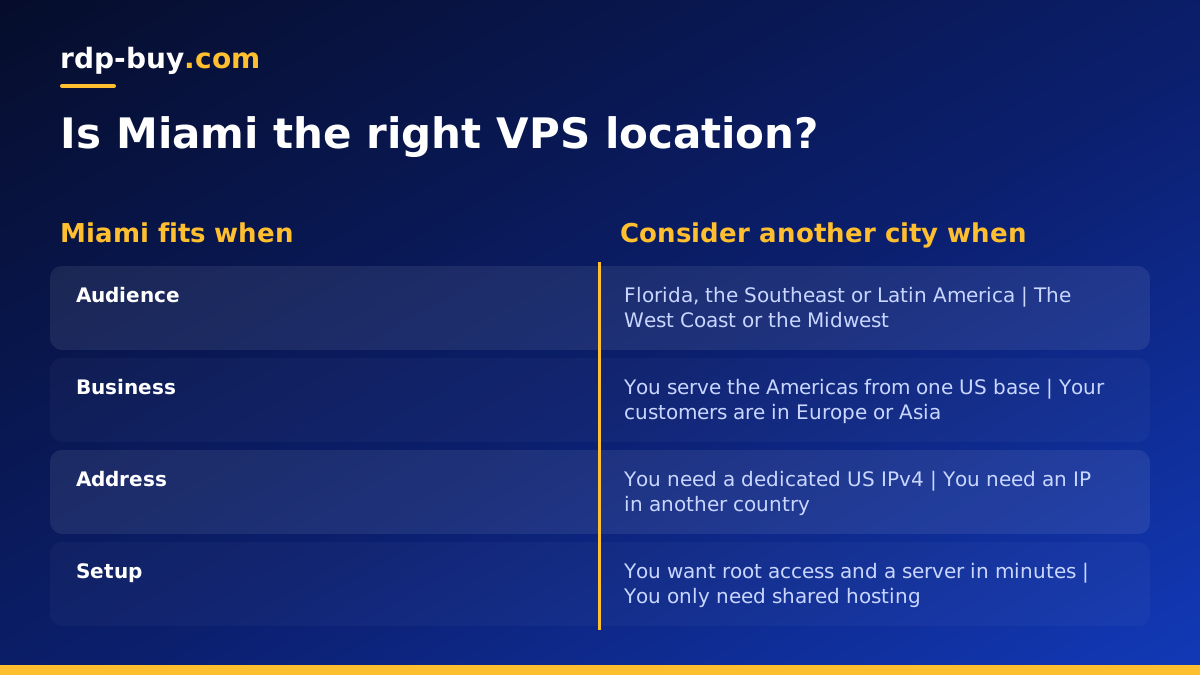
Location decides how far your data travels. Miami sits at the southeastern corner of the United States and has long been a meeting point between North America, the Caribbean and Latin America. Hosting your project there keeps it close to users in Florida and the Southeast while also giving a sensible route towards Central and South America. You also get a United States IP address, which many US services and dashboards expect.
Every USA VPS from rdp-buy.com includes full root access, a dedicated IPv4 address and 24/7 support.
Who a Miami VPS suits best
If none of these sound like you, the location may matter less, and another US city closer to your audience might fit better.
- Businesses serving Florida and the Southeast who want their website, booking system or customer portal hosted close to their customers.
- Companies working with Latin America who need a US server that also sits on a natural path towards Spanish and Portuguese speaking markets.
- Ecommerce and travel sites with visitors spread across the Americas who want one US base for the whole region.
- Developers and agencies hosting client sites, APIs and staging environments for clients in the region.
- Automation and AI users running n8n workflows, scrapers, bots or agents that must stay online and need a US address.
Miami versus other US VPS locations
rdp-buy.com offers 33 locations, with US cities including New York, Los Angeles, Dallas, Chicago, Miami, Atlanta, Seattle, Silicon Valley and Honolulu. You can browse them on the server locations page.
Choose Miami when your users are in the Southeast, the Caribbean or Latin America. Atlanta is another good southeastern choice if your audience is more inland. New York suits the Northeast, Chicago and Dallas are good central options, and Los Angeles, Seattle or Silicon Valley serve the West Coast. If your audience is truly national, a central city may balance things better, and you can always add a second server later since new servers are ready in minutes.
How to size a Miami VPS
Plan for the busiest moment rather than the average. List everything that will run at the same time and add headroom for updates and growth.
- A single website or small app: an entry plan is often enough. The cheap VPS plans are designed for this kind of start.
- Several sites or a busy store: more memory helps the web server and database cache content and respond quickly.
- Docker and automation stacks: add up the memory each container needs. Our Docker VPS page explains what to plan for.
- AI agents and n8n: agents that call APIs are often light on CPU but need steady memory and to run without interruption. See VPS for n8n for a typical setup.
Buying a VPS in Miami, step by step
From there you can connect over SSH and start building.
- Open the US VPS plans and choose the size you planned above.
- Select Miami as the location and pick a Linux distribution. Ubuntu or Debian long term support releases are a reliable default.
- Choose monthly, half-yearly or yearly billing.
- Pay by card, PayPal or crypto. If you prefer crypto, read how to buy a VPS with crypto.
- Receive your IP address and root login within minutes.
Setting up the server securely
Before installing your applications, lock the server down. It only takes a short while and protects everything you add later.
- Update the system packages so you begin with current security fixes.
- Create a regular user with sudo rights and switch to SSH key login.
- Disable password login for root once your key works.
- Enable a firewall and allow only SSH and the ports your application needs, such as web traffic.
- Set the time zone to match your audience so logs and scheduled jobs line up with their day.
Hosting a site for US and Latin American visitors
If you serve visitors in more than one language, a single Miami server can host all versions of your site. Keep each language on its own path or subdomain, set the correct language tags in your pages, and use caching so repeat visitors load pages quickly. Point your domain to the server's dedicated IPv4 address, add an SSL certificate with a free tool such as Certbot, and test the site from a phone as well as a desktop.
For applications rather than websites, the same principle applies: keep the server close to the people and services it talks to most, and keep the software running with systemd services or Docker restart policies so it recovers on its own after any reboot.
VPS or shared hosting for a Miami business?
Many small businesses start on shared hosting, where one server runs hundreds of unrelated websites. That is fine for a simple brochure site, but it limits what you can install, and a busy neighbour can slow your pages down. A VPS gives you your own environment with resources set aside for you, root access to install anything, and a dedicated IP address that belongs only to your server.
The switch usually makes sense when you need custom software, background jobs, a database you control, an automation tool such as n8n, or simply more predictable performance for a growing store. It also helps when you run several client sites and want them all on one server you manage yourself.
If you only need a single static page, shared hosting may still be enough. If you need control, reliability and room to grow, a VPS is the natural next step, and choosing Miami keeps it close to a southeastern or Latin American audience.
Keeping your Miami VPS online
Schedule updates for quiet hours on Eastern time, keep regular backups of your data and configuration, and watch disk space so logs do not quietly fill the drive. Test a reboot once after setup so you know every service comes back without you. With root access you can fix most issues yourself, and 24/7 support is available if you cannot reach the server.
Choosing your Miami VPS plan
If your users are in Florida, the Southeast, the Caribbean or Latin America, a Miami VPS keeps your project close to them while giving you a US IP address and full control. Start with the plan that covers your peak load and grow into a larger one as traffic increases.
When you are ready, compare sizes and order a US VPS in Miami. If you are still deciding between a Windows desktop and a Linux server, read RDP vs VPS: the difference first.
