 Sign in
Best RDP Server: How to Judge a Plan Before You Buy in 2026
The best RDP server is not the one with the longest feature list. It is the one that runs your work smoothly, from the right place, with the access and support you need. This buyer's guide gives you a clear way to judge any plan before you buy RDP.
What makes an RDP server the best choice for you
An RDP server is a Windows machine in a data centre that you use through Remote Desktop. You see its desktop on your own screen, install programs on it and leave it running when you log off. People rent one to keep trading terminals online, run automation and AI agents around the clock, work from a fixed IP address, or get a clean Windows machine without buying hardware.
Because the uses are so different, there is no single best RDP server for everyone. A trader needs a location near the broker. A freelancer needs a stable desktop and a fixed IP. Someone running browser automation needs more memory. The right approach is to judge every plan against the same short list of questions, then pick the one that answers them best for your workload.
The sections below are that list. Work through them in order and you will end up with a plan that fits, whether you are after a cheap and simple desktop or a larger Windows RDP server for heavier work.
Check the access you get
The first question is what kind of access the plan gives you. Some offers are a user account on a shared Windows machine. Others are a whole server that belongs to you. The difference matters every day.
With full administrator access you can install any software, change Windows settings, manage the firewall, add users and set programs to start automatically. Without it, you are limited to what someone else has allowed. Every Windows server on rdp-buy.com comes with full admin access. If admin rights are central to your work, our admin RDP page explains what that includes.
Also check the IP address. A dedicated IPv4 address is assigned only to your server, which keeps logins, whitelists and trading accounts stable. A shared address can be affected by what other users do.
Make sure Windows is properly licensed
A Windows server needs a genuine licence to activate and receive updates. Some offers leave this out of the price and expect you to sort it out, while others include it.
On rdp-buy.com, the Windows licence is included in Windows prices. That means the price you compare is the price you pay for a working, updatable system. When you compare any two plans, check this first, because it changes the real cost more than small differences in the headline figure.
Pick the location before the plan size
Location affects two things: how responsive the remote desktop feels to you, and how quickly the server reaches the services it talks to. For most people, the second matters more.
If you trade, choose a location close to your broker's trade server. If you run a business tool or an AI agent, choose a location near the APIs, websites or customers it works with. If you mostly use the desktop yourself, choose a location near you. rdp-buy.com offers 33 locations, listed on the server locations page, and there are dedicated pages for popular regions such as USA RDP and UK RDP.
Match resources to what you actually run
Memory, CPU and storage decide how the server feels under load. The best RDP server for you has enough of each for what you run at the same time, plus some headroom, and no more.
Here is a simple way to estimate your needs:
- Light use: one browser, office tools and a chat app. An entry level plan is usually enough.
- Medium use: several browsers with many tabs, one or two trading terminals, or a few automation tools. Choose more memory.
- Heavy use: many trading terminals, browser automation at scale, development builds or AI agent tools that run in parallel. Choose more memory and CPU cores, or consider a dedicated server.
- Storage: fast SSD space for Windows, your programs and their data. Count what you install and keep, then add room for updates.
Look at support and setup time
Even a well chosen server can need help: a forgotten password, a Windows update that needs a restart, or a firewall rule that locked you out. When that happens, support hours decide how long you are stuck.
Look for 24/7 support, so help is available at night and on weekends. Also check how long it takes to get started. rdp-buy.com servers are ready in minutes, so you can order, connect and start working in the same sitting.
Compare billing and payment options
Billing flexibility lets you test before you commit. Monthly billing is the safest way to try a plan. Half-yearly and yearly billing suit a setup you already know works.
Payment options matter too, especially if you buy from outside Europe or North America. rdp-buy.com accepts card, PayPal and crypto. You can read the steps for each on the pages for buying RDP with PayPal, paying by card or paying with crypto.
Cheap and best RDP: can you have both?
Yes, if the plan fits the job. A small plan is the best RDP for light use because you are not paying for capacity you never touch. The problem only starts when a small plan is asked to do heavy work.
A good rule is to start one size smaller than you fear you need, on monthly billing, then watch Task Manager for a week. If memory stays near the limit during your busiest hours, upgrade. If it rarely passes the middle, you chose well. Our cheap RDP plans are a sensible starting point for light, always-on work.
Your checklist for choosing the best RDP server
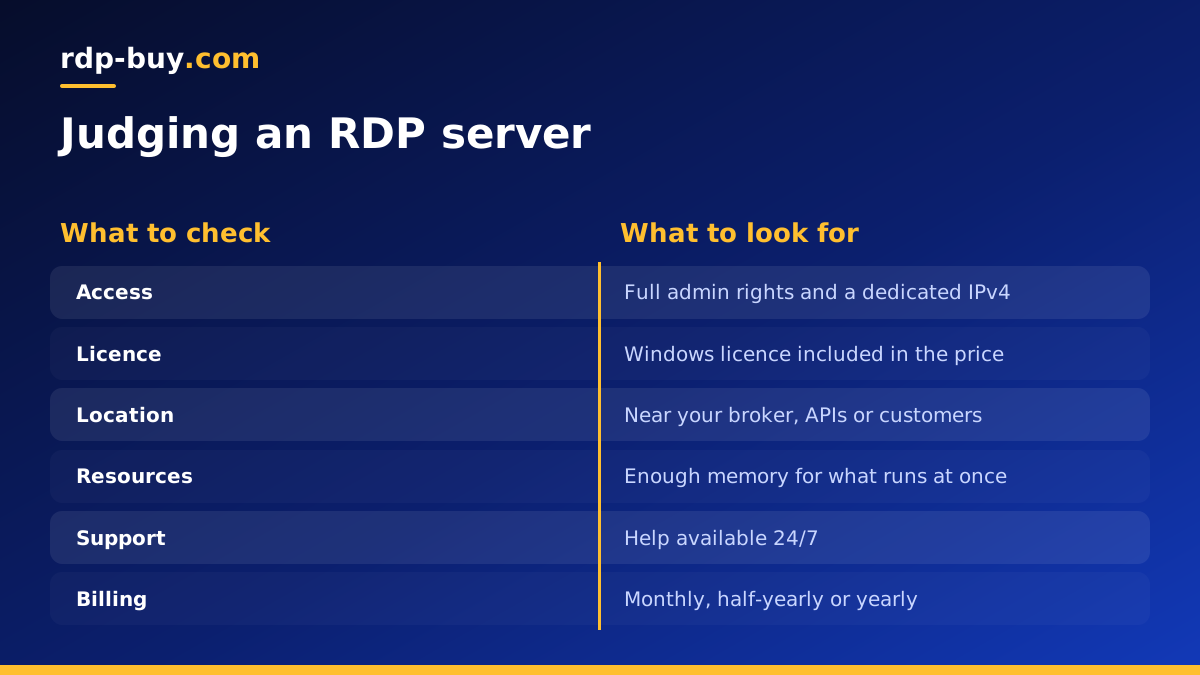
Before you order, run through this list once more: full admin access, a dedicated IPv4 address, an included Windows licence, a location near the services you use, enough memory for what you run at the same time, 24/7 support, flexible billing and a payment method that works for you.
If a plan ticks every box for your workload, it is the best RDP server for you. You can compare the Windows options and choose an RDP server plan now, or read which RDP plan you need for more help with sizing. If you are still deciding between RDP and a Linux server, our guide on the difference between RDP and VPS explains both.
