 Sign in
Buy VPS Server in India: Location, Payment and Setup Guide
If your visitors, customers or tools are in India, it often makes sense to buy VPS server capacity close to them. This guide explains when an Indian location helps, what to check before you order, payment options and the first setup steps, so you can buy VPS hosting with confidence.
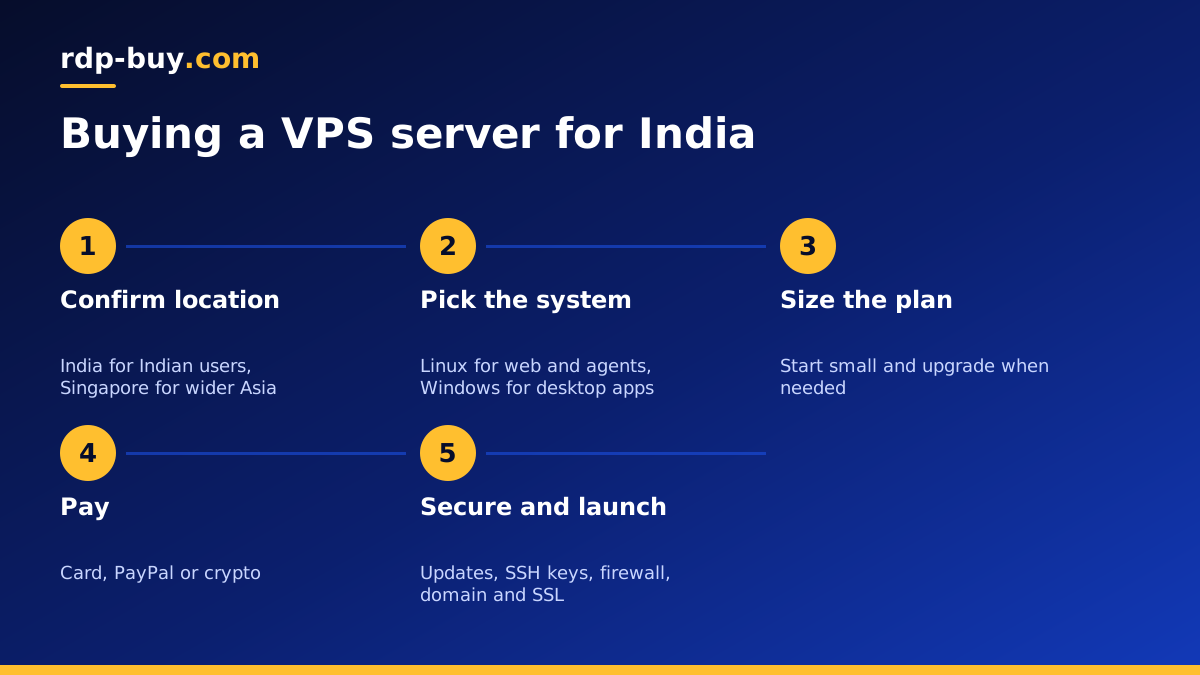
Why buy a VPS server in India?
The main reason is distance. A server located in India sits much closer to Indian users than one in Europe or North America, so every page load, API call and remote session has a shorter path to travel. For an online shop, a SaaS app, a WhatsApp or Telegram bot serving Indian customers, or a remote desktop used from Indian cities, that shorter path makes the service feel noticeably more responsive.
Some businesses also prefer to keep their data on servers in the same country as their customers, for example to match the expectations of clients or partners. Check the rules that apply to your industry, but for many projects an Indian location is simply the practical choice.
Finally, a server in India gives you an Indian IP address. That can matter for testing how a site looks to Indian visitors, for services that expect local traffic, or for a VPN that should exit in India.
Who benefits from an India VPS
These are the projects that gain most from hosting in India.
If your project fits one or more of these, an Indian location is worth testing. If it does not, read the next section before you decide, because a nearby hub may serve you better.
- Websites and online stores whose visitors are mainly in India.
- Apps and APIs used by Indian customers or partners.
- Chat bots and support agents that reply to Indian users on messaging apps.
- Developers and agencies hosting client projects for Indian businesses.
- Traders whose broker or exchange servers are in India.
- Remote teams that need a shared server close to staff in Indian cities.
When another location is better
An Indian server is not always the right choice. If your users are spread across Asia, a hub such as Singapore may give a better balance. If your AI agent mostly calls APIs hosted in the United States or Europe, a server near those APIs may finish each step sooner. If your audience is global, pick the location nearest to your largest group and consider adding a content delivery network for static files.
rdp-buy.com offers 33 server locations, so you can compare India with nearby options such as Singapore before choosing. Windows users can also look at the dedicated India RDP and Singapore RDP pages.
What to check before you buy
Use this list to compare any India VPS offer.
- The exact city. Make sure the provider names the location rather than a vague region.
- Full root access, so you can install anything and configure the server your way.
- A dedicated IPv4 address for your domain, allow lists and API keys.
- Linux and Windows options, in case your software needs Windows.
- Clear billing cycles: monthly, half-yearly or yearly, with renewal terms stated up front.
- 24/7 support that covers Indian business hours and late nights.
- Quick delivery, so you can start within minutes of paying.
- Payment methods that work for you.
Paying for a VPS from India
Buyers in India sometimes find that international cards are declined for foreign services, or that a card needs to be enabled for online international use first. If that happens, check your card settings in your banking app, or try another payment method.
rdp-buy.com accepts card, PayPal and crypto. If your card works for international payments, paying by card is quick. PayPal is an alternative for those who prefer it. If you would rather pay with coins, read the guide on buying a VPS with crypto before you send anything.
Whichever method you use, pick the billing cycle that suits your plans. Monthly billing is ideal while you test the location and plan size. Once the server has proven itself, a half-yearly or yearly cycle means fewer renewals to remember and less chance of a lapsed payment taking your site offline at a bad moment. Keep the email address on your account current so renewal reminders reach you.
Linux or Windows for your India server
Choose Linux for websites, online stores, APIs, Docker, VPNs and automation tools such as n8n, OpenClaw and Hermes Agent. It is light and has no licence cost. Choose Windows if your software only runs on Windows, if you use a desktop trading terminal, or if your team wants a familiar desktop over Remote Desktop. At rdp-buy.com, the Windows licence is included in Windows prices.
Still undecided? The guide on choosing a Windows or Linux server walks through the decision.
How to size your plan
Pick a plan from what you will run, not from the location. A small business site or a single bot runs well on a small plan. A store with a database and caching, or a Docker host with several containers, needs more memory. Several AI agents or a busy n8n instance need more cores as well.
Start with the smallest plan that comfortably fits, watch memory and CPU for a couple of weeks, and upgrade if you see the server running close to its limits. Starting on monthly billing makes this easy.
First steps after you buy
Once your server is ready you receive its IP address and login details. On Linux, these steps give you a safe base.
- Connect over SSH and run all system updates.
- Set the time zone to India Standard Time if your scheduled jobs depend on local time.
- Create a non root user with sudo rights and add your SSH key.
- Disable password login for SSH once your key works.
- Enable a firewall and open only the ports you need.
- Install your web server, Docker or application stack.
- Point your domain's A record at the server's dedicated IP and add a free SSL certificate.
- Set up regular backups stored off the server.
Running automation and AI agents from India
An India VPS is a good home for bots and agents that serve Indian users. A customer support agent replying on a messaging app, an n8n workflow syncing orders from an Indian store, or a scraper collecting local data all benefit from sitting close to the people and services they work with. The server stays on around the clock, so your automation does not stop when your laptop sleeps.
If you plan to run agents, the AI agent hosting hub and the VPS for n8n page show how to set them up.
Common mistakes when buying a VPS for Indian users
A few avoidable mistakes come up again and again. Steering clear of them saves time and money later.
- Choosing a far away location because it looked cheaper. The small saving rarely makes up for slower pages and sessions for every user.
- Buying a plan far larger than needed. Start small, measure and upgrade. You can always grow.
- Skipping backups. A server without off site backups is one mistake away from losing data.
- Leaving password login on. Bots scan for SSH and Remote Desktop around the clock. Use keys on Linux and strong passwords on Windows.
- Ignoring renewal terms. Make sure the price you accept today is one you accept at renewal.
- Forgetting the time zone. Scheduled tasks and logs are easier to read when the server uses the same time as your business.
Buying your VPS server for India
Check the location list for India and nearby options, choose Linux or Windows, size the plan from your workload and pick a billing cycle. Every plan includes full root or admin access, a dedicated IPv4 address and 24/7 support, and servers are ready in minutes.
When you are ready, compare the Linux VPS plans or start with cheap VPS options for a smaller project. You can pay by card, PayPal or crypto.
