 Sign in
Buy VPS for Crypto: Run Nodes, Bots and Tools Around the Clock
People buy VPS for crypto work because nodes, bots and monitoring tools need to stay online day and night, which a home computer rarely manages. This guide covers what you can run, how to size and secure the server, and how to buy VPS hosting that suits your crypto setup.
Why buy a VPS for crypto projects?
Crypto software tends to be always on. A node keeps syncing with its network, a trading bot watches markets continuously, and an alert script needs to fire the moment something changes. Running these on a laptop means they stop when it sleeps, restarts for updates or loses its Wi Fi connection.
A VPS sits in a data centre with stable power and network connections, and it stays on whether you are at your desk or not. It has a dedicated IPv4 address, which helps when an exchange API lets you restrict keys to a specific IP. You also keep your crypto tools away from your personal computer, which separates your everyday browsing from software that touches keys or accounts.
This guide is about hosting software. It does not give financial or investment advice, and nothing here suggests what to buy, sell or hold.
What crypto workloads suit a VPS
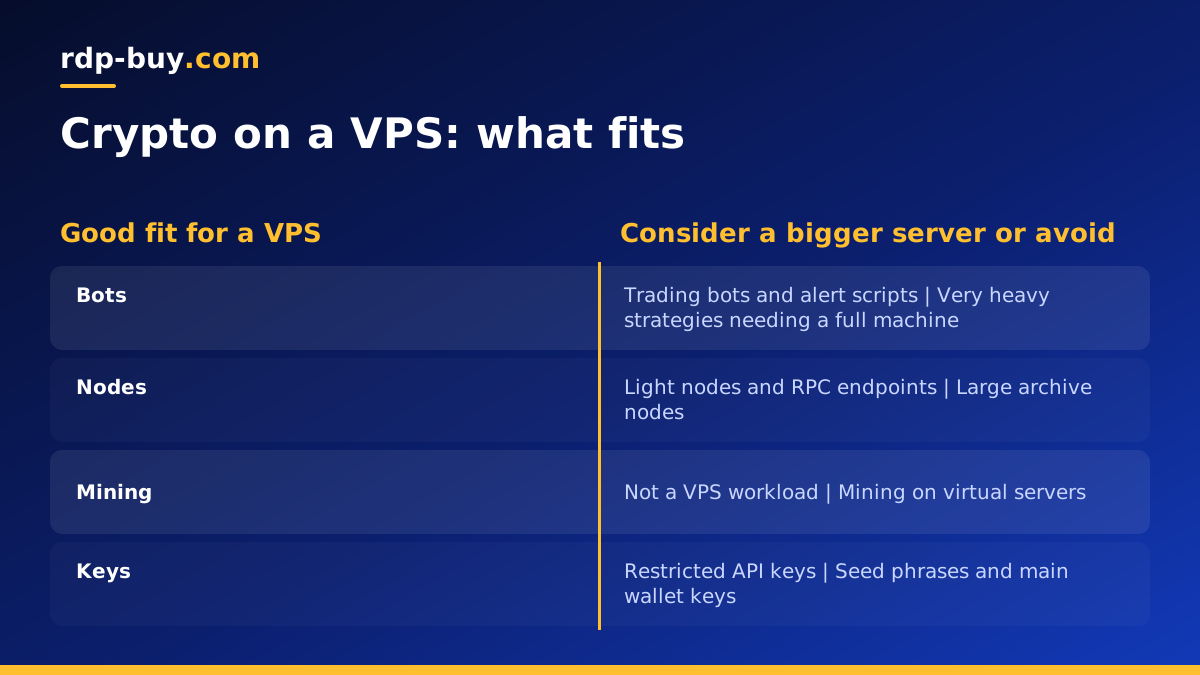
A VPS is a good fit for software that needs steady uptime but not huge amounts of hardware.
- Trading bots that connect to exchange APIs and follow rules you define.
- Price and wallet alerts that send messages to Telegram, Discord or email.
- Light nodes and RPC endpoints for networks whose requirements fit a VPS plan.
- Block explorers and indexers for a single project or test network.
- Payment processors for accepting crypto on your own shop, using self hosted open source tools.
- Development environments for smart contract testing and local test networks.
- Automation workflows in n8n that pull market data, log it and notify you.
What does not suit a VPS
Some crypto workloads need more than a virtual server can offer. Full archive nodes for large blockchains may need very large and fast storage that grows every day. Mining is generally not suitable for virtual servers, and many providers do not allow it at all. Validator setups for some networks have strict hardware, uptime and key management requirements that can call for a physical machine.
If your workload outgrows a VPS, a dedicated or bare metal server gives you the whole machine. The dedicated server plans and the guide on dedicated server vs VPS help you decide when to step up. Always check the software's official requirements before you choose a plan.
Windows or Linux for crypto tools?
Most node software, bots and open source tools are built for Linux and install easily on Ubuntu or Debian, often with Docker. Linux is light, has no licence cost and is well suited to software that runs in the background.
Choose Windows if your tool is a Windows desktop program, such as some charting or trading terminals, or if you prefer to work through a desktop over Remote Desktop. At rdp-buy.com the Windows licence is included in Windows prices. You can compare Windows RDP plans if that suits you better.
How to size your crypto VPS
Start from the software's documented requirements and add some headroom.
- Bots and alerts: a small plan is usually enough, since these scripts use little CPU and memory.
- Light nodes and RPC endpoints: check the network's guidance for memory and storage, and leave room for growth as the chain gets longer.
- Indexers and explorers: plan for more memory and storage, because they keep their own database.
- Several tools at once: add them up and choose a plan that fits all of them with room to spare.
- Storage: blockchain data only grows. Watch disk use and upgrade before you run out.
Choosing a server location
For trading bots, place the server close to the exchange's API servers, since every order and price request makes a round trip. For nodes, a well connected location with plenty of peers nearby is helpful. For alerts and dashboards, location matters less, so pick one near you for easier access.
Make sure the service you use is allowed from the country where your server sits. Some exchanges restrict access from certain regions, so check their terms before choosing a location. rdp-buy.com offers 33 server locations to choose from.
Security for crypto servers
Any server linked to crypto accounts deserves extra care, because mistakes can be expensive and irreversible.
- Use SSH keys and disable password login on Linux. On Windows, use a strong unique password and restrict who can reach Remote Desktop.
- Never store seed phrases or main wallet private keys on a VPS.
- Use exchange API keys with only the permissions the bot needs, and switch off withdrawal permission.
- Restrict API keys to your server's dedicated IP where the exchange supports it.
- Keep secrets in environment files readable only by your user, never in public repositories.
- Enable a firewall and open only the ports your software needs.
- Install updates regularly and remove software you no longer use.
- Turn on two factor authentication for your hosting account and exchange accounts.
Setting up a bot or node: the basic steps
Exact steps depend on the software, but most setups follow the same order. Many projects publish their install guides and Docker images on github.com.
- Order a Linux VPS in the location you chose and connect over SSH.
- Update the system, create a non root user and secure SSH.
- Install Docker, or the runtime your software needs.
- Download the software from its official source and verify it where checksums are published.
- Set configuration and API keys in a protected environment file.
- Run the software as a service or container with automatic restart.
- Set up logs and alerts so you know if it stops.
- Back up configuration files, never wallet seeds, to a safe place.
Keeping your crypto tools running
The whole point of a VPS is that your software keeps working while you sleep, so build in ways to know when it does not. A bot that silently crashed is worse than no bot, because you assume it is still watching the market.
Run each tool under systemd or with a Docker restart policy so it starts again after a crash or a reboot. Send a short heartbeat message to Telegram or email on a schedule, so silence tells you something is wrong. Rotate logs so they do not fill the disk, and keep an eye on storage if you run a node, since chain data grows steadily.
Plan updates too. Node software and exchange libraries change over time, and an outdated version can stop syncing or lose its connection to an API. Read release notes, update on a quiet day and confirm the tool reconnects afterwards. An n8n workflow can help here: the VPS for n8n page shows how to run one alongside your other tools.
Paying for your VPS with crypto
Many crypto users prefer to pay for hosting the same way. rdp-buy.com accepts crypto as well as card and PayPal. The guide to buying a VPS with crypto explains how payment works and what to check before you send funds, such as the correct network and amount. If you need a Windows server instead, you can also buy RDP with crypto.
Picking your crypto VPS plan
Check your software's requirements, choose Linux unless you need a Windows program, pick a location near the services you connect to and start with a plan that has some headroom. Monthly billing lets you test before you commit to a half-yearly or yearly cycle.
When you are ready, browse the Linux VPS plans. Every plan includes full root access, a dedicated IPv4 address and 24/7 support, and servers are ready in minutes.
