 Sign in
VPS Price for MT5: What You Pay For and How to Choose a Plan
The VPS price for MT5 depends on a handful of things you can control: Windows or Linux, how many terminals you run, how much memory your Expert Advisors use and where the server sits. This guide explains each factor so you can buy RDP for MetaTrader 5 that is sized for your trading, not for a guess.
Why traders pay for a VPS for MT5 at all
MetaTrader 5 only trades while the terminal is open and connected. If your Expert Advisor runs on a home laptop, a sleep timer, a Windows update, a power cut or a weak home connection can stop it in the middle of a position. A VPS for MT5 is a remote Windows machine that stays on around the clock, so the terminal keeps running when your own computer is switched off.
That is the real thing you are paying for: a terminal that does not depend on your desk. Everything else in the VPS price for MT5, from memory to location, is about doing that job reliably for the number of accounts and strategies you run.
Most traders use a Windows server because MT5 is a Windows application. You connect to it with Remote Desktop, install the terminal exactly as you would at home, log in to your broker and leave it running. A Windows RDP server is the simplest form of this, and it is what most people mean when they search for a forex VPS.
What actually drives the VPS price for MT5
Server prices are built from a few resources. Once you know which ones MT5 really uses, it becomes much easier to compare plans and avoid paying for capacity you will never touch.
Here are the factors that move the cost up or down:
- Memory (RAM): each MT5 terminal, every open chart and every indicator uses memory. This is usually the first resource traders run out of, so it has the biggest effect on which plan fits.
- CPU cores: one terminal with a simple EA needs little processing. Several terminals, heavy custom indicators or the strategy tester need more cores.
- Storage: MT5 stores history data and logs. Fast SSD storage keeps the terminal responsive when it loads charts and writes logs.
- Operating system: Windows plans include a licence cost. On rdp-buy.com the Windows licence is included in Windows prices, so there is no separate licence to buy.
- Billing period: monthly, half-yearly or yearly billing changes how you pay. Longer terms suit traders who already know their setup works.
- Location: some locations cost more to run than others, and the right one depends on where your broker's trade server is.
How to size a server for MetaTrader 5
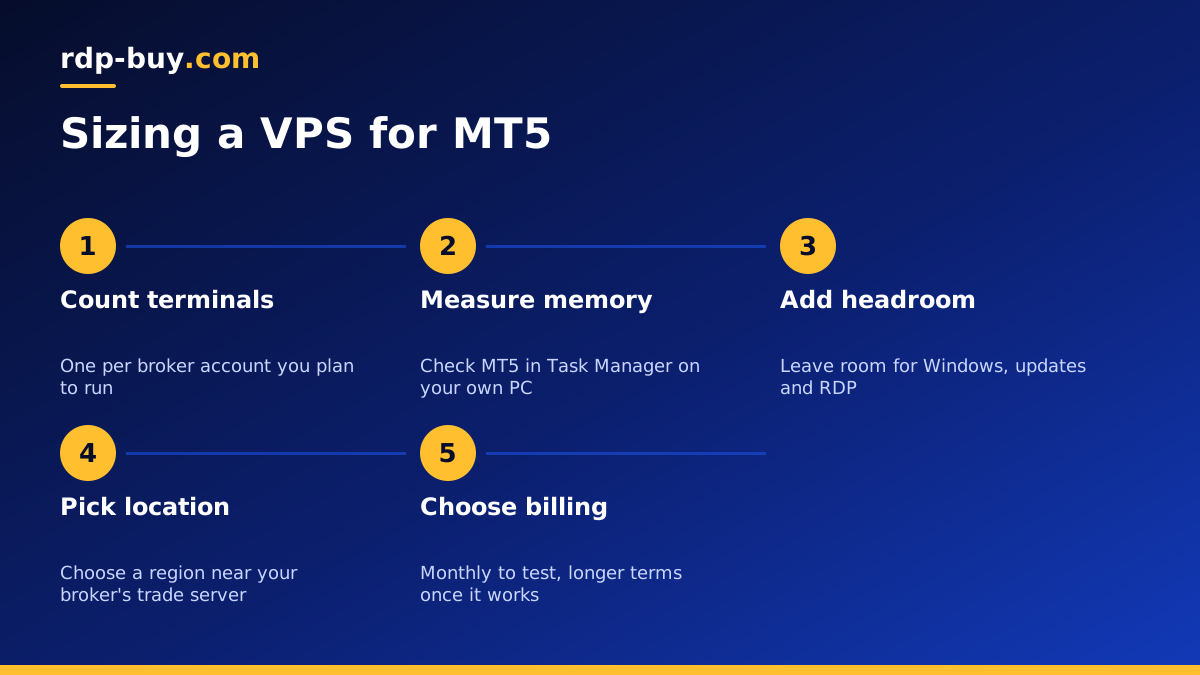
The cheapest plan that runs your setup without strain is the right plan. To find it, count what you will actually run rather than what you might run one day.
Start with the number of MT5 terminals. Each broker account usually means one terminal, and each terminal loads its own charts and EAs. A single account with one or two EAs is a light workload. Several accounts across different brokers, each with multiple charts, is a medium workload. Running the strategy tester or optimisation on the same server is a heavy workload, because testing uses every core it can find.
Next, look at your EAs and indicators. Simple EAs that check a few conditions per tick use very little. EAs that scan many symbols, build their own data or call external services use more memory and CPU. If you are not sure, open Task Manager on your current computer while MT5 runs and note how much memory the terminal process uses. That gives you a real starting figure instead of an estimate from a forum.
Then leave headroom. Windows itself, updates and Remote Desktop all need some memory. A server that runs at its limit all day is more likely to freeze during busy market hours, which is exactly when you need it most.
- One account, one or two EAs: an entry level Windows plan is usually enough.
- Several accounts or brokers: choose a plan with more memory so every terminal has room.
- Backtesting and optimisation: pick more CPU cores, or test on a separate machine and keep the live server lean.
Location matters more than raw power
For MT5, the distance between your server and your broker's trade server affects how quickly orders reach the market. A modest server close to the broker often serves a trader better than a large server on the other side of the world.
Find out where your broker hosts its trade servers. Brokers often list this in their help pages or will tell you through support. Many are in major financial hubs in Europe, North America or Asia. Choose a VPS location in or near the same region.
rdp-buy.com has 33 server locations, which you can see on the server locations page. Once your server is running, you can check the connection inside MT5 itself: the status bar in the bottom corner shows the ping to the trade server. Compare a couple of nearby locations if your strategy is sensitive to execution time.
Windows or Linux for MT5
MT5 is built for Windows. It can be run on Linux through a compatibility layer, and a Linux server can cost less because there is no Windows licence, but you trade simplicity for that saving. Updates, fonts, broker plugins and some EAs can behave differently, and troubleshooting takes more time.
For most traders, Windows is the better choice. You install MT5 the normal way, every EA and indicator behaves as it does at home, and you manage it with Remote Desktop. If you want a deeper comparison, read our guide on whether to rent a Windows or Linux server.
Linux makes sense if you are comfortable with the command line and run tools alongside trading, such as data collectors or bots written in Python. In that case a Linux VPS can be a good second server next to your Windows trading machine.
Hidden costs to check before you buy
A VPS price for MT5 should be compared on what you get for it, not only on the number on the order page. Before you commit, check a few things that change the real value of a plan.
- Licence: make sure the Windows licence is included. If it is not, you will pay for it separately.
- Admin access: you need full administrator rights to install MT5, add EAs and change Windows settings. rdp-buy.com gives full admin access on Windows servers.
- Dedicated IP: a dedicated IPv4 address keeps your server identity stable, which helps with broker logins and firewall rules.
- Support hours: markets move outside office hours. 24/7 support matters when something goes wrong on a Sunday night open.
- Setup time: a server that is ready in minutes lets you move your terminals quickly instead of waiting a day to start trading.
Setting up MT5 on your new server
Once the server is ready, the setup takes a short session. Connect with Remote Desktop using the IP address and login details you receive. If you have not done this before, our guide on how to connect to your RDP server walks through Windows, Mac and mobile.
Download MT5 from your broker's website, install it, and log in to your trading account. Copy your EAs, indicators and templates into the terminal's data folder, then attach them to the right charts. Turn on algorithmic trading and confirm that each EA shows as active.
Finally, change your Windows password to a strong one, set MT5 to start when Windows starts, and log out of Remote Desktop by closing the window rather than signing out, so the terminal keeps running.
Choosing the right MT5 plan
Put the pieces together: count your terminals, note how much memory they use, add headroom, and pick a location near your broker. That gives you the smallest plan that will run your trading without strain.
If you trade with one or two EAs, start small and upgrade later. If you run several accounts, choose more memory from the start. Our forex RDP plans are set up for trading terminals, and you can compare every Windows option when you choose a Windows RDP plan. Payment is by card, PayPal or crypto, including through buying RDP with PayPal. For a broader look at plan sizes, see which RDP plan you need.
