 Sign in
VPS Hosting vs Shared Hosting: Which One Should You Buy?
The VPS hosting vs shared hosting choice is about control and isolation. Shared hosting is a room in a busy house; a VPS is your own flat with its own key. This guide explains the real differences and when it makes sense to buy VPS hosting instead of staying on a shared plan.
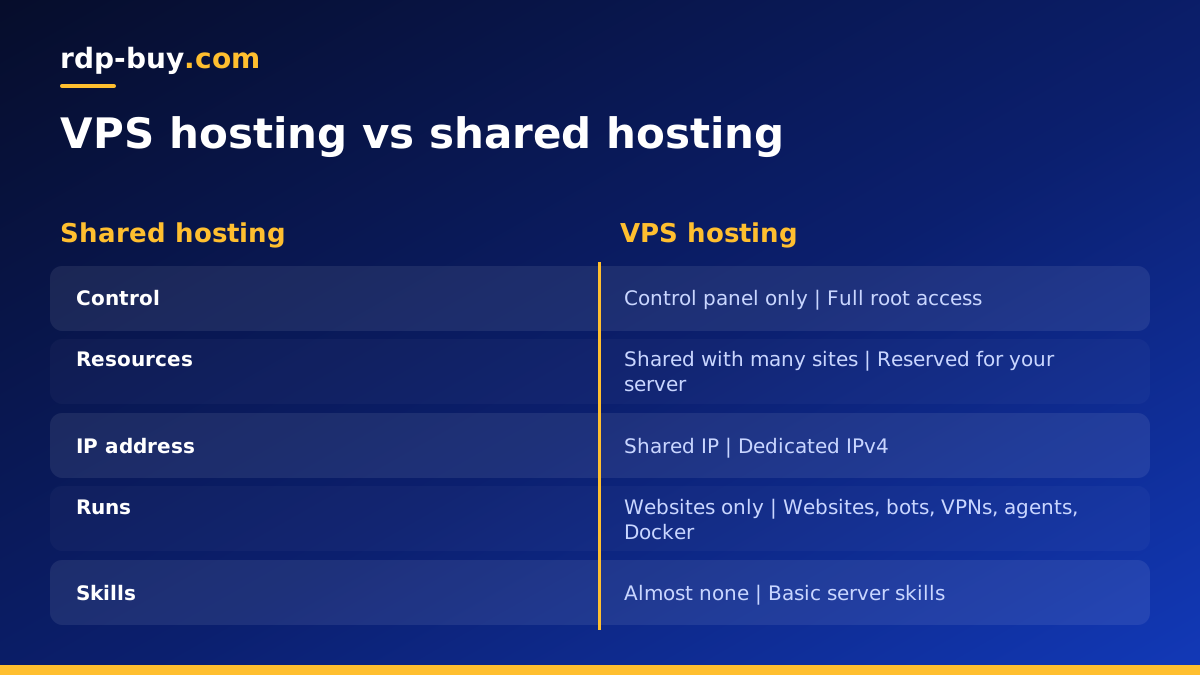
VPS hosting vs shared hosting: the core difference
On shared hosting, many customers' websites live on the same server and share the same operating system, web server and resources. The host manages everything. You upload files and use a control panel, but you cannot change the server itself.
On a virtual private server, one physical machine is split into several isolated virtual machines. Each VPS has its own operating system, its own allocated resources and its own dedicated IP address. You get root access, which means you can install any software, change any setting and run any kind of service, not just websites.
In short: shared hosting rents you space on someone else's server. VPS hosting rents you a server of your own, even though it runs on shared hardware underneath.
That difference shapes everything else: what software you can run, how predictable your performance is, how isolated you are from other customers and how much of the server's care falls to you. The sections below take each point in turn so you can decide with a clear picture of both options.
Side by side comparison
Here is how the two compare on the points that matter most when you are deciding what to buy.
- Control: shared hosting gives you a control panel and file access. A VPS gives you full root access to the whole system.
- Software: shared hosting supports the languages and tools the host chose. A VPS runs anything that runs on Linux, or on Windows if you choose a Windows server.
- Resources: on shared hosting, a busy neighbour can slow your site. On a VPS your allocated resources are reserved for you.
- IP address: shared hosting puts many sites on one IP. A VPS includes its own dedicated IPv4 address.
- Security isolation: on shared hosting, a compromised neighbour can sometimes affect others. A VPS is isolated at the virtual machine level.
- Skills needed: shared hosting needs almost none. A VPS needs basic server skills such as SSH, updates and a firewall.
- Background tasks: shared hosting usually limits long running processes. A VPS can run bots, agents and services around the clock.
When shared hosting is enough
Shared hosting still has a place. If you run a small brochure site or a personal blog with modest traffic, use a standard content system, and never need to install anything unusual, shared hosting is simple and needs no technical work.
It is also fine if you value having everything managed for you more than you value control. The trade off is that you live within the host's rules: their software versions, their limits on processes and memory, and their choices about security.
Signs it is time to move to a VPS
Most people move from shared hosting to a VPS because they hit one of these limits.
- Your site slows down at busy times, or you receive warnings about resource use.
- You need software the host does not allow, such as Docker, a specific database version, Node.js or Python apps.
- You want to run something that is not a website: a bot, a VPN, an automation platform like n8n or an AI agent.
- You need a dedicated IP address for allow lists, APIs or email reputation.
- You want full control over security settings, firewall rules and updates.
- You host several sites or client projects and want them separated properly.
- Your scheduled tasks or background jobs keep getting stopped by the host.
What you gain with a VPS beyond websites
The biggest difference often has nothing to do with websites. A VPS is a full server that stays on day and night, so it can run anything that needs to be always available.
You can host an n8n instance for workflow automation, run AI agents such as OpenClaw, Hermes Agent or Claude Code (by Anthropic), keep trading bots online, run a private VPN or host internal tools for a small team. The guide on what you can run on an RDP or VPS server lists many more ideas, and the AI agent hosting hub covers agents in particular.
None of this is possible on shared hosting, which is built only to serve web pages.
The skills you need for a VPS
Moving to a VPS means taking on some responsibilities the shared host used to handle. The good news is that the basics are well documented and quick to learn.
- Connecting over SSH from Windows, Mac or Linux.
- Installing updates with the package manager.
- Creating a non root user and using SSH keys.
- Setting up a firewall that allows only the ports you need.
- Installing a web server such as Nginx or Apache, or Docker.
- Getting a free SSL certificate with Let's Encrypt.
- Taking regular backups and storing them off the server.
How to move a site from shared hosting to a VPS
Migration is simpler than it sounds if you follow a clear order.
- Order the VPS and secure it: updates, a non root user, SSH keys and a firewall.
- Install the same stack your site needs, for example a web server, PHP and a database.
- Export your files and database from the shared host and import them on the VPS.
- Test the site on the VPS using a hosts file entry or a temporary subdomain.
- Lower the DNS record lifetime ahead of time, then change the A record to the VPS IP.
- Add SSL on the VPS and confirm everything loads over HTTPS.
- Keep the shared plan for a short while until you are sure nothing is missing.
Managed shared hosting vs a self managed VPS
Part of what you pay for on shared hosting is management. The host patches the operating system, updates the web server, watches for abuse and keeps the machine running. When you move to a VPS, those jobs become yours, unless you buy a managed service on top.
For many people that is a fair trade. A self managed VPS gives you full root access and the freedom to configure everything exactly as you want. The routine work is modest: install security updates, check backups, renew certificates and glance at disk and memory use now and then. With 24/7 support available, you also have somewhere to turn if the server itself has a problem.
If you prefer a desktop over a terminal, a Windows server with Remote Desktop is another route. It gives you the same isolation and control with a familiar interface, and the Windows licence is included in Windows prices at rdp-buy.com. The Windows VPS hosting page explains the options.
Is a VPS more expensive than shared hosting?
A VPS usually costs more than an entry level shared plan, because you are reserving resources rather than sharing them with many others. What you get for that difference is control, isolation, a dedicated IP and the freedom to run anything.
If budget is the main concern, a small VPS is often enough for one or two sites plus a background task or two. Look at the cheap VPS range before assuming a VPS is out of reach. The dedicated server vs VPS guide also helps if you are weighing a bigger step.
Choosing your first VPS plan
Start with a plan sized for your current site and anything else you want to run, then grow from there. Choose a location near your visitors from the 33 server locations, pick Linux unless you have a reason to need Windows, and begin with monthly billing while you migrate.
When you are ready to make the switch, compare the Linux VPS plans. Every plan includes full root access, a dedicated IPv4 address and 24/7 support, servers are ready in minutes, and you can pay by card, PayPal or crypto.
