 Sign in
Linux VPS: What It Is, What It Runs and How to Choose a Plan
A Linux VPS is a private virtual server running a Linux operating system, with its own resources, its own IP address and full root control. This guide explains how it works, what people run on it and how to choose and buy a Linux VPS that fits your project.
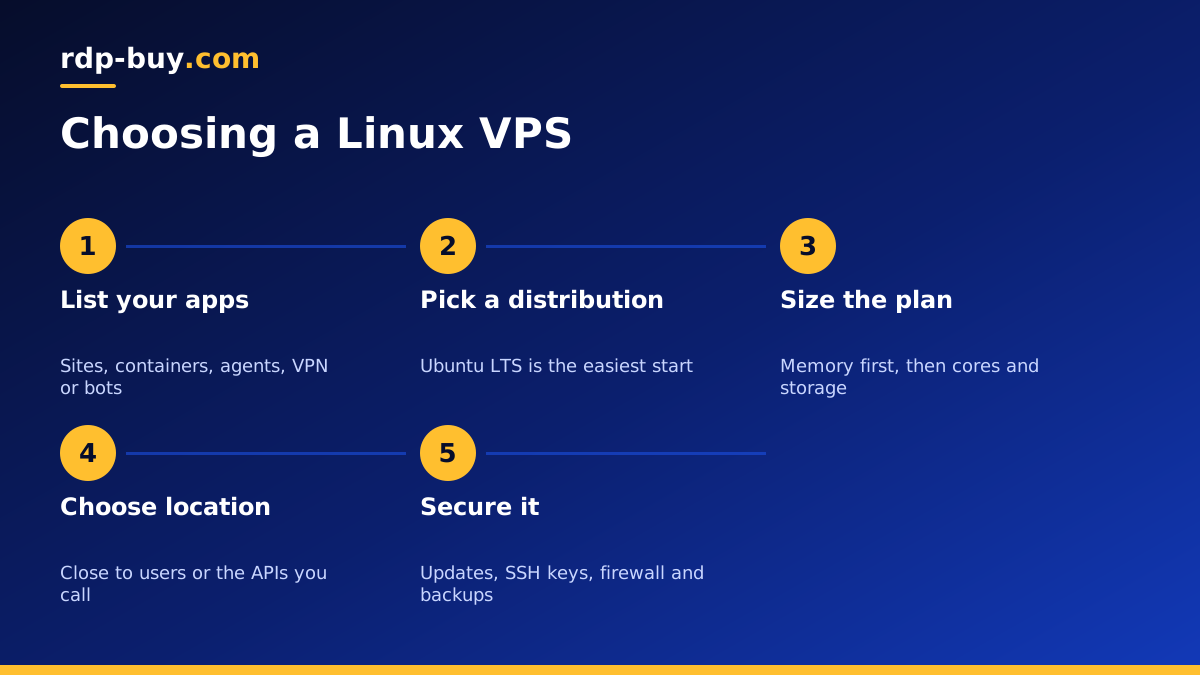
What is a Linux VPS?
A VPS, or virtual private server, is a slice of a powerful physical machine in a data centre. Software called a hypervisor divides that machine into isolated virtual servers, each with its own share of CPU, memory and storage. To you, a VPS looks and behaves like a separate computer that stays switched on all the time.
A Linux VPS is simply a VPS running a Linux distribution such as Ubuntu, Debian, Rocky Linux or AlmaLinux. Linux is the most common server operating system in the world, it costs nothing to license and almost all server software is built for it first.
You manage a Linux VPS over SSH, a secure connection that gives you a command line on the server. With root access you can install packages, change configuration, run services and set firewall rules. There is no graphical desktop by default, which keeps the system light and leaves more resources for your applications.
What you can run on a Linux VPS
Because it is a full server that never sleeps, a Linux VPS can host almost anything that needs to be online all the time.
- Websites and online stores with Nginx or Apache, PHP and a database.
- Web apps and APIs built with Node.js, Python, Go, Ruby or PHP.
- Docker containers, so each app runs in its own clean environment. See Docker VPS.
- Workflow automation with n8n, including webhooks that need a stable public address. See VPS for n8n.
- AI agents such as OpenClaw, Hermes Agent or Claude Code (by Anthropic), running around the clock without your laptop.
- Private VPN servers with WireGuard or OpenVPN.
- Bots for Telegram, Discord, trading or monitoring.
- Development and staging environments, CI runners and Git hosting.
- Databases such as PostgreSQL, MySQL or Redis for your other apps.
Linux VPS vs other hosting types
Compared with shared hosting, a Linux VPS gives you root access, reserved resources and a dedicated IP, and it can run far more than websites. Compared with a Windows server, it is lighter and has no licence cost, but you manage it from a terminal instead of a desktop. Compared with a dedicated server, it is smaller and more affordable, but you share the physical hardware with other virtual servers.
For most people starting a project, a Linux VPS is the sweet spot: enough control to run anything, enough isolation to stay predictable, and small enough to stay affordable. You can read how it compares with a full physical machine in the dedicated server vs VPS guide.
Choosing a Linux distribution
The distribution is the flavour of Linux your server runs. They share the same core but differ in package tools, release cycles and defaults.
- Ubuntu: the most popular choice for new servers. Huge community, many guides and long term support releases.
- Debian: stable and conservative, with a long track record. Great for servers you want to leave running quietly.
- Rocky Linux or AlmaLinux: suited to people who know the Red Hat family or run software that expects it.
- Our suggestion: if you are unsure, pick the latest long term support release of Ubuntu. Most tutorials assume it.
How to size a Linux VPS
Size the server from what it will run. Memory is usually the first limit you reach, so pay most attention to it.
- Small plan: a VPN, a personal site, a single bot or a light API.
- Medium plan: an online store with a database, a handful of Docker containers, or n8n with regular workflows.
- Larger plan: several AI agents at once, many containers, heavier databases or build jobs.
- Storage: leave room for logs, uploads, Docker images and local backups, not just the install.
Picking the right location
A server responds faster to the people and services that are physically close to it. Choose a location near your visitors for a website, near your broker for trading tools, or near the APIs your agents call most. If you run a VPN, choose the country you want your traffic to appear from.
rdp-buy.com offers 33 server locations, with dedicated pages for popular choices such as the USA VPS, UK VPS and Germany VPS.
Your first hour on a new Linux VPS
A few steps right after delivery make your server safer and easier to work with.
- Connect over SSH with the IP and root login from your welcome details.
- Run all system updates.
- Create a normal user with sudo rights.
- Add your SSH public key and test logging in with it.
- Disable root password login and password authentication for SSH.
- Enable a firewall such as UFW and allow only SSH plus the ports your apps need.
- Turn on automatic security updates.
- Install your stack: a web server, Docker, or the application you plan to run.
- Set up backups that copy data off the server.
Keeping a Linux VPS healthy
Once the server is running, a short routine keeps it safe. Check for updates regularly and reboot when the kernel is updated. Look at disk space now and then, since logs and container images grow over time. Review who has SSH access and remove keys you no longer need. Test a backup restore occasionally, because a backup you have never restored is only a hope.
The guide to a Linux VPS maintenance routine goes deeper, and the VPS backup guide covers protecting your data.
Running AI agents on a Linux VPS
One of the fastest growing reasons to buy a Linux VPS is to give AI agents a permanent home. An agent that runs on a laptop stops when the lid closes, loses its connection on bad Wi Fi and shares memory with your browser. On a VPS it runs day and night, with a dedicated IP that APIs and webhooks can rely on.
A typical setup uses Docker to run each agent in its own container, a reverse proxy to give each one an HTTPS address on a subdomain, and a process manager or Docker restart policy so agents come back automatically after a reboot. Keep API keys in environment files readable only by your user, and never commit them to a repository.
Placing the server near the services your agents call shortens each round trip, which adds up across long workflows. The AI agent hosting hub and the VPS for Claude Code page cover setups in more detail.
Is a Linux VPS hard to learn?
It is easier than it looks. You need a handful of commands to move around the file system, edit files, install packages and restart services. Most software projects publish step by step install instructions for Ubuntu and Debian, and you can copy them line by line. Within a few sessions, the terminal starts to feel natural.
If you never want to touch a command line, a Windows server with Remote Desktop may suit you better. Windows VPS hosting gives you a familiar desktop, with the Windows licence included in the price.
Choosing and buying your Linux VPS plan
Decide what you will run, pick a distribution, size the plan from your workload and choose a location near your users. Start with monthly billing if you want to test, then move to half-yearly or yearly once you are settled.
When you are ready, compare the Linux VPS hosting plans. Every plan includes full root access, a dedicated IPv4 address and 24/7 support, servers are ready in minutes, and you can pay by card, PayPal or crypto. If you are starting small, look at the cheap VPS range first.
