 Sign in
Buy VPS Server Europe: Choosing a European Location and Plan
To buy a VPS server in Europe, start with where your users and data need to be, then size a Linux plan for your busiest hour. This guide walks through both decisions and shows where to buy VPS plans with European locations.
Why buy a VPS server in Europe
A VPS gives you your own Linux system with root access, fixed resources and a dedicated IP address, without the cost and upkeep of a whole physical machine. Where you place it is one of the most important choices you make, because it affects speed, legal fit and how your service is seen by visitors and partners.
Buying a VPS server in Europe makes sense when most of your users are in Europe, when your company is based there, or when you handle personal data of European residents and want it to stay in the region. A European server also sits between North America, Africa, the Middle East and Asia, so it can be a reasonable middle point for a mixed audience.
If you are new to the idea, read what you can run on a VPS and then come back to the location question. The rest of this guide assumes you already know you want a Linux VPS, and you want to know where to put it and how to buy it well.
How to choose a European location
Europe is large and diverse, so the best city depends on your audience. A few practical rules help:
- Follow your users. If most visitors are in the UK and Ireland, a London server is the natural pick. For Germany, Austria, Switzerland and Central Europe, a German location usually fits best.
- Follow your APIs. If your server spends most of its time calling a service hosted in one country, put the server near that service.
- Think about language and market. A site aimed at one national market benefits from a server in or near that country.
- Consider your company base. Some teams simply prefer to keep infrastructure in the country where they are registered, which keeps contracts and paperwork simple.
- Test before committing. Monthly billing lets you try a city with real traffic before you move to half-yearly or yearly billing.
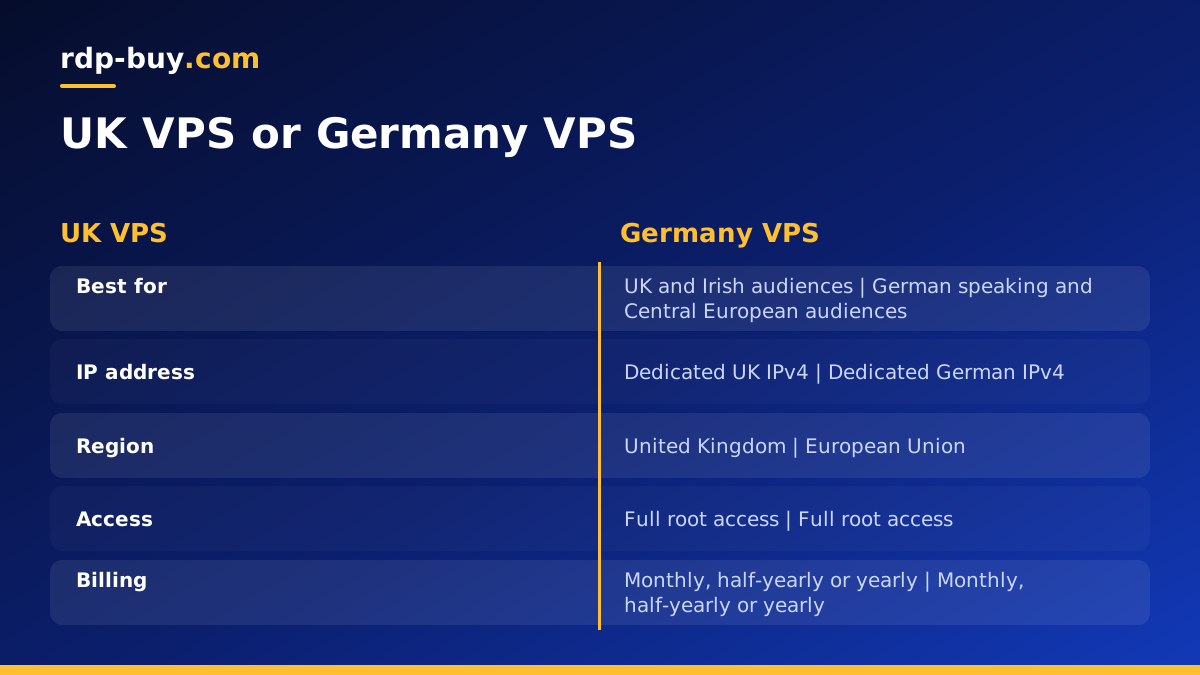
UK VPS or Germany VPS
Two of the most requested European locations are the United Kingdom and Germany. A UK VPS suits British businesses, English language sites aimed at the UK, and services that want a UK IP address. A Germany VPS suits German speaking markets, Central and Eastern European audiences and projects that want a server in the European Union.
If your audience covers the whole continent, either location can work. Look at your analytics, see where the largest group of visitors comes from, and start there. You can see every European option alongside the other cities on the server locations page, which lists all 33 locations.
Data protection and where your data lives
Many European buyers care about data location because of privacy rules such as the GDPR. A server in the EU or the UK keeps the data stored on that server in that region. That does not make you compliant on its own: you are still responsible for how you collect, store, secure and delete personal data, and for any services you send data to.
Practical steps that help include encrypting backups, limiting who can log in, keeping software updated, recording what personal data you store and why, and deleting data you no longer need. If you are unsure about your obligations, ask a qualified adviser. Choosing a European server is a good foundation, and the rest is how you run it.
Sizing your European VPS
The right plan depends on what you run and how busy it gets at peak times. Make a list of every service: web server, database, cache, background workers, automation tools and anything else. Memory is usually the first resource to run short, so estimate generously and leave room for growth.
As a rough guide by type of workload rather than by number: a single small website, a VPN or one bot is a light workload and fits an entry plan. A website with a database, an automation tool such as n8n and a few containers is a medium workload. A busy online shop, many containers or heavy data jobs are a heavy workload and may suit a dedicated CPU server where cores are reserved for you.
Plan storage for the year ahead, not just today. Databases, uploads and logs grow quietly. Turn on log rotation and check disk use every month. If you are unsure whether Linux is right for your software, our guide on Windows or Linux servers helps you decide.
How to buy a VPS server in Europe step by step
Ordering takes a few minutes. Here is the full process:
- Pick your plan based on the workload list you made.
- Choose a European location such as the UK or Germany.
- Select your Linux distribution. Ubuntu and Debian are popular, well documented choices.
- Choose billing: monthly, half-yearly or yearly.
- Pay by card, PayPal or crypto. If you prefer digital currency, see how to buy a VPS with crypto.
- Receive your details. Servers are ready in minutes, with root login and a dedicated IPv4 address.
- Secure it before anything else: SSH keys, a firewall, updates and a normal user with sudo rights.
First tasks after your server is ready
A good first hour sets you up for months of quiet running. Log in over SSH, create a regular user, switch to key based login and turn off password login. Enable a firewall and allow only SSH and the ports your app needs. Update all packages and turn on automatic security updates.
Next, install your stack. Many people now use Docker so that each app lives in its own container and can be moved or rebuilt easily; the Docker VPS page explains that approach. Add a free TLS certificate for any website, set up backups that copy data off the server on a schedule, and add a simple uptime check so you hear about problems before your users do.
Finally, set the server time zone and locale to suit your team, and write down every change you make. A short setup note or a script in a private repository makes it easy to rebuild or move the server later.
Mistakes to avoid when buying a European VPS
Most problems with a new server trace back to a handful of choices made at checkout or in the first day. Keep these in mind:
- Picking a city by habit. Check where your visitors and APIs really are before you choose a location.
- Buying the smallest plan to save money. A server that runs out of memory during a busy hour costs more in lost visitors than a step up in plan.
- Assuming location equals compliance. A European server helps, but privacy rules still depend on how you handle data.
- Leaving defaults in place. Change login methods, enable a firewall and update the system on day one.
- Keeping backups on the same server. Copy backups to a separate place so one failure cannot take everything.
- Forgetting the time zone. Scheduled jobs, logs and reports are easier to read when the server time matches your team.
Europe or the United States?
Some projects serve both sides of the Atlantic. If most of your users are in Europe, start with a European server. If the majority are in North America, a US server is usually better; a USA VPS covers that route. When traffic is truly split, some teams run one server in each region and point users to the nearest one, but for most projects a single well chosen location is enough.
Choose your European plan
When your workload list is ready and you know which city fits your audience, you are ready to order. Every plan comes with full root access, a dedicated IPv4 address, 24/7 support and flexible billing. Compare plans and pick your location on the Linux VPS hosting page, or go straight to the UK or Germany plans if you have already decided. If you need Windows software instead, look at a Windows VPS.
