 Sign in
What Is Dedicated Server Hosting? A Plain Guide for Buyers
Dedicated server hosting means renting server resources that are reserved for you alone, instead of sharing them with other customers. This guide explains what that means in practice, when it is worth it and how to buy a dedicated server that fits your workload.
What is dedicated server hosting in simple terms
Every website, app or bot runs on a computer somewhere. With hosting, that computer sits in a data centre and you rent it instead of buying it. The question is how much of the computer is yours.
With shared hosting, many customers sit on one server and share everything. With a VPS, the machine is split into virtual servers, each with its own operating system, but the CPU is still shared among them. With dedicated server hosting, the resources you pay for are reserved for you. Nobody else's workload can take CPU time away from yours.
At rdp-buy.com, that comes in two forms. A dedicated CPU server reserves processor cores for you on a virtualised platform, which keeps setup fast and flexible. A bare metal server gives you the whole physical machine. Both include full root or admin access and a dedicated IPv4 address.
Shared hosting vs VPS vs dedicated server
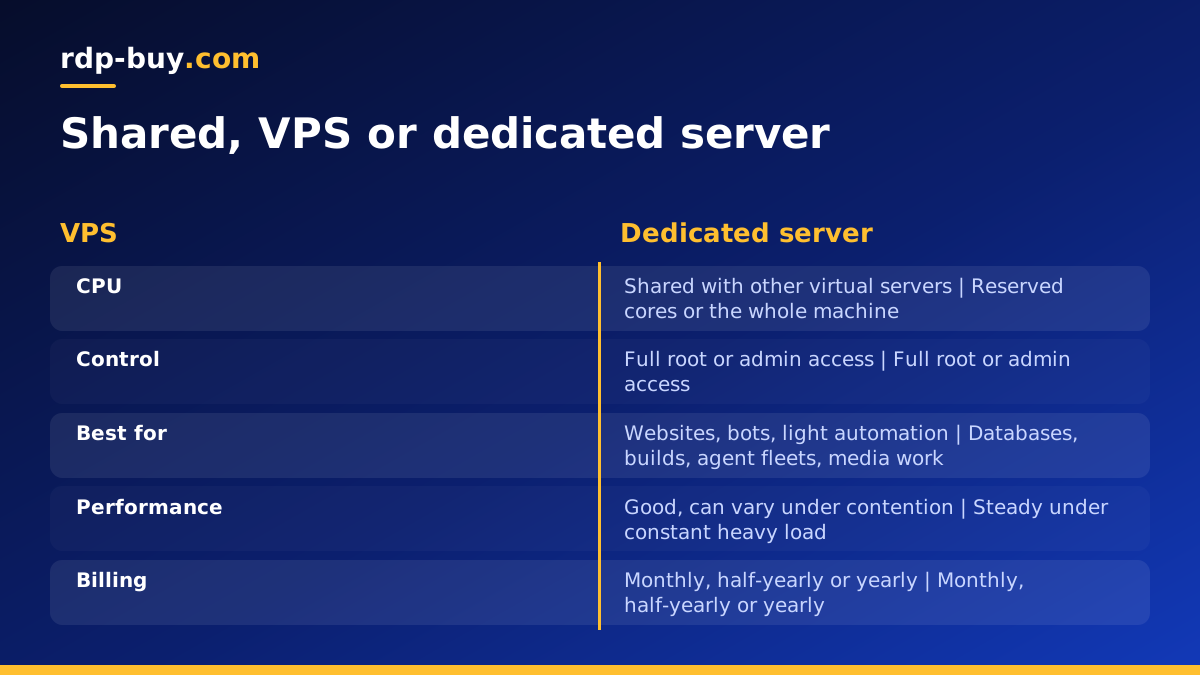
The three options sit on a ladder of control and isolation. Shared hosting is the simplest: you upload files and the provider runs everything else, but you cannot install your own software. A VPS gives you your own operating system with full control, which is enough for most websites, bots, automation and development work. A dedicated server adds guaranteed resources, so performance stays steady even under constant heavy load.
If you are not sure which side of that line you are on, start with the workload rather than the label. Our guide on what you can run on an RDP or VPS lists common jobs and what each needs.
- Shared hosting: least control, shared everything, simple websites only.
- VPS: your own operating system and root access, shared CPU. See Linux VPS plans.
- Dedicated CPU server: your own operating system and reserved cores.
- Bare metal: the whole physical machine, nothing shared.
How dedicated server hosting works day to day
Once you order, the provider prepares the server with the operating system you chose and sends you the login details. On Linux you connect over SSH with root access. On Windows you connect over Remote Desktop with admin access, and the Windows licence is included in the price. From there, the server behaves like any computer you own: you install software, open the ports you need, create users and keep it updated.
The provider looks after the physical side: power, cooling, network connection and hardware in the data centre. You look after the software side. That split is what makes it hosting rather than buying your own hardware. Servers at rdp-buy.com are ready in minutes and 24/7 support is available if something on the platform side needs attention.
Who needs a dedicated server
Most projects start on a VPS. Moving to dedicated resources makes sense when the work is heavy and constant, or when steady performance matters more than the lowest monthly bill. Typical cases:
- Busy databases that answer queries all day and slow down when CPU is contested.
- Build and CI servers that compile code or run test suites many times a day.
- Large automation stacks such as n8n with many workflows, queues and workers. See VPS for n8n for how those stacks are sized.
- Many AI agents at once, each running tools, browsers or code in the background. The AI agent hosting hub covers these setups.
- Media processing such as video encoding, image pipelines or audio work.
- Data collection and analysis jobs that run for hours on every core.
- Windows desktops for heavy trading with many terminals and charts open together.
Signs you have outgrown a VPS
You do not need to guess. A few signals suggest it is time to move up:
- CPU usage stays high for long periods, not just short spikes.
- Jobs take noticeably longer at some times of day than others, even though your own load is the same.
- You keep splitting work across several small servers just to get more processing power.
- Your users or your bots feel the slowdown and it costs you time or results.
- You need predictable performance for a client contract or a production service.
Dedicated CPU or bare metal: which to choose
A dedicated CPU server is the natural next step after a VPS. You keep the convenience of a virtual server, such as quick setup and easy reinstalls, but your cores are reserved. It suits most heavy workloads, from databases to agent fleets.
Bare metal makes sense when you want the entire machine: every core, all the memory and no virtualisation layer at all. It suits very large workloads, software that needs direct hardware access or teams that want to run their own virtualisation on top. The bare metal plans list what each machine includes.
How to size a dedicated server plan
Size from what you see on your current server. Note how many cores stay busy during your heaviest hour, how much memory is in use and how quickly the disk is filling. Choose a plan with enough cores for that peak, memory with some headroom and storage that covers your data, logs and backups for the months ahead.
Then pick a location. With 33 locations listed on the server locations page, choose the one closest to your users or to the services the server talks to most. Finally choose an operating system: Linux for most server software and Docker, or Windows if you need a desktop or Windows only apps, as explained in our guide on Windows or Linux server.
Looking after a dedicated server once it is running
Because you have full control, a few routine jobs fall to you. Install operating system updates on a regular schedule, and reboot during a quiet hour when an update needs it. Keep a firewall that allows only the ports your services use. Use SSH keys on Linux or a long, unique password on Windows, and give each person their own account rather than sharing one login.
Backups matter more on a busy server, because there is more to lose. Copy databases, configuration files and important data to a second location on a schedule, and test a restore now and then so you know it works. Simple monitoring that alerts you when a service stops or a disk fills up lets you fix problems before your users notice them.
If you would rather not run several services by hand, container tools such as Docker keep each one separate and easy to rebuild. The Docker VPS page explains the approach, and it applies just as well to dedicated hardware.
Buying dedicated server hosting step by step
- Choose the type: dedicated CPU for reserved cores, or bare metal for the full machine.
- Pick the plan by cores, memory and storage for your heaviest workload.
- Select a location close to your users or services.
- Choose the operating system, Linux or Windows with the licence included.
- Pick a billing term: monthly, half-yearly or yearly.
- Pay by card, PayPal or crypto. If you plan to pay with a stablecoin, see our guide to buying a dedicated server with USDT.
- Connect and secure the server once it is ready in minutes: updates, SSH keys or a strong admin password, and a firewall.
Choosing your dedicated server
Dedicated server hosting is worth it when your workload is heavy, constant and sensitive to slowdowns. If that describes your project, choose a dedicated CPU server for reserved cores or bare metal for the whole machine, size it for your busiest hour and place it near your users. If not, a VPS is still the better value, and you can move up later.
When you are ready, compare the dedicated server plans and pick the location and billing term that suit you, with full root or admin access, a dedicated IPv4 address and 24/7 support included.
