 Sign in
Buy Dedicated Server With USDT: A Safe Crypto Checkout Guide
If you want to buy a dedicated server with USDT, the process is simple once you know which network to use and what to check before you send. This guide walks through choosing the server, paying with a stablecoin and setting it up, so you can buy a dedicated server without payment surprises.
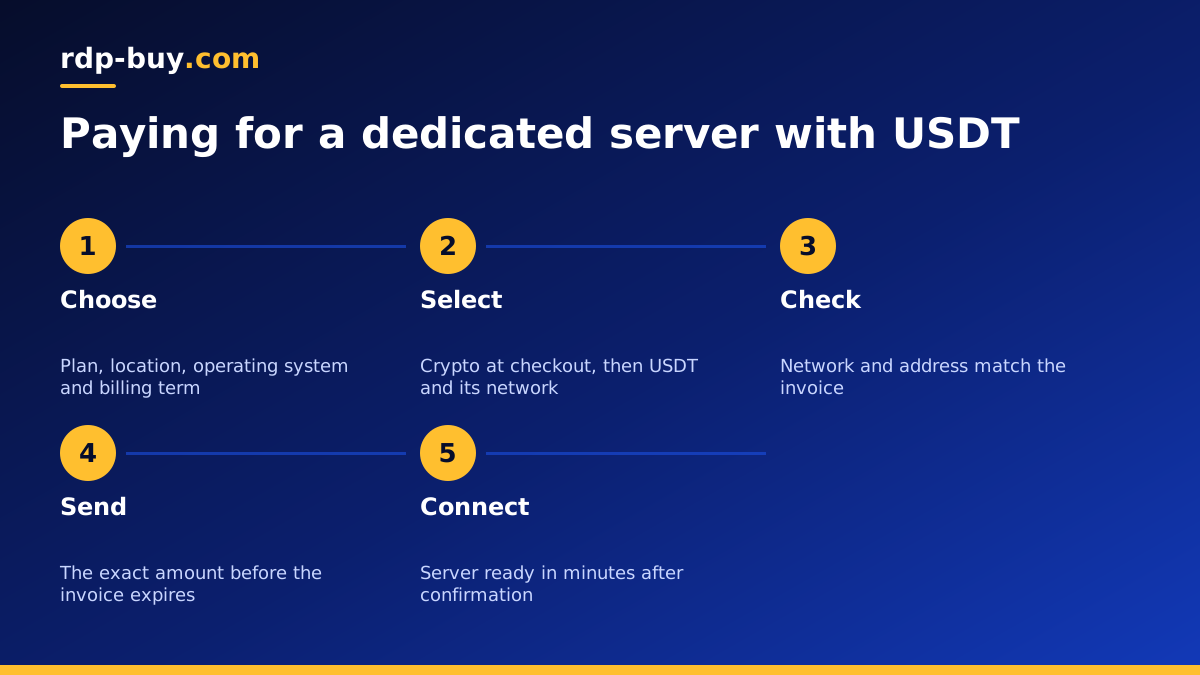
Why people buy a dedicated server with USDT
USDT is a stablecoin designed to track the US dollar. Many buyers prefer it to other cryptocurrencies for hosting because the value does not swing much between the moment you see the invoice and the moment the payment confirms. That makes it easier to pay the right amount and to plan monthly or yearly renewals.
Crypto payments also suit buyers who do not have an international card, who run their business finances in digital currency or who simply prefer to keep hosting payments separate from their bank. rdp-buy.com accepts card, PayPal and crypto, so you can choose the route that fits you. The dedicated server plans work the same way whichever method you pick.
What a dedicated server gives you
Before paying, it helps to be sure a dedicated server is the right product. On a standard VPS, CPU time is shared with other virtual servers on the same machine. A dedicated CPU server reserves cores for you, so heavy workloads are not slowed by neighbours. A bare metal server goes further and gives you the whole physical machine.
Every option comes with full admin or root access, a dedicated IPv4 address and a choice of 33 locations. Choose dedicated resources when you run steady heavy jobs such as databases, build servers, large automation stacks, video processing or many AI agents at once. For lighter work, a VPS is usually enough. Moving up later is straightforward once you see your server working hard all day.
- Dedicated CPU server: reserved cores, ideal for steady heavy workloads.
- Bare metal server: the full machine, see bare metal server plans.
- VPS: shared CPU, good value for websites, bots and light automation, see Linux VPS plans.
Understanding USDT networks before you pay
USDT exists on several blockchains, such as Tron (TRC20), Ethereum (ERC20) and others. The token has the same name on each, but the networks are separate. Coins sent on one network cannot be received at an address that only watches another network. This is the most common reason crypto payments go wrong.
When you check out, the invoice shows which coins and networks are accepted and gives an address for the one you pick. Send on exactly that network. Network fees differ between blockchains, so many buyers choose the one their wallet or exchange supports at the lowest fee, as long as it is listed on the invoice.
- Match the network on your wallet or exchange to the network on the invoice.
- Copy the address with the copy button, never by typing it.
- Check the first and last characters of the pasted address against the invoice.
- Leave enough in your wallet to cover the network fee on top of the invoice amount.
Step by step: buying a dedicated server with USDT
- Pick the plan that matches your workload, starting from the cores, memory and storage you need.
- Choose the location nearest to your users or the services the server talks to. All 33 options are on the server locations page.
- Choose the operating system: Linux for most server workloads, or Windows with the licence included if you need a Windows desktop.
- Select a billing term: monthly, half-yearly or yearly.
- Choose crypto at checkout and select USDT with the network you plan to send on, if it appears in the list.
- Send the exact amount shown, on the network shown, before the invoice timer runs out.
- Wait for confirmation. Once the blockchain confirms the payment, the server is set up and ready in minutes, and you receive the login details by email.
Common mistakes when paying for hosting with USDT
Most problems come from a few avoidable slips. Sending on the wrong network is the biggest one, followed by sending slightly less than the invoice because an exchange took its withdrawal fee from the amount. If you pay from an exchange, check whether the fee is added on top or taken from the total, and adjust so the amount that arrives matches the invoice.
Other slips include paying after the invoice has expired, reusing an address from an old invoice and closing the payment window before the transaction is broadcast. If anything looks wrong, keep the transaction ID and contact 24/7 support, who can trace the payment on the blockchain.
Setting up your dedicated server after payment
Once the welcome email arrives, connect and secure the server before you put anything important on it. On Linux, log in over SSH, update all packages, create a sudo user with an SSH key, disable root password logins and enable a firewall such as ufw. On Windows, connect with Remote Desktop, run Windows Update, change the administrator password and check the firewall rules. Our guide on how to connect to your RDP server covers the Windows side.
Then install your stack. Many dedicated servers run Docker so that several services can share the machine cleanly; the Docker VPS page explains that setup, and it applies just as well to dedicated hardware. If you plan to run AI agents or automation around the clock, the AI agent hosting hub has setup guides for n8n, OpenClaw, Hermes Agent and Claude Code (by Anthropic).
Renewals and records when you pay with crypto
Crypto payments are not pulled automatically like a card subscription, so renewals need a little planning. Each renewal creates a new invoice with its own address, which you pay the same way as the first. A longer billing term, half-yearly or yearly, means fewer renewals to remember once your setup is stable.
Keep a simple record of each payment: the invoice number, the network used and the transaction ID. It makes accounting easier and speeds up any support request. If you also rent Windows servers, the same approach works when you buy RDP with crypto, and for Linux servers see how to buy VPS with crypto.
Choosing your dedicated server plan
Decide first whether you need reserved cores or a whole machine, then size memory and storage for your heaviest workload. Pick the location closest to your users or services and start on monthly billing if you are still testing. At checkout, choose USDT on a network your wallet supports and that the invoice lists, send the exact amount and keep the transaction ID.
When you are ready, compare the dedicated CPU server plans, or look at bare metal servers if you need the full machine.
