 Sign in
Buy VPS for VPN: How to Choose and Set Up Your Own VPN Server
When you buy VPS for VPN use, you get a private server with its own dedicated IP that only you and the people you invite connect through. This guide explains what to look for, how setup works and how to pick a VPS hosting plan that suits a personal or team VPN.
Why people buy a VPS for VPN instead of a VPN app
A commercial VPN app routes your traffic through servers shared by many users. That is convenient, but you do not control the server, you share the IP address with strangers, and you rely on someone else's settings. Running your own VPN on a VPS changes all three.
With your own server, the dedicated IPv4 address belongs to your server only. That matters when you need a stable address for allow lists at work, for logging into admin panels that block shared VPN ranges, or for connecting to your own services from anywhere. You decide which protocol to use, who gets access and what is logged.
A VPN on a VPS is also useful for teams. A small company can give staff a single address that office systems trust, without paying for a shared VPN product or exposing internal tools to the open internet.
- A dedicated IP that is not shared with other VPN customers.
- Full control over protocols, keys and logging.
- A stable address for allow lists and remote admin access.
- The same server can also run other small services you need.
What to look for when you buy a VPS for VPN
A VPN server is one of the lightest jobs a VPS can do. You do not need a large plan, but a few features matter a lot.
- Root access. You need it to install WireGuard or OpenVPN, change kernel networking settings and set firewall rules.
- A dedicated IPv4 address. This is the address your VPN traffic appears to come from.
- The right location. Your VPN exit point is wherever the server sits. Pick a country that matches what you need to reach.
- Linux support. Ubuntu or Debian are the easiest systems for VPN software.
- Simple billing. Monthly billing is handy while you test, and a longer cycle suits a VPN you plan to keep.
- 24/7 support. If the server stops responding, you want help at any hour.
Picking a server location for your VPN
Location is the most important choice when you buy a VPS for VPN use. Websites and services see the country of your server, not your own. If you travel and want to reach services from home, pick a location in your home country. If you want the shortest path for a remote team, pick a location close to most team members.
Distance also affects how responsive the connection feels. Every extra hop between you and the server adds delay, so a server nearer to you usually feels quicker. rdp-buy.com has 33 server locations, which gives you room to match the exit country to your needs. Dedicated pages exist for popular regions such as the USA VPS, UK VPS and Germany VPS plans.
How much server do you need for a VPN?
VPN software is efficient. A small Linux plan is enough for one person or a small household, because the main work is encrypting and passing traffic through. WireGuard in particular uses very little CPU and memory.
Move up a size if many people will connect at the same time, if you will also run other services on the server such as a DNS filter or a small web app, or if you want room to grow. Since you can upgrade later, it makes sense to start small and watch how the server behaves under your real usage. The cheap VPS plans are a sensible starting point for a personal VPN.
WireGuard or OpenVPN?
Both are well established, open source and free to run on your own server.
- WireGuard: a modern protocol with a small codebase, simple configuration files and very good efficiency. Apps exist for Windows, macOS, Linux, Android and iOS. It is the easiest choice for most new VPN servers.
- OpenVPN: older, very flexible and widely supported. It can run over TCP, which can help on networks that block unusual traffic. Setup has more moving parts.
- Our suggestion: start with WireGuard unless you have a specific reason to need OpenVPN.
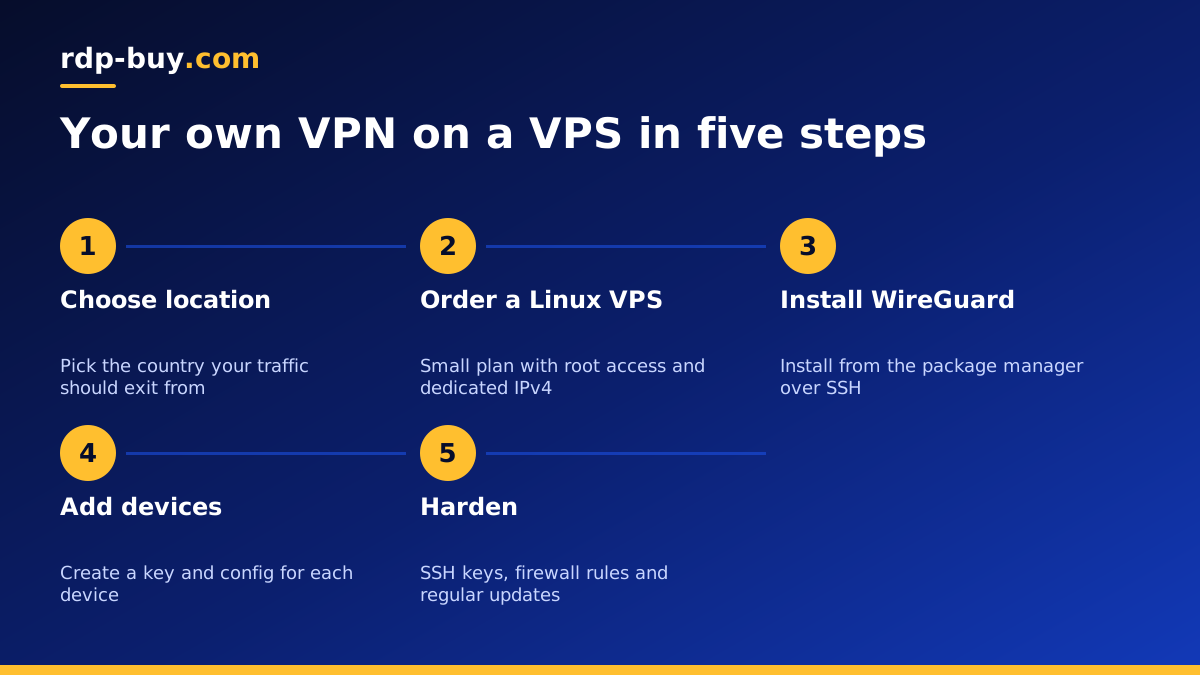
Setting up a WireGuard VPN on your VPS: the steps
The exact commands depend on your Linux distribution, but the process always follows the same order. You can find official guides and community scripts on github.com if you prefer an automated install.
- Connect to your new server over SSH using the IP address and root login you received.
- Update the system packages so you start from a patched base.
- Install WireGuard from your distribution's package manager.
- Generate a key pair for the server and one for each device that will connect.
- Write the server configuration with its private address range and listening port.
- Turn on IP forwarding and add firewall rules so client traffic can leave through the server.
- Create a client configuration for each device and import it into the WireGuard app, often by scanning a QR code.
- Start the service, enable it at boot and test that your public IP now shows the server's address.
Keeping your VPN server secure
A VPN server is only as private as the machine it runs on. After setup, take a few minutes to harden it. Switch SSH to key based login and disable password authentication. Allow only the SSH port and your VPN port through the firewall. Install security updates regularly, or enable automatic updates for security patches. Remove client keys as soon as a device is lost or a person leaves your team.
It also helps to keep a copy of your configuration files somewhere safe, so you can rebuild the server quickly if you ever need to. The guide on what you can run on an RDP or VPS server has more ideas if you want the same server to do other jobs as well.
Common VPN problems and how to fix them
Most problems with a self hosted VPN come from a handful of small mistakes. Work through these checks before assuming anything is wrong with the server itself.
- The client connects but no websites load. IP forwarding is usually off, or the firewall is missing the rule that lets client traffic leave through the server's public interface.
- The client never connects at all. Check that the VPN port is open in the server firewall and that the client configuration points at the correct dedicated IP and port.
- Names do not resolve. Add a DNS server to the client configuration so devices know where to send lookups while the tunnel is up.
- It worked yesterday and stopped today. Confirm the WireGuard service is enabled at boot, especially after a reboot for updates.
- One device works and another does not. Each device needs its own key pair and its own address inside the VPN range. Two devices sharing one key will knock each other off.
- The connection feels slow. Try a server location closer to where you are, since distance adds delay to every request.
Use it responsibly
A private VPN is a legitimate tool for privacy, remote work and secure access. Follow the law in your country and the terms of the services you use. Do not use your VPN server to send spam, attack other systems or hide abuse: that puts your server, your IP address and your account at risk.
Ready to buy a VPS for your VPN?
Pick the location that matches where you want your traffic to appear, choose a small Linux plan to start, and select monthly billing if you want to test first. When you buy a Linux VPS at rdp-buy.com you get full root access, a dedicated IPv4 address and 24/7 support, and the server is ready in minutes. You can pay by card, PayPal or crypto, and if you prefer to keep payments private there is a guide to buying a VPS with crypto.
