 Sign in
VPS Price Explained: What Drives the Cost and How to Compare
A VPS price is not one number but the sum of several choices: CPU, memory, storage, location, operating system and billing cycle. This guide explains each one so you can compare offers fairly and buy VPS hosting that fits your budget without surprises.
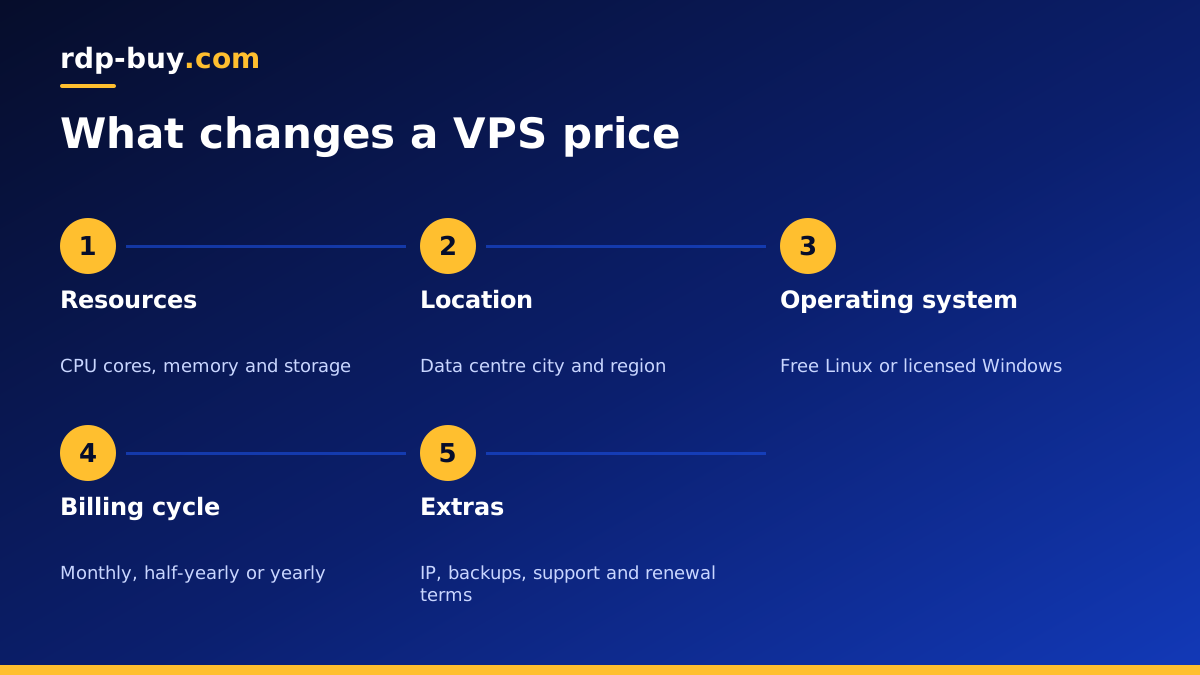
What a VPS price actually covers
When you pay for a virtual private server, you are renting a slice of a physical machine in a data centre. The provider buys the hardware, pays for power, cooling, network connections and staff, and divides that cost across the servers it sells. The VPS price you see is the share of those costs assigned to your slice, plus the provider's margin.
That is why two plans that look similar on paper can be priced differently. One may include a dedicated IP, an operating system licence and round the clock support, while the other charges extra for each. Before you compare any two offers, make sure you are comparing the same bundle.
The sections below walk through every factor that moves a VPS price up or down, and what each one means for your workload.
The resources that shape VPS price
The core of every plan is its resources. These are the biggest drivers of cost, and the ones you should size most carefully.
- CPU cores. More virtual cores let your server handle more work at once. Busy websites, build jobs and several AI agents benefit from extra cores. A VPN or a small bot does not.
- Memory (RAM). Memory is often the first limit people hit. Databases, Docker containers, browsers and Windows desktops all use a lot of it.
- Storage. SSD or NVMe storage holds your system, applications and data. Plan for logs, backups and growth, not just the install size.
- Bandwidth or traffic. Some plans include a traffic allowance. Check what happens if you go over it.
- IP addresses. A dedicated IPv4 address is a real cost for providers. Some include it, some charge for it.
How location affects VPS price
Data centres in different cities have different costs for power, space and network connections, so the same plan can be priced differently by location. A server in one region may cost a little more than the same size somewhere else.
Do not let that alone decide your location. A server close to your users, your broker or the APIs your agent calls will feel faster and work better. The small difference between locations is usually worth paying for the right one. rdp-buy.com offers 33 server locations, so you can balance distance and budget.
Linux vs Windows: the licence question
Linux distributions such as Ubuntu and Debian are free, so a Linux VPS price covers only the server. Windows Server needs a licence, which adds to the cost. Some providers show a low Windows price and add the licence at checkout, which makes comparisons misleading.
At rdp-buy.com the Windows licence is included in Windows prices, so what you see is what you pay. If you need Windows, look at Windows VPS hosting or cheap RDP plans. If your software runs on Linux, a Linux plan will normally give you more resources for the same budget.
Billing cycles and why they matter
Most providers offer several billing cycles. Monthly billing gives you flexibility: you can test a server and cancel or change plans quickly. Longer cycles, such as half-yearly or yearly, mean fewer renewals to manage and are often better value over time.
A sensible approach is to start monthly while you confirm the plan fits your workload, then switch to a longer cycle once you know you will keep it. rdp-buy.com offers monthly, half-yearly and yearly billing on its plans.
Always read the renewal terms. Some providers offer a low first period and then renew at a much higher rate. A fair VPS price is one you are happy to pay again at renewal.
Hidden costs to look for
The headline price is only part of the story. These are the extras that most often turn a cheap looking plan into an expensive one.
- An operating system licence added at checkout.
- A separate charge for the IPv4 address.
- Setup fees on the first order.
- Paid backups or snapshots you assumed were included.
- Support that costs extra outside office hours.
- Traffic overage charges once you pass an allowance.
- A much higher renewal rate after the first billing period.
How to compare VPS prices fairly
To make a real VPS price comparison, write down what each offer includes and compare like for like. Use the same checklist for every provider.
- Match CPU, memory and storage as closely as possible.
- Confirm whether a dedicated IPv4 address is included.
- Check whether the Windows licence is included, if you need Windows.
- Compare the total for the same billing cycle, including renewal.
- Check support hours and how you reach support.
- Check how quickly the server is delivered after payment.
- Check which payment methods you can use: card, PayPal or crypto.
Right sizing: the best way to keep VPS price low
The easiest way to overspend is to buy far more server than you need. The easiest way to waste time is to buy far too little. Right sizing sits in between.
Start by listing what will run on the server. A personal VPN, a small website or a single bot will run happily on a small plan. A Docker host running several containers, an n8n instance with many workflows or a Windows desktop for trading needs more memory. Several AI agents running side by side need more cores and memory again.
Pick the smallest plan that comfortably covers your list, watch memory and CPU use for a couple of weeks, and upgrade if you see the server running near its limits. You can read more in the guide on which RDP plan you need, which applies the same logic to Windows servers.
Unmanaged vs managed: the time cost
Some offers include management, where the provider handles updates, security and software installs for you. Others are unmanaged: you get the server with root access and run it yourself. Management adds to the VPS price because someone else is spending time on your machine.
Unmanaged servers suit people who are happy to follow guides and run a few commands. You keep full control and pay only for the server. If you have never managed a Linux machine, budget a little of your own time at the start to learn SSH, updates and a basic firewall. The effort is small and the skills last.
Whichever you choose, count your own time as part of the cost. A plan that is slightly larger but saves you hours of troubleshooting can be the better value.
Payment method and VPS price
The way you pay does not usually change the plan price, but it does change how easy buying is. Card payments settle quickly and suit most buyers. PayPal adds buyer protection that some people prefer. Crypto suits buyers who do not want to use a card online.
rdp-buy.com accepts card, PayPal and crypto. If you want to pay with coins, read the guide on buying a VPS with crypto first so you know what to check before sending a payment.
Questions to ask before you pay
Before you commit to any plan, run through these quick questions. If you cannot answer one from the provider's website, ask support before you order: how they reply is a useful preview of the service you will get later.
- Is the price the same at renewal?
- Is the dedicated IPv4 address included?
- Can I move to a bigger plan later without starting from scratch?
- How do I reach support at night or at the weekend?
- How long until the server is ready after payment?
A good VPS price for your workload
A good VPS price is the one that covers your real workload with some headroom, includes the essentials and renews at a rate you accept. Cheapest is rarely best if it means missing support or a shared IP.
When you are ready, compare the Linux VPS plans and pick the size that fits. Each plan includes full root access, a dedicated IPv4 address and 24/7 support, servers are ready in minutes, and you can pay by card, PayPal or crypto. If you are starting small, the cheap VPS page is the quickest place to begin.
