 Sign in
Dedicated CPU Server Hosting: When Guaranteed Cores Pay Off
Dedicated CPU server hosting gives your server processor cores that are reserved for you alone, so performance stays steady when neighbours get busy. This guide explains how it differs from a regular VPS, which jobs truly need it, and how to choose a dedicated server plan that fits.
What dedicated CPU server hosting means
Every virtual server runs on a physical machine with a fixed number of processor cores. On a standard VPS, the virtual CPUs you see are scheduled onto those physical cores alongside other customers' virtual CPUs. Most of the time that works well, because most servers sit idle for much of the day. When several neighbours get busy at once, though, everyone shares the same pool, and your server may wait its turn.
With dedicated CPU hosting, the cores assigned to your server are reserved for you. Nobody else's workload is scheduled on them. You still get a virtual machine with its own operating system and full root or administrator access, but the processing power behind it is consistent hour after hour.
In short, a shared vCPU plan gives you a fair slice of a busy kitchen; a dedicated CPU plan gives you your own burners. If your job cooks all day, that difference matters.
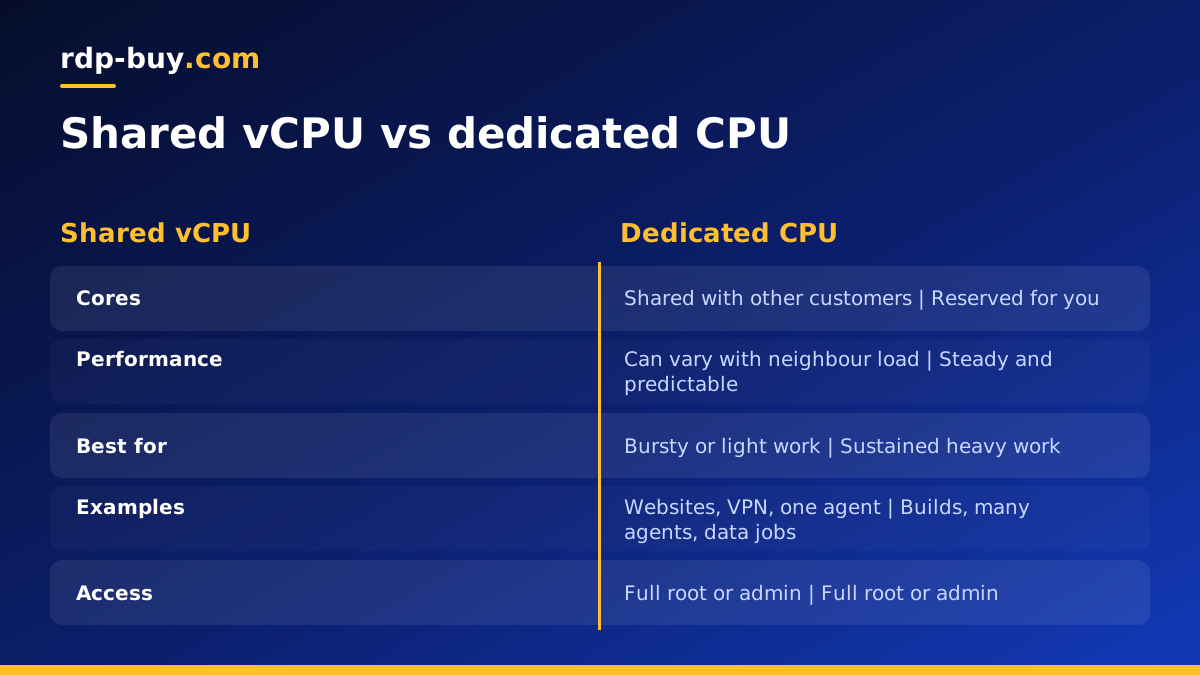
Shared vCPU vs dedicated CPU: the practical differences
The two types of plan look similar on paper, so it helps to compare how they behave in use.
- Consistency: shared vCPU performance can vary with neighbour load; dedicated CPU performance stays steady.
- Sustained load: shared plans suit work that comes in bursts; dedicated plans suit work that keeps the processor busy for long stretches.
- Predictability: with dedicated cores, a job that took an hour yesterday takes about the same today, which makes scheduling easier.
- Cost of capacity: shared plans are the economical choice for light or bursty work; dedicated plans cost more because the cores cannot be shared.
Workloads that benefit from dedicated CPU server hosting
Dedicated cores pay off when the processor, not memory or disk, is the bottleneck, and when that load lasts. Common examples include:
- Many AI agents or automations in parallel, especially when they run browsers, parse documents or process data locally between API calls. See the AI agent hosting hub.
- CI pipelines and build servers that compile code, run test suites and build Docker images many times a day.
- Trading systems that run several terminals, backtests or strategy optimisations around the clock.
- Video, image and audio processing, such as transcoding or batch conversions.
- Busy databases and application servers where steady response times matter to users.
- Scraping and data pipelines that render many pages and transform large datasets.
When a regular VPS is enough
Plenty of workloads do not need reserved cores. A single website, an n8n instance with a handful of workflows, a VPN server, a personal assistant like OpenClaw, or a trading terminal or two will usually spend most of the day waiting on the network, not the processor. For those, a standard Linux VPS or Windows RDP plan is the sensible choice.
A simple test: watch CPU use during your busiest hours for a week. If it is mostly low with short spikes, shared vCPU is fine. If it sits high for long periods, or jobs take noticeably longer at some times of day than others, dedicated cores are worth a look.
Dedicated CPU vs bare metal
Dedicated CPU hosting is still virtualised. You get reserved cores inside a virtual machine, which keeps the convenience of fast provisioning, simple resizing and familiar management. A bare metal server is the whole physical machine with no hypervisor at all.
Choose dedicated CPU when you want steady performance without managing hardware-level details. Choose bare metal when you need every core and all the memory of a machine, want to run your own hypervisor such as Proxmox, or have software that must run directly on hardware.
Signs your current server needs dedicated cores
Processor contention rarely announces itself clearly. It shows up as small frustrations that are easy to blame on something else. Look for these patterns before you upgrade:
- The same job takes noticeably longer at certain times of day, even though your own load has not changed.
- CPU use looks maxed out during long tasks, and adding more parallel jobs makes everything slower rather than finishing sooner.
- On Linux, tools such as top show a high steal time value, which means your virtual CPU was ready to work but had to wait for the physical core.
- Builds, backtests or batch conversions keep missing the windows you scheduled them for.
- Users notice uneven response times from an app even when memory and disk look healthy.
How to size a dedicated CPU server
Start from the work, not the plan list. Count how many jobs run at the same time and how long each keeps a core busy. A build server that runs two builds at once, each of which uses several threads, needs more cores than a database that serves many small queries.
Then check memory. Processor-heavy jobs often use memory heavily too: browsers, compilers and data tools all hold a lot in RAM. A plan with plenty of cores and too little memory will still feel slow. Finally, leave headroom for the operating system, monitoring and updates.
If you are moving from a shared plan, your current CPU graphs are the best guide. Pick a dedicated plan with at least the number of cores your busiest hour used, then add some room to grow.
Choosing a location and operating system
Place the server near the systems it works with: your users, your trading venue, your code repository and registries, or the APIs your agents call. rdp-buy.com offers 33 locations, which you can browse on the server locations page.
Linux is the usual choice for build servers, Docker, databases and agents. Windows makes sense for Windows-only trading platforms and desktop automation; on rdp-buy.com the Windows licence is included in Windows prices. The guide on Windows or Linux server helps if you are unsure.
Getting the most from dedicated cores
Once you have reserved cores, a few habits make sure you use them well.
- Run parallel jobs up to the number of cores you have, not far beyond it.
- Watch for memory or disk becoming the new bottleneck once CPU waits are gone.
- Schedule heavy batch work for quieter hours so interactive tasks stay responsive.
- Keep the operating system and your tools updated, and restart after kernel updates.
- Use containers or separate users to keep different workloads from interfering.
Common misconceptions about dedicated CPU
Dedicated cores fix processor contention, not every slow server. If your bottleneck is memory, a plan with more RAM will help more than reserved cores. If it is a slow external API, no amount of local processing power changes the wait. And dedicated CPU does not replace good habits: unpatched software, runaway processes or a full disk will still cause trouble. Diagnose first, then buy the resource you are actually short of.
Buying a dedicated CPU server
If your workload keeps the processor busy for long stretches, or you need performance you can plan around, browse the dedicated CPU server plans. Every server includes full root or administrator access, a dedicated IPv4 address, 24/7 support and billing that can be monthly, half-yearly or yearly. Servers are ready in minutes.
You can pay by card, PayPal or crypto. If you want to test the jump from shared to dedicated cores, start monthly and compare your job times against your current server before committing to a longer term.
