 Sign in
Hermes Agent vs Claude Code: Which to Run on a VPS?
Hermes Agent and Claude Code (by Anthropic) are both agents you can leave running on a server, but they are built for different jobs. This guide compares them on tasks, models, cost and server needs, then shows how to run both on one VPS.
The short answer
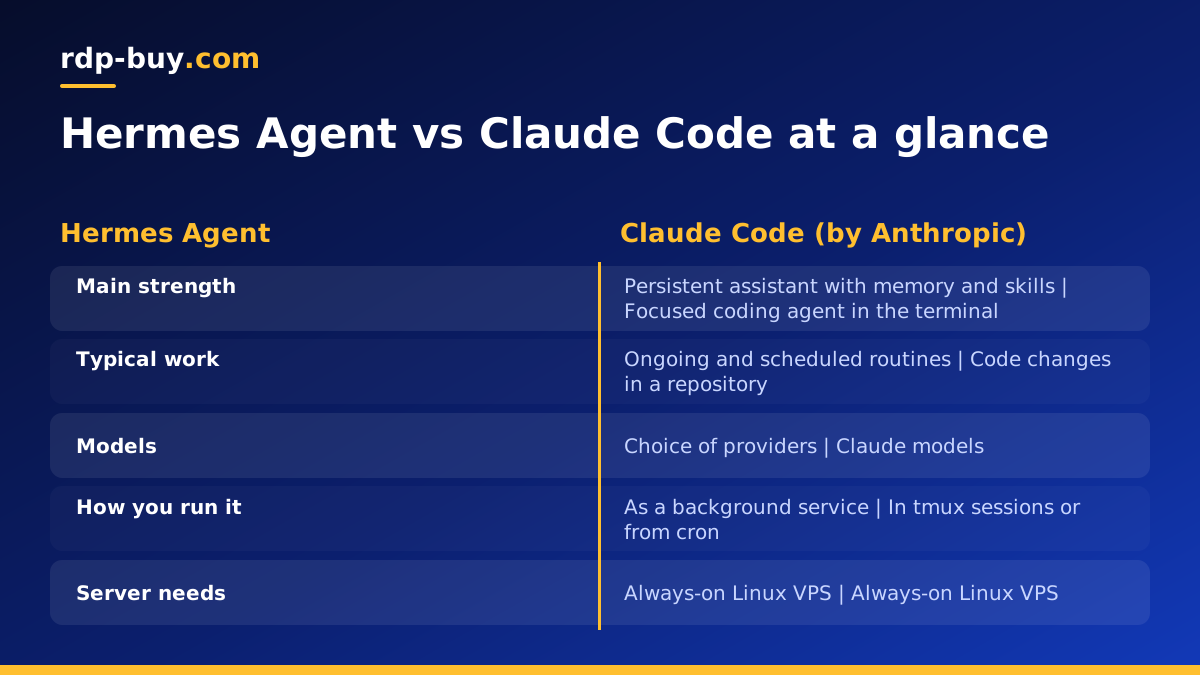
If your main goal is writing, reviewing and fixing code inside a repository, start with Claude Code (by Anthropic). If you want a general-purpose agent that stays online, remembers context, runs scheduled work and lets you pick the model behind it, start with Hermes Agent from Nous Research.
They are not strict rivals. Many people end up using both: one for focused coding sessions, the other as an always-on assistant. A single Linux VPS can host both, and that is the setup this guide builds towards.
Features change quickly in this space, so treat the comparison below as a framework for deciding. Always confirm the current feature list in the official documentation at nousresearch.com and anthropic.com before you commit.
What each agent is built for
Claude Code is a terminal-based coding agent. You open it inside a project folder, describe what you want, and it reads files, edits code, runs commands and works through multi-step changes. It is session oriented: you give it a task, it works, you review the result. It can also be run non-interactively, which makes it usable from scripts and scheduled jobs.
Hermes Agent is an open-source agent from Nous Research that is designed to run persistently. It is the kind of tool you leave running, talk to over time, and let build up memory and reusable skills. It is closer to an assistant that lives on a server than a tool you open for one coding session. Check the project's documentation for exactly which chat integrations and scheduling features are supported in your version.
That difference in design drives almost every other comparison point.
Comparing task types
Think about the shape of the work, not just the label.
Claude Code fits best when: the task lives in a codebase, the output is a diff or a pull request, and you want to review the result. Typical examples are fixing a failing test, refactoring a module, writing a script, or explaining unfamiliar code.
Hermes Agent fits best when: the task is ongoing or spread across tools and time. Examples are a recurring research routine, a personal assistant you message from your phone, or an agent that accumulates knowledge about your preferences and workflows.
Some tasks overlap. Both can run shell commands and both can touch code. The practical test is simple: if you would be happy to start a fresh session each time, Claude Code is a natural fit. If you want the agent to still be there tomorrow, already knowing what happened yesterday, Hermes Agent is the better match.
- Code changes in a repo, reviewed by you: Claude Code
- Long-running assistant with memory and skills: Hermes Agent
- Scheduled or recurring routines: Hermes Agent, or Claude Code in non-interactive mode triggered by cron
- Quick one-off terminal help: either, though Claude Code is more focused on code
Model flexibility
Claude Code is built around Claude models. That tight pairing is a strength: the tool and the model are designed together. The trade-off is that you are choosing one vendor's model family.
Hermes Agent is built to work with a range of model providers, including Nous Research's own models, and is not tied to a single vendor. That is useful if you want to switch models as prices and quality change, or keep sensitive work on a different provider than everyday work. Provider support evolves, so check the docs for the providers available today.
If model choice matters a lot to you, that points towards Hermes Agent. If you want the most integrated coding experience with a single model family, that points towards Claude Code.
Cost: what you actually pay for
There are two separate costs with any agent on a server: the model usage and the server itself.
Model usage. Claude Code is used either with an Anthropic subscription or with API usage, depending on how you sign in. Hermes Agent uses whichever provider you configure, so you pay that provider. Agents that loop through many steps can use a lot of tokens, so set sensible limits and watch your provider dashboard in the first weeks.
The server. This part is predictable. On rdp-buy.com you can pay monthly, half-yearly or yearly, and the plan stays the same however many tasks your agent runs. The agent software itself is mostly waiting on API responses, so the server is not usually the expensive part of the setup.
Browse the Linux VPS plans to see the options, and pick the billing period that matches how long you plan to keep the agent running.
Server needs and why a VPS helps
Neither agent needs a powerful machine when the models run in the cloud, because the heavy computing happens on the provider's side. What the server does need is to be always on, reachable, and stable.
This is where a 24/7 server beats a laptop. A laptop sleeps, changes networks, and gets closed. An agent running on it stops mid-task. On a VPS, your sessions and background services keep going while you are offline.
A few server points that matter for these two agents:
Each plan on rdp-buy.com comes with a dedicated IPv4 address, full root access on Linux, and servers are ready in minutes. 24/7 support is available if you get stuck during setup.
- Location: pick a server close to the APIs your agent calls and to the users or services it talks to. With 33 server locations to choose from, see the server locations page.
- Dedicated IP: useful when you need to allowlist your agent's address for a service or webhook.
- Root access: lets you install Node, Python, Git, Docker and anything else the agent needs.
- Memory and disk: give yourself headroom for repositories, logs and tools. If you also run containers, read about a Docker VPS.
What about Codex, OpenCode and Pi?
Readers often ask how Hermes Agent compares with other terminal agents. The same framework applies, so you can judge each one by task type, model flexibility, cost and server needs.
Hermes Agent vs Codex: Codex is OpenAI's coding agent, so like Claude Code it is centred on coding work and one vendor's models. Hermes Agent is the more general, persistent option.
Hermes Agent vs OpenCode: OpenCode is an open-source terminal coding agent. It overlaps with Hermes Agent on open-source flexibility, but it is aimed at coding sessions rather than a long-lived assistant.
Hermes Agent vs Pi: Pi is a minimal terminal coding agent. It sits closer to the coding-tool end of the spectrum, while Hermes Agent leans towards memory and always-on use.
All of these run comfortably on a small Linux server because they are mostly command-line programs calling remote model APIs. Check each project's own repository on github.com for the latest details, since features shift often.
Claude Code VPS setup, step by step
Here is a practical Claude Code VPS setup you can follow on a fresh Linux server. For the full walkthrough, see our page on a VPS for Claude Code.
- Step 1, order a Linux VPS. Choose a location near the services you use most. Compare options on the Linux VPS plans page.
- Step 2, connect over SSH. Log in as root with the details from your welcome message.
- Step 3, create a normal user. Add a non-root user, give it sudo if needed, and use that account for the agent. This limits the damage if a command goes wrong.
- Step 4, update the system and install basics. Update packages and install Git and a terminal multiplexer such as tmux.
- Step 5, install Claude Code. Follow the current install instructions in Anthropic's documentation, since the recommended method can change.
- Step 6, authenticate. On a server with no browser, use the login flow that lets you open a link on your own computer, or provide an API key as an environment variable. Keep keys out of your shell history and out of Git.
- Step 7, clone your project and start a session inside tmux. Detach with tmux and the session keeps running after you disconnect. Reattach later to see progress.
- Step 8, review before you merge. Have the agent work on a branch, then read the diff yourself.
Running Hermes Agent and Claude Code on one box
Running both on a single VPS is straightforward if you keep them separated. The goal is that one agent's mistakes, files and credentials do not leak into the other's.
The setup below keeps each agent in its own space. For Hermes Agent specifics, our VPS for Hermes Agent page covers hosting in more detail.
- Separate Linux users. Create one user for Claude Code and another for Hermes Agent, each with its own home directory and its own API keys.
- Separate working folders. Give each agent its own directory so they do not edit the same files by accident.
- Run Hermes Agent as a service. Use systemd or a container so it restarts after a reboot or crash. Run Claude Code interactively in tmux, or trigger it from cron for scheduled jobs.
- Use Docker when you want clean isolation. Containers make it easy to limit what each agent can see. See the Docker VPS page and Docker's own documentation at docker.com.
- Watch resources. Check memory and disk now and then. If both agents are busy and the server feels tight, move up a plan rather than letting jobs fail.
- Back up configuration. Keep agent config and memory files in a backup, since these are what you would miss most after a rebuild.
When Windows RDP makes sense instead
Both agents are command-line friendly, so Linux is usually the natural choice. A Windows server makes sense if your workflow depends on Windows-only software, a desktop app, or a graphical session you want to watch. In that case, a Windows RDP gives you full admin access, and the Windows licence is included in the Windows prices.
If you are unsure, read Windows or Linux: which server to rent and RDP vs VPS. For the Windows route, see Windows RDP for AI agents.
Security habits for any always-on agent
An agent that can run commands on a server is powerful, so treat it like a new team member with limited access.
Use SSH keys instead of passwords where you can, and keep the system updated. Give each agent only the credentials it needs. Avoid pasting secrets into prompts. Start with a test repository before you point an agent at anything important, and keep Git history clean so you can roll back any change.
If you also automate workflows with n8n, the same server rules apply. Our AI agent hosting hub collects the guides for each tool.
How to decide
Ask three questions. What is the work: code in a repo, or ongoing assistance? Which models do you want: one integrated family, or the freedom to switch? How do you want to work: in sessions you start, or with something always there?
Answers leaning towards code, one model family and sessions point to Claude Code. Answers leaning towards persistence, model choice and background routines point to Hermes Agent. A mixed set of answers is a good reason to run both on one server and let each do what it does best.
