 Sign in
AI Agent Hosting Explained: Options, Costs and What to Choose
AI agent hosting means choosing where your agent runs, who keeps it online and how much control you keep. This guide compares managed platforms, shared hosting, a Linux VPS and Windows RDP, and shows which fits which job.
What AI agent hosting means
Start with the ai agent meaning. An AI agent is a program that uses a language model to decide what to do next. It calls tools such as APIs, a browser, files or shell commands, and it keeps working until a task is finished or it needs your input. A chatbot answers and stops. An agent acts, waits, and acts again.
That waiting is why hosting matters. Many agents react to a schedule, a webhook, an incoming message or a queue of jobs. If the machine they run on is asleep, offline or closed, the agent is not working. AI agent hosting is the decision about where that process lives, who keeps it running and how much of the machine you control.
There are four common answers: a managed agent platform, shared hosting, a Linux VPS and a Windows RDP server. The rest of this guide compares them. For a shorter overview of the topic, see our AI agent hosting hub.
AI agents examples and what each one needs
The best ai agent hosting for you depends on what the agent does. These ai agents examples show how different the requirements can be.
- Workflow agents in n8n. An n8n workflow with AI steps can sort incoming emails, summarise documents or answer form submissions. It needs a process that stays up and a stable address for webhooks. The n8n documentation covers self-hosting options.
- Coding agents such as Claude Code (by Anthropic). A terminal-based coding agent works on a repository, runs tests and makes changes. It benefits from a persistent shell, so long tasks continue after you disconnect. See the Anthropic site for the official product information.
- Always-on assistants such as OpenClaw or Hermes Agent. These are typically run as long-lived, self-hosted processes that you reach through a chat or terminal interface. They need to be running whenever you send a message. Check openclaw.ai and nousresearch.com for the current setup instructions.
- Containerised agent stacks. Some setups combine an agent, a database and a few helper services using Docker. They need root access and room to run several containers. Read the Docker site for the basics.
- Desktop and browser automation agents. An agent that clicks through a Windows application or a logged-in browser session needs a real desktop, not just a command line.
The four ways to host an AI agent
Each option trades convenience against control. Here is how they differ in practice.
- Managed agent platforms. You build or configure the agent inside a vendor's product and they run it. Setup is quick and you do not manage a server. The trade-offs are less control over the environment, dependence on the vendor's feature set and the pricing model, and limits on what software you can install.
- Shared hosting. This is the classic web hosting account where many sites share one machine. It is built for websites, not for long-running processes. You usually cannot keep a background service alive, install Docker or open the ports an agent needs. It is rarely a good fit for agents.
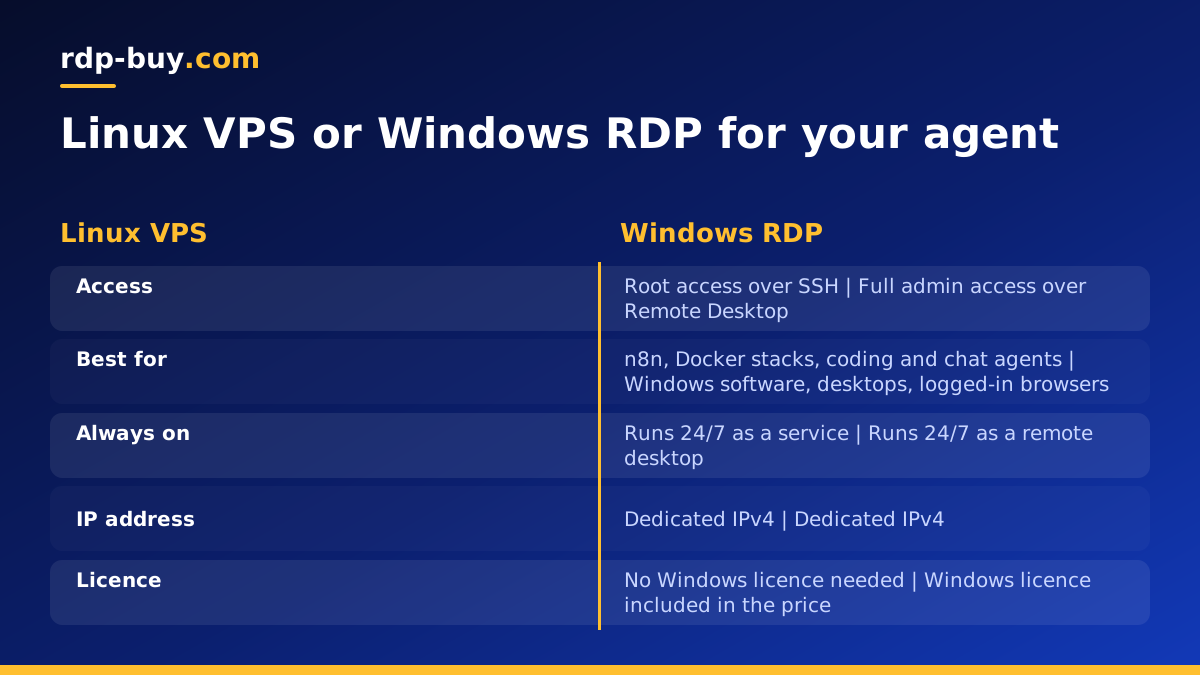
- Linux VPS. A virtual private server gives you your own operating system with root access. You install what you want, run it as a service, and keep it online around the clock. This is the most flexible and common home for n8n, coding agents, assistants and Docker stacks. Our Linux VPS plans are built for this.
- Windows RDP server. A Windows server you control through Remote Desktop, with full administrator access. It runs Windows-only software, desktop applications and browser sessions that need a visible screen. Our Windows RDP plans include the Windows licence in the price.
Comparing cost, control, uptime and typical use
Exact prices vary by provider and plan, so this comparison stays qualitative. Use it to narrow the field, then check the current plan details before you buy.
On cost, managed platforms often charge in a way that grows with usage or features, while a VPS or RDP server is a predictable fixed bill for the resources you pick. Shared hosting is usually the cheapest on paper, but it often cannot run the agent at all, so the saving is not real. With rdp-buy.com you can pay monthly, half-yearly or yearly, which lets you test on a short term and commit later.
On control, a VPS with root access and an RDP server with full admin access sit at the top. You choose the software, the versions, the firewall rules and the update schedule. A managed platform sits at the other end: simple, but you work within its rules.
On uptime, the key difference is who is responsible. A laptop depends on your battery, Wi-Fi and lid. A managed platform depends on the vendor. A server in a data centre is designed to stay online, but you still need to configure your agent to restart after a reboot or a crash. We do not quote uptime figures, and you should be careful with any provider that promises a number without explaining how it is measured.
On typical use, managed platforms suit quick experiments and teams that do not want to touch infrastructure. A Linux VPS suits most agent workloads. Windows RDP suits agents that depend on Windows software or a desktop. If you are still unsure about the Linux and Windows choice, read Windows or Linux server: which to rent and RDP vs VPS.
Why an always-on server beats a laptop
Running an agent on your own computer works for a first test. It breaks down when the agent is meant to work while you do not. A server solves several problems at once.
- No laptop that has to stay on. You can close the lid, travel or restart your own machine without stopping the agent.
- 24/7 operation. Scheduled jobs, webhooks and chat messages are handled at any hour, because the server is always running.
- A dedicated IP address. Each rdp-buy.com server comes with a dedicated IPv4 address. That gives webhooks a fixed target and makes it possible to allowlist the address with services that support it.
- Isolation. An agent that runs shell commands or edits files is safer on a separate machine than on the computer that holds your personal documents and passwords.
- Clean environment. You control the installed software, so the agent does not conflict with whatever else you run day to day.
Choosing a server location for your agent
An agent spends much of its time talking to other systems: model APIs, your databases, SaaS tools and the people who message it. Each round trip crosses the network, and a multi-step task can involve many of them. Placing the server close to the services it calls most often keeps those trips short.
A practical way to decide: list the three or four endpoints your agent contacts most. Note where your users or team are based. Then pick the region that sits closest to the heaviest traffic. If most calls go to an API hosted in one region, start there. If the agent mainly serves users in another country, favour their side. If you are unsure, pick a central option and measure the response time from the server itself.
rdp-buy.com offers 33 server locations, and you can see them all on the server locations page. Some services also behave differently depending on the country they see, so location can matter for access and compliance as well as speed. Check the terms of any service your agent uses.
How to set up an agent on a VPS, step by step
The exact commands depend on the agent, so follow its official documentation. The general sequence is the same for most Linux setups.
- 1. Pick the server type and location. Choose Linux for most agents, then the location closest to your APIs and users.
- 2. Order and log in. Servers are ready in minutes. Connect over SSH with the root credentials you receive.
- 3. Update and secure the system. Install system updates, create a non-root user for daily work and set up a firewall that only opens the ports you need. Prefer SSH keys over passwords.
- 4. Install your runtime. Many people install Docker and run the agent in a container. Our Docker VPS page explains this setup. For n8n specifically, see VPS for n8n.
- 5. Store secrets safely. Keep API keys in environment files or a secrets manager with strict file permissions. Never paste them into shared chat logs or commit them to a repository.
- 6. Make it restart by itself. Use a restart policy in Docker or a systemd service so the agent comes back after a crash or reboot.
- 7. Add monitoring and backups. Check logs regularly, set an alert for when the agent stops responding and back up the data directory or database.
- 8. Put it behind HTTPS if it receives webhooks. Use a domain pointed at your dedicated IPv4 address and a reverse proxy with a certificate.
When Windows RDP is the better choice
Linux handles most agent workloads, but some jobs need Windows. Examples include automating a Windows-only desktop program, running a browser session that must stay logged in on a visible desktop, or using tools that have no Linux version. In those cases a Windows RDP server is the practical answer, and you connect to it through Remote Desktop like a normal PC that never switches off.
Our guide on Windows RDP for AI agents goes deeper, and how to connect to your RDP server walks through the first login. If you are not sure how much capacity to order, which RDP plan do you need helps you size it.
A short decision guide for 2026
If you want the shortest path to a decision, use these rules of thumb.
If you only want to try an idea and do not want to manage anything, a managed platform is reasonable, as long as you accept its limits. If your agent needs to run continuously, install its own software or use Docker, choose a Linux VPS. If it needs Windows software or a desktop, choose Windows RDP. Skip shared hosting for agents unless the provider explicitly supports long-running processes.
Whichever you choose, judge a provider on things you can verify: root or admin access, a dedicated IP, the locations on offer, how quickly the server is ready, whether support is available around the clock and what the billing terms are. Be cautious about unverifiable promises. For a wider look at what else these servers can run, see what you can run on an RDP or VPS server.
rdp-buy.com is an independent hosting provider and is not affiliated with or endorsed by Anthropic, n8n, OpenClaw, Nous Research, Docker or any other vendor named in this guide.
