 Sign in
VPS Low Cost Options: How to Choose a Cheap Plan That Works
A low cost VPS can run a surprising amount, as long as you match the plan to the job and refuse to compromise on a few basics. This guide shows how to choose a budget plan that still works, and how to buy VPS hosting without paying for capacity you do not need.
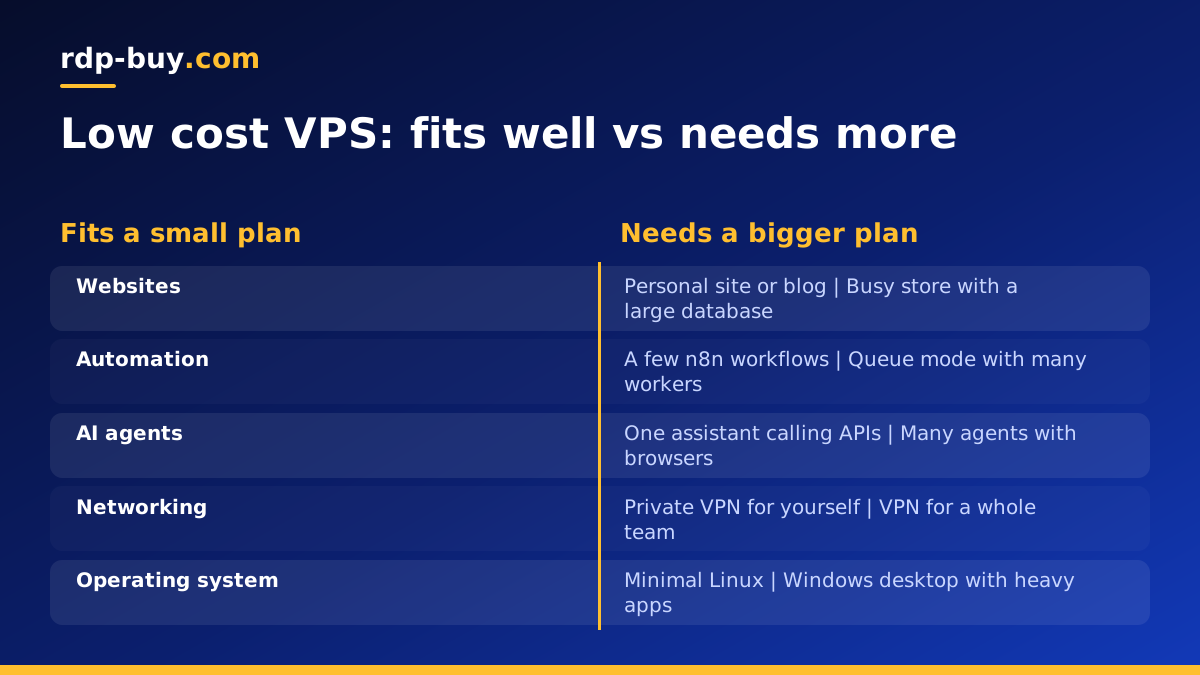
What a low cost VPS is good for
The cheapest VPS plans have a small amount of memory, one or two virtual CPU cores and modest storage. That sounds limited, but a lean Linux server uses very little on its own, which leaves room for real work. Many useful projects fit comfortably in a small plan:
- A personal website, blog or portfolio served by a light web server.
- A private VPN, so your traffic leaves from an IP address you control.
- A small n8n instance with a handful of workflows.
- A personal AI assistant or bot that mostly calls model APIs.
- A Git server, a password manager or a small dashboard for yourself.
- A test or staging server where you try ideas before putting them on a bigger machine.
What a cheap VPS will struggle with
Budget plans run out of room when a job needs lots of memory or keeps the processor busy for long periods. Running a full desktop environment, several headless browsers, large databases, heavy builds or local AI models will feel slow on the smallest tiers. Windows Server also needs more resources than a minimal Linux install, so a Windows desktop on the very smallest plan is rarely a good experience.
If your project sits in this list, you will save time and frustration by starting one size up, or by looking at a dedicated CPU server for sustained heavy work.
What never to compromise on, even on a low cost VPS
Cheap should mean small, not missing the essentials. Whatever plan you pick, check that it includes:
- Full root access, so you can install and configure anything.
- A dedicated IPv4 address, not a shared one that other customers' behaviour can affect.
- A choice of location, so the server sits near your users or the services it calls.
- Real support, ideally around the clock, for the day something goes wrong.
- Flexible billing, so you can upgrade without being locked into a plan you have outgrown.
- Clear payment options, such as card, PayPal or crypto.
How to size a low cost VPS correctly
The trick to buying cheap is buying exactly enough. Write down what will run at the same time and how heavy each part is. A web server and a small database, a VPN service, or one bot are light. A database that grows, several Docker containers or anything with a browser is moderate.
Memory is where small plans usually run out first. You can stretch a small plan by using light software choices, such as a lean web server, SQLite for small apps, and Alpine or slim Docker images. Adding a swap file gives a safety margin for rare spikes, but if the server swaps all the time, it is time to move up a size.
Because billing can be monthly, the lowest risk approach is to start small, watch memory and CPU for a couple of weeks, then upgrade only if the numbers say so.
Linux keeps a VPS low cost
If your software runs on Linux, choose Linux. It has no licence cost, uses less memory than Windows and is the default home for web servers, Docker, VPNs and automation tools. A minimal distribution such as Debian or Ubuntu Server leaves most of a small plan free for your own work.
If you need Windows software, a Windows server is the right tool even if it costs a little more, because the Windows licence is included in Windows prices on rdp-buy.com. The cheap RDP plans are the budget entry point for Windows.
Keep a budget VPS fast
Small servers reward tidy habits. These keep a low cost plan responsive for longer:
- Install only what you use, and remove packages and containers you no longer need.
- Limit log sizes and rotate logs so the disk does not fill up.
- Set memory limits for Docker containers so one service cannot starve the others.
- Prune old Docker images and volumes from time to time.
- Run heavy jobs such as backups at quiet hours.
- Check memory, disk and CPU weekly so you notice growth before it becomes a problem.
Keep a budget VPS secure
A cheap server on the internet faces the same scanners as an expensive one. Security costs nothing but a little time: use SSH keys and turn off password login, keep the firewall closed except for the ports you need, apply updates regularly and run each service under its own user. Back up important data to somewhere outside the server. Our guide on what you can run on an RDP or VPS has more ideas for small servers.
Location still matters on a cheap plan
Distance adds a delay to every request, whatever the price of the plan. Choose a city near your users, or near the APIs and services your server talks to. rdp-buy.com has 33 locations on the server locations page, so a low cost plan does not mean settling for a far away data centre.
A low cost VPS for AI agents
AI agents are a good match for small servers when the language model runs at a provider. The agent spends most of its time waiting for API responses, so a modest plan can keep it online around the clock. A personal assistant such as OpenClaw, a Hermes Agent instance or a coding agent like Claude Code (by Anthropic) working on small repositories can all start on an entry-level Linux plan.
Size up when the agent drives a headless browser, works with large files, or when you run several agents side by side. The AI agent hosting page lists plans set up for these tools.
Billing choices that keep costs down
Billing terms affect what you spend as much as plan size. Monthly billing is the flexible option while you are still finding the right size or testing an idea, because you can change or cancel at the next renewal.
Once a small server has proved itself and you know you will keep it, half-yearly or yearly billing means fewer renewals to think about. A sensible pattern is to start monthly, settle on the right size, then switch to a longer term at renewal.
When to stop saving and upgrade
Upgrade when the server tells you to: memory constantly near full, swap in heavy use, processes killed for running out of memory, slow responses at busy times, or a disk that refills soon after you clean it. Moving one plan up usually solves all of these at once, and it is cheaper than the hours spent tuning a server that is simply too small for the job.
When you do upgrade, move one step at a time and watch the same numbers again. Jumping several sizes at once often means paying for idle capacity, which defeats the point of choosing a low cost VPS in the first place.
Choosing your low cost VPS plan
Start with the cheap VPS plans if your project is light: a website, a VPN, a bot or a small automation tool. If you expect to grow, compare the full range of Linux VPS plans and pick the smallest one that covers your list with some headroom. Every plan includes full root access, a dedicated IPv4, servers ready in minutes and 24/7 support, with monthly, half-yearly or yearly billing.
You can pay by card, PayPal or crypto; the buy VPS with crypto page explains the crypto option.
