 Sign in
RDP Server vs VPS: Which One Fits Your Workload?
An RDP server is a Windows machine you use through a full graphical desktop, while a VPS is a virtual server you usually manage from a command line. If your work lives in Windows programs, a Windows RDP server is usually the better fit; if it lives in services, scripts and containers, a Linux VPS usually wins.
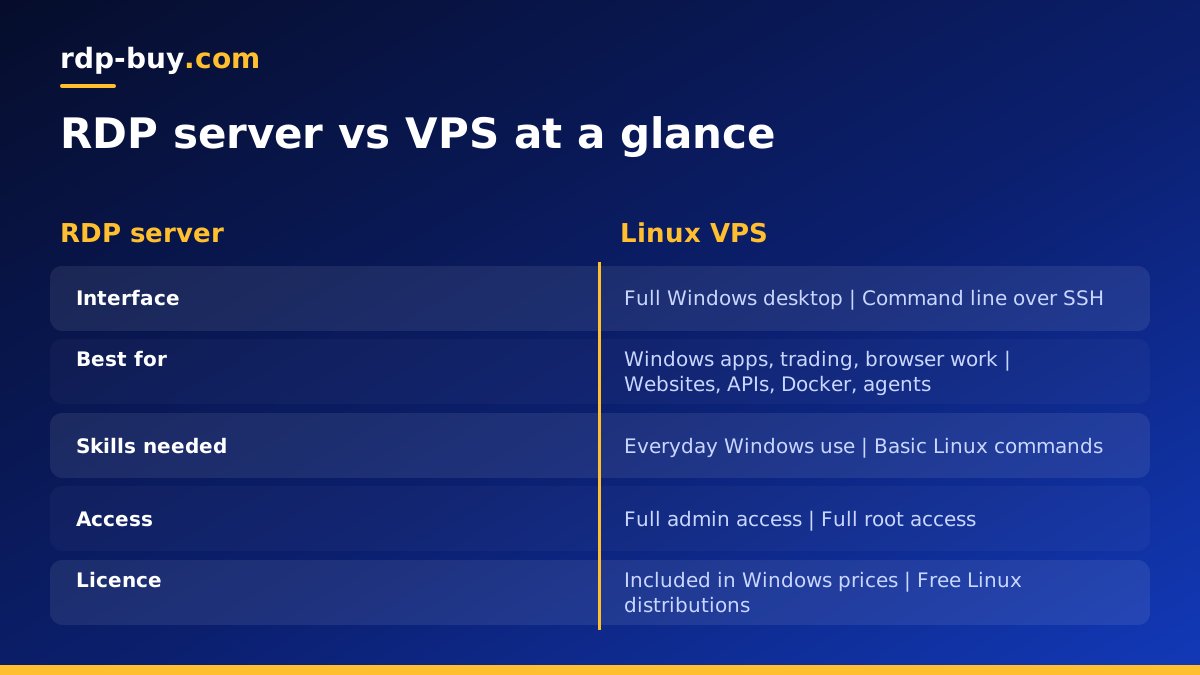
RDP server vs VPS: the short answer
People often compare these two as if they were different products, but they overlap more than most comparison pages admit. Almost every RDP server sold today is itself a virtual private server running Windows, with Remote Desktop Protocol switched on so you can log in to a visual desktop. A VPS, in the everyday sense, is a virtual machine with its own operating system, its own resources and its own IP address, most often running Linux and reached over SSH.
So the real question is not which technology is better. It is which way of working matches the job you need done. If you want to open a browser, run a Windows program, click through installers and leave a desktop app running all day, you want an RDP server. If you want to run a web server, a database, a Docker stack or a background script that nobody needs to look at, a Linux VPS is the more natural home.
The rest of this guide walks through the differences that matter in practice, a set of common workloads with a clear recommendation for each, and a few cases where the honest answer is that either one will do.
What an RDP server actually gives you
An RDP server is a remote Windows computer. You connect with the Remote Desktop client that ships with Windows, or with the Microsoft app on Mac, iPhone, iPad or Android, and you see a normal Windows desktop with a Start menu, File Explorer and whatever programs you install. Everything runs on the server, and only the screen image and your keyboard and mouse input travel over the connection.
That model has some clear strengths. You can run software that only exists for Windows, such as MetaTrader, many trading terminals, accounting packages, older line of business tools and plenty of automation programs built around a visual interface. You can keep a browser session open and logged in around the clock. You do not need to learn shell commands to get work done, because the experience is close to sitting at a desktop PC.
With rdp-buy.com, Windows servers come with full administrator access, a dedicated IPv4 address and the Windows licence included in the price, so you can install what you need without asking anyone for permission.
- Interface: a full Windows desktop over Remote Desktop Protocol.
- Best for: Windows only software, browser based work, trading platforms and visual tools.
- Skills needed: the same skills you use on a home Windows PC.
- Trade off: the desktop itself uses some memory and processor time, so a plan has to cover both Windows and your apps.
What a Linux VPS gives you
A Linux VPS is usually headless, which means there is no desktop at all. You connect over SSH, type commands and manage services that run in the background. Distributions such as Ubuntu and Debian are popular because their package managers make it simple to install web servers, databases, programming runtimes and Docker.
Because there is no graphical layer, more of the plan goes to your actual workload. That makes a VPS a strong choice for websites, APIs, automation platforms like n8n, game servers, and AI agents that run as services. You also get root access, so you can configure the firewall, users and software exactly the way you want.
The trade off is the learning curve. If you have never used a terminal, the first hour can feel slow. Our guide on connecting to a VPS over SSH covers the first login from Windows, Mac and Linux.
Key differences side by side
The table below sums up the points that usually decide the choice. None of them make one option better in general. They simply point each one at different jobs.
- Operating system: RDP servers run Windows; most VPS plans run Linux, although a Windows VPS is also an option.
- How you connect: RDP uses a graphical client; a Linux VPS uses SSH from a terminal.
- Software: RDP suits Windows programs and anything with a visual interface; a VPS suits servers, scripts and containers.
- Resource use: a Windows desktop has more overhead; a headless Linux system leaves more room for your workload.
- Licensing: Windows needs a licence, which is included in rdp-buy.com Windows prices; Linux distributions are free to use.
- Automation: both can run around the clock, but Linux tooling such as systemd, cron and Docker makes unattended services simpler to manage.
Which one to choose for common workloads
Most readers arrive here with a specific job in mind. Here is how the choice usually plays out for the workloads we see most often.
- Forex and stock trading platforms: choose an RDP server. MetaTrader and most broker terminals are Windows programs, and a remote desktop lets them run while your own PC is off. See forex RDP for plans aimed at traders.
- Websites, blogs and APIs: choose a Linux VPS. Web servers and databases run comfortably without a desktop.
- n8n, OpenClaw or Hermes Agent: usually a Linux VPS with Docker, because these tools run as services. The AI agent hosting hub explains the options.
- Browser automation that needs a visible browser: an RDP server is often easier, since you can watch the browser and step in when a site changes.
- Remote office or a second Windows PC: an RDP server, because the whole point is a familiar desktop you can reach from anywhere.
- Learning Linux or self hosting: a VPS, since the command line is the skill you want to build.
When either one will work
Some tasks sit in the middle. Python scripts, simple bots and scheduled jobs run fine on both Windows and Linux. In that case, pick the system you already know. A script you can debug confidently on Windows is worth more than a theoretically leaner setup you struggle to maintain.
Claude Code (by Anthropic) is a good example. It runs in a terminal on Linux, Mac or Windows, so either server type can host it, but most guides and community examples assume Linux. If you are comfortable there, a VPS is the smoother path. If you would rather see a desktop and use a familiar editor, Windows works too. Our guide on choosing a Windows or Linux server goes deeper on this decision.
Location, IP address and uptime matter for both
Whichever you pick, three practical points apply equally. First, choose a server location close to the services you talk to most, whether that is your broker, the APIs your agent calls or the people who visit your site. rdp-buy.com offers 33 locations, listed on the server locations page.
Second, a dedicated IPv4 address helps when a service ties logins or API keys to an IP, and it keeps your traffic separate from other customers. Third, both options run around the clock, which is the main reason people rent a server at all: your work keeps going when your laptop sleeps, loses power or leaves the house.
How to pick the right plan
Start with the software, not the server. List the programs or services you need, check which operating systems they support and how much memory they ask for, then add room for the operating system itself. Windows needs more headroom than a headless Linux system, so if you are running several desktop programs at once, lean toward a larger plan.
If your list is mostly Windows programs, browse plans to buy RDP and pick a location near your broker or main services. If it is mostly services and containers, look at Linux plans to buy a VPS instead. Both are ready in minutes, come with full admin or root access and can be billed monthly, half-yearly or yearly, so you can start small and move up once you see how your workload behaves. Not sure about sizing? The guide on which RDP plan you need walks through it step by step.
