 Sign in
Cheap VPS Hosting: When It Works and What to Watch For
Cheap VPS hosting works well for small, steady projects such as a personal site, a bot, a VPN or a test environment, as long as the provider is reliable and you size the server honestly. This guide explains where a budget server shines, where it struggles, and how to choose VPS hosting that stays good value after the first month.
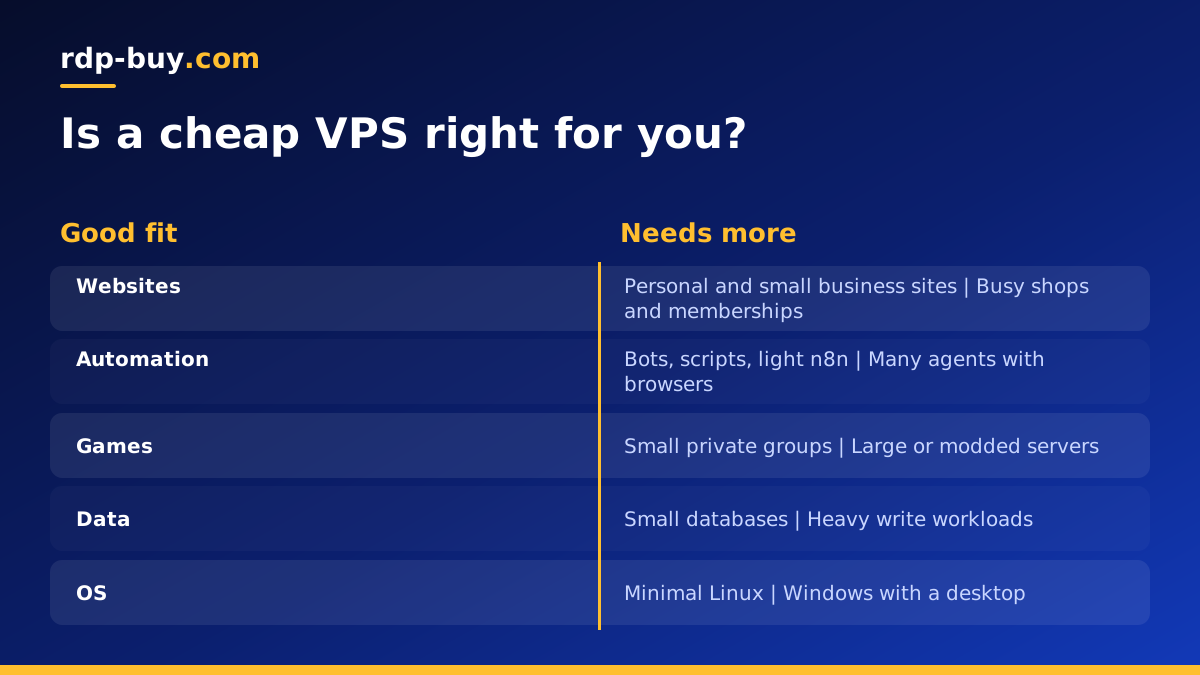
What cheap VPS hosting actually gives you
A low cost VPS is a small virtual machine on a provider's hardware. You get your own operating system, root access, a share of CPU, a fixed amount of memory and some SSD storage. Compared with shared web hosting, even a small VPS is a big step up in control: you can install any software, run background processes and open the ports you need.
What makes a plan cheap is mostly its size. Fewer virtual cores, less memory and a smaller disk cost less. Some budget plans also cut costs in less visible ways, such as heavily oversold hosts, limited support or extra fees for things others include. The first is a fair trade. The second is where cheap becomes expensive.
Projects that suit cheap VPS hosting
Plenty of useful workloads need very little. If your project is on this list, a small plan is often all you need.
- Personal or portfolio websites with modest traffic, especially static sites or a lightweight CMS.
- Chat bots for Discord or Telegram that respond to commands and call external APIs.
- A personal VPN such as WireGuard for private browsing on public Wi-Fi.
- Small automation tools like scheduled scripts, uptime checks or a light n8n instance for personal workflows.
- Development and staging servers where you test changes before they go live.
- Learning Linux by practising server administration on a real machine with a public IP.
- A reverse proxy or jump host that forwards traffic to other servers.
Workloads that outgrow a budget plan
Some jobs need more than a small server can offer, and trying to squeeze them in leads to frustration.
- Busy online shops and membership sites with many simultaneous visitors.
- Game servers for larger groups, especially modded ones.
- Databases that hold a lot of data or handle frequent writes.
- Several AI agents with headless browsers running side by side.
- Build servers that compile large projects.
- Anything that must run Windows with a desktop, which needs more memory and a licence.
Warning signs of a false saving
The cheapest plan is good value only if it is dependable. Watch for these signs before and after you buy.
- Extra fees for basics: setup charges, paid IPv4 addresses or charges for reinstalling the operating system.
- A big jump at renewal: an introductory price that rises sharply after the first term.
- Unclear resources: plans that do not state memory, storage type or the number of cores.
- Slow or no support: a ticket that takes days to answer turns a small problem into an outage.
- Frequent unexplained reboots or network drops: a server that is often unreachable defeats the purpose of having one.
- Noisy neighbours: performance that changes sharply through the day even when your own load is steady.
How to get the most from a small VPS
A little tuning makes a modest server feel much bigger. These habits cost nothing and keep a budget plan responsive.
- Choose a minimal Linux image and install only what you use.
- Use a lightweight web server such as Caddy or Nginx rather than a heavy stack you do not need.
- Add a small swap file as a safety net, but do not rely on it for everyday memory.
- Run services in Docker with memory limits so one process cannot starve the rest.
- Cache pages and static files, and put a CDN in front of a public website if it gets traffic spikes.
- Turn off services you are not using, and check what starts at boot.
- Monitor memory, CPU and disk with a simple tool so you notice trends early.
Security on a small server
A cheap server is still a public server. Bots scan the whole internet for open SSH ports, default passwords and outdated software, and they do not care how much you paid for the machine. Securing a budget VPS takes the same steps as securing a large one, and none of them cost money.
Log in with SSH keys and turn off password logins. Create a normal user with sudo rights instead of working as root. Enable a firewall such as ufw and allow only the ports your services use. Install unattended security updates on Debian or Ubuntu so patches arrive even when you forget. If you run a web app, put it behind HTTPS with a free certificate from Let's Encrypt, which Caddy can handle automatically.
Finally, back up anything you would miss. A small server is easy to rebuild, but your data is not. A nightly copy of databases and important folders to another location is the cheapest insurance you can buy.
Cheap VPS vs shared hosting vs free tiers
Shared web hosting is often cheaper still, but you share one server and one set of software with many other sites. You cannot run background processes, install your own packages or open custom ports. It suits simple websites and little else.
Free tiers from large cloud platforms look attractive, but they usually come with strict limits, time-limited trials or complicated billing that can charge you if you exceed an allowance. They are fine for experiments, less so for something you want to leave running for a year.
A small VPS sits between the two: a predictable bill, real control and enough power for most personal and small business projects. For many people it is the best value way to run something that must stay online.
Linux or Windows on a cheap VPS
Linux is the natural choice for budget hosting. It is free to use, runs comfortably in small amounts of memory and is what most server software expects. Windows Server needs a licence and a graphical desktop uses more memory, so Windows plans start larger.
If you need Windows to run desktop apps, trading platforms or software that only exists for Windows, choose a Windows RDP plan sized for it rather than forcing Windows onto the smallest server. Our guide to choosing Windows or Linux walks through the decision.
Location matters even on a budget
A server close to its users answers faster, and a server close to the APIs it calls finishes tasks sooner. When you compare cheap plans, make sure the cheapest option is not in a region far from your audience. A slightly larger plan in the right city is usually better value than a tiny plan on the wrong continent.
Check the provider's list of regions before you order. With rdp-buy.com you can choose from 33 server locations, so you can match the server to where your users or services are.
Planning for growth
Most projects that start on a cheap VPS either stay small forever or grow quickly. Plan for both. Keep your setup in scripts or a Docker Compose file, back up your data regularly and note every change you make to the server. Then, if you need more resources, moving to a larger plan or a different provider is a short job rather than a weekend project.
Also check whether your provider lets you upgrade in place. Resizing without rebuilding saves time when traffic arrives sooner than expected. Our VPS hosting checklist lists the other questions worth asking before you commit.
Picking your budget VPS
Start by writing down what the server will run, how much memory each part needs and where your users are. Pick the smallest plan that covers that list with a little headroom, in the right location, from a provider that includes the basics rather than charging extra for them.
When you buy a Linux VPS from rdp-buy.com, every plan includes full root access and a dedicated IPv4 address, with monthly, half-yearly or yearly billing so you can start small and commit only once you are sure. Servers are ready in minutes and 24/7 support is available when something needs a second pair of eyes. If you are unsure what a small server can handle, our guide on what you can run on a VPS has more ideas.
