 Sign in
Dedicated Server Best Price: How to Compare Real Value
The best price on a dedicated server is the lowest total cost for the resources, location and support your workload actually needs, not simply the smallest number on a pricing page. This guide shows how to compare offers fairly before you buy a dedicated server.
Why the dedicated server best price is rarely the lowest sticker
Searches for the dedicated server best price usually start with a list of plans sorted from cheapest to most expensive. That is a sensible first step, but two plans with similar headline prices can be very different products once you look at what is included, what costs extra and how the server behaves under load.
A plan that looks cheap can end up costing more if you must add a control panel, an operating system licence, extra IP addresses or paid support to make it usable. It can also cost more in time if the hardware is older, the location is far from your users, or provisioning takes days instead of minutes.
So the goal is not to find the smallest figure. It is to find the plan where every part of what you pay for is something you will use, and nothing you need is missing.
What actually drives dedicated server cost
Understanding the main cost drivers makes it much easier to see whether a price is fair.
- Processor: the generation, core count and whether cores are reserved for you. Dedicated cores cost more than shared ones because nobody else can use them.
- Memory: RAM is often the resource workloads run short of first, and it is a big part of the price.
- Storage type and size: NVMe SSD is faster than SATA SSD, which is faster than spinning disks. More and faster storage costs more.
- Location: data centers in some cities cost more to operate, and providers pass that on.
- Operating system: Linux is free to use. Windows Server requires a licence, which is either included in the price or charged separately.
- Bandwidth and IPs: how much traffic is included, and whether extra IPv4 addresses are available.
- Support level: whether help is available around the clock, and what it covers.
Hidden extras to check before you pay
These are the items most often left out of a headline price. Read the plan details and the order form for each one.
- Setup fees charged once at the start.
- Windows licence fees added monthly on top of the server.
- Control panel licences, if you want one.
- Charges for extra IPv4 addresses.
- Backup storage or snapshot fees.
- Traffic overage charges if you exceed an allowance.
- Price increases at renewal after an introductory term.
- Fees for reinstalling the operating system or for hands-on support.
Dedicated hardware vs dedicated CPU plans
The word dedicated covers two different products, and mixing them up leads to unfair comparisons.
A bare metal or physical dedicated server gives you an entire machine. All of its processor, memory and disks are yours. This suits very heavy workloads, special hardware needs and situations where you must not share a host with anyone.
A dedicated CPU server is a virtual server whose processor cores are reserved for you alone. Memory and storage are also allocated to you, but the physical host may run other isolated servers. You get steady performance without the cost of a whole machine, and you can resize more easily.
If your workload is a busy website, a game server, a CI runner or a group of AI agents, dedicated CPU is often the better value. If you need the whole box, compare bare metal server plans instead. Our guides on what a bare metal server is and on the dedicated CPU server explain the difference in more depth.
How billing terms affect the best price
Many providers offer a lower effective rate when you commit for longer. That is good value only if you are confident the server will still fit your needs at the end of the term.
A sensible approach is to start monthly while you learn how your workload behaves. Once you know the plan is right, switch to a half-yearly or yearly term for the saving. If you expect to grow quickly, keep the shorter term so you can move to a bigger plan without being tied to the old one.
Also check how upgrades work mid-term. Some providers let you move up and pay the difference, while others require a new order.
Sizing: the most common way to overpay
Buying far more server than you need is the easiest way to waste money, and buying too little is the easiest way to waste time. Size from evidence rather than guesses.
If you are moving an existing workload, check its current CPU, memory and disk usage over a normal week, including busy periods. Add headroom for growth, then pick the smallest plan that covers that. If the workload is new, start one size smaller than you think, monitor it for a couple of weeks and resize if it is consistently busy.
Memory deserves extra attention. A server that runs out of memory slows sharply or kills processes, while spare CPU simply sits idle. When in doubt, favour more RAM over more cores.
Quality factors that are worth paying for
Some features do not show up as a line item but change how much value you get every day.
- Provisioning speed: servers that are ready in minutes let you test, rebuild and scale without waiting.
- Location choice: a server close to your users or to the APIs your software calls feels faster and can reduce timeouts.
- Full access: root or administrator access means you can install anything without asking permission.
- A dedicated IPv4 address: needed for allow lists, mail, licensing and stable DNS.
- Support hours: a problem at night is easier to solve when someone answers.
When a VPS is better value than a dedicated server
Not every project needs dedicated resources. If your site or app is quiet most of the day, uses little memory and does not suffer when a neighbour on the host gets busy, a regular VPS can deliver the same result for less. Many personal projects, staging environments and small business sites fall into this group.
The signs that you have outgrown a VPS are fairly clear: response times that vary a lot through the day, CPU steal time showing up in monitoring tools, builds or game ticks that slow down without any change on your side, and a plan that is already the largest your provider sells. Once you see those, paying for reserved cores is good value rather than an expense.
If you are unsure, run the workload on a VPS first and watch it. Moving to a dedicated CPU plan later is straightforward when you deploy with scripts or Docker, and you will buy with real usage data instead of a guess. Compare Linux VPS plans for that first step.
A simple way to compare offers
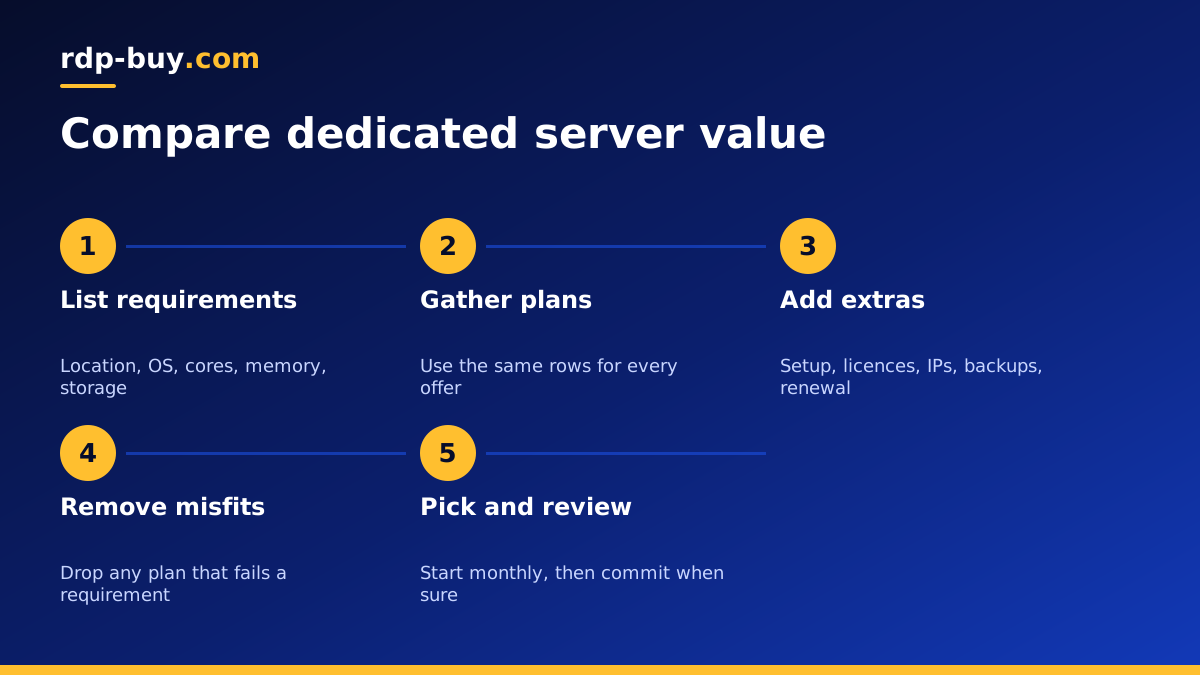
Put each candidate plan in a short table with the same rows: cores and whether they are dedicated, memory, storage type and size, location, operating system and licence, IPs, support, setup fees, billing terms and renewal price. Fill in every cell from the provider's own pages.
Then remove any plan that fails a hard requirement, such as the wrong location or no Windows option. From what is left, add up the true monthly cost including extras. The best price is the lowest figure among plans that meet every requirement, not the lowest figure overall.
If two plans are close, choose the one with better support and easier upgrades. Those matter more over a year than a small difference in the monthly bill.
Choosing a dedicated server plan
Before you commit, check our guide to renting vs buying server hardware if you are weighing your own hardware. Then compare plans on the dedicated CPU server page.
At rdp-buy.com there are no surprises on the items that matter most: every server includes full root or administrator access and a dedicated IPv4 address, Windows prices already include the Windows licence, and you can choose from 33 server locations. Billing is monthly, half-yearly or yearly, servers are ready in minutes and support is available 24/7. Start with the plan that fits today and move up when your workload proves it needs more.
