 Sign in
Self Host n8n for Free: What Is Really Free and What Is Not
Yes, you can self host n8n for free: the Community Edition costs nothing to download and run, with unlimited workflows and executions on your own hardware. What is not free is the machine it runs on, your time and a few enterprise features, so this guide separates the two and shows when a small server for AI agent hosting is worth it.
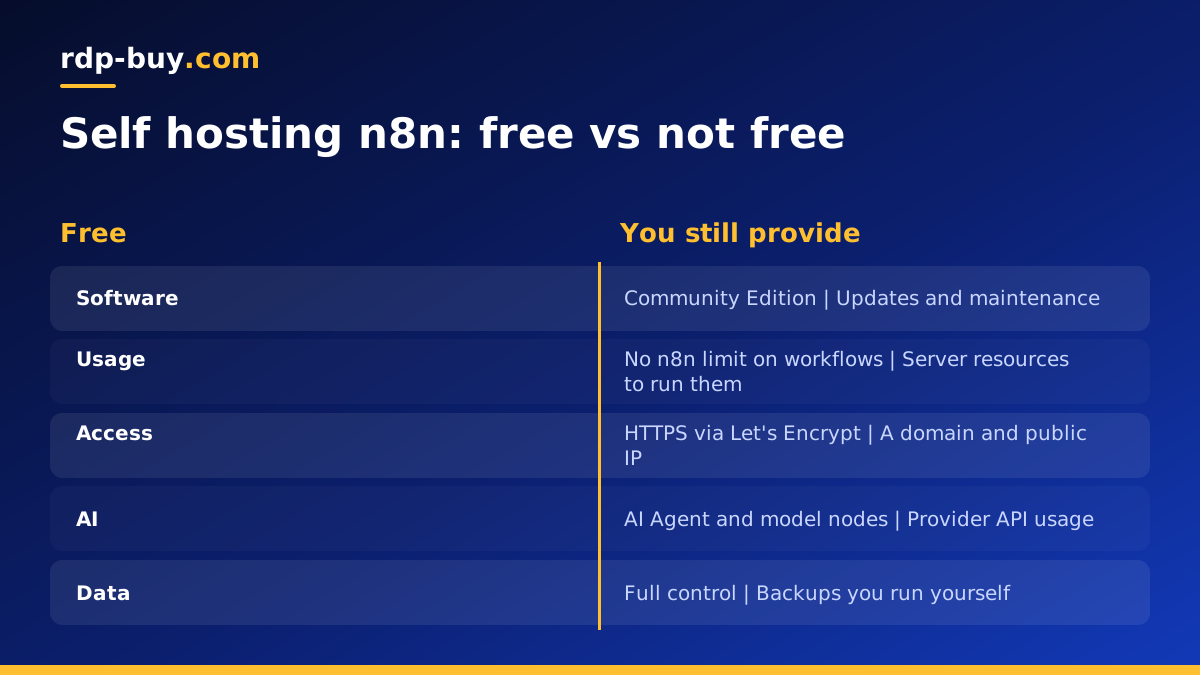
Can you self host n8n for free?
n8n is a workflow automation tool that connects apps, APIs and AI models. Alongside its paid cloud service, n8n publishes a self-hosted Community Edition that you can install with Docker or npm. The software itself has no licence fee, and n8n does not limit how many workflows you build or how many times they run when you host it yourself.
n8n describes its model as fair-code. The source is available on GitHub and is distributed under the Sustainable Use License, which allows free use for your own internal business purposes and personal projects. It places limits on things like selling n8n itself as a hosted service to others. Read the licence in the official docs if your use case is commercial or client facing. n8n is an independent company and is not affiliated with rdp-buy.com.
What the free Community Edition includes
For most individuals and small teams, the Community Edition covers everything that matters day to day.
- The full visual workflow editor.
- Hundreds of built-in integration nodes, plus community nodes you can install.
- Triggers for webhooks, schedules, forms, email and many apps.
- AI nodes, including the AI Agent node, chat model nodes for several providers, memory and vector store nodes.
- Code nodes for JavaScript and Python when you need custom logic.
- Credentials storage, execution history and error workflows.
- No limit on workflows or executions set by n8n.
What is not included for free
Some features are reserved for paid plans or enterprise licences. Check the current feature list in the n8n docs, because it changes between releases, but these are typical examples.
- Single sign-on with SAML or LDAP.
- Environments and source control features for moving workflows between staging and production.
- Advanced user roles and permissions across projects.
- External secret stores.
- Log streaming to external monitoring tools.
- Official support with response commitments.
The costs you still carry when n8n is free
Free software is not the same as a free setup. Self hosting moves several jobs and costs from the vendor to you.
- A machine to run it: a computer that stays on, has a stable connection and can be reached by webhooks.
- A domain and HTTPS: webhooks and OAuth logins need a public HTTPS address. Domains cost a little; certificates from Let's Encrypt are free.
- AI model usage: if workflows call Claude, GPT or other hosted models, those providers bill you per use.
- Your time: installing, updating, backing up and fixing problems are now your job.
- Backups: your workflows, credentials and execution data live in your database, so you are responsible for copying them somewhere safe.
Free ways to run n8n, and their limits
There are a few genuinely free places to run n8n. Each has a catch worth knowing.
Your own computer. Running n8n in Docker Desktop on a laptop is free and perfect for learning. It stops when the computer sleeps, and webhooks from outside services cannot reach it without a tunnel. It is fine for building and testing, not for production.
A spare machine at home. An old PC or a mini computer can run n8n around the clock. You pay for electricity, and you have to deal with a home internet address that may change, port forwarding or a tunnel, and power cuts.
Cloud free tiers. Some cloud platforms offer small free instances. They often come with tight memory, time limits or billing surprises if you exceed allowances, and they can be withdrawn. They are good for experiments rather than workflows your business depends on.
For anything you rely on, a small paid server usually ends up cheaper than the time spent keeping a free option alive.
Step by step: a low cost reliable n8n setup
If you want n8n running all the time without managing hardware, this is a straightforward path on a Linux VPS.
- Create a small Linux VPS and log in over SSH.
- Install Docker and the Docker Compose plugin using the instructions on docs.docker.com.
- Point a subdomain such as n8n.yourdomain.com at the server's IP address.
- Write a Docker Compose file with n8n, a Postgres database for durability and a reverse proxy such as Caddy for automatic HTTPS.
- Set environment variables for your domain, the webhook URL, the time zone and an encryption key, and keep that key safe.
- Start the stack, open your domain and create the owner account.
- Schedule a nightly backup of the database and the n8n data folder to another location.
- Update regularly by pulling the new image and restarting the stack.
Keeping a free n8n install healthy
A self hosted n8n instance needs a little regular care, and most problems people hit come from skipping it. The first habit is updates. n8n releases often, with new nodes, AI features and security fixes. Read the release notes, back up first, then pull the new image and restart. Avoid jumping many major versions at once; step through them so database migrations run cleanly.
The second habit is pruning execution data. By default n8n stores details of every run, and on a busy instance the database grows steadily. Turn on execution pruning with environment variables so old runs are deleted after a period you choose, and keep failed runs longer than successful ones if you use them for debugging.
The third is watching for failures. Create an error workflow that sends a message to email, Slack or Telegram whenever another workflow fails. That single step turns silent breakage into something you notice the same day.
Security basics for a self hosted instance
n8n holds credentials for every service it connects to, so it is worth protecting well. Always serve it over HTTPS, never on a bare HTTP port. Use a strong owner password and turn on two factor authentication for users. Keep the encryption key in a safe place, because without it stored credentials cannot be decrypted after a restore.
On the server itself, allow only SSH and the HTTPS port through the firewall, use SSH keys, and keep the operating system patched. If only your team needs the editor, consider limiting access to it by IP address or a VPN, while leaving webhook paths open for the services that call them.
Is self hosted n8n worth it compared with the cloud?
n8n Cloud removes the server work and adds support, at a price tied to usage. Self hosting removes usage limits and keeps your data on a server you control, at the cost of some maintenance. If you run many executions, need custom community nodes, want data to stay in a particular country, or plan to run AI agents alongside n8n, self hosting tends to win. If you run a handful of workflows and never want to see a terminal, the cloud may be simpler.
Agencies have extra licensing questions when building for clients, which our guide on self hosting n8n for clients covers.
Choosing a server for free n8n
n8n is light on its own. A small VPS with Docker handles personal and small team use comfortably. If you add AI workflows with large prompts, vector databases or several agents on the same machine, give it more memory. The VPS for n8n page shows plans sized for it.
Pick a plan from our hosting for AI agents range and your free Community Edition gets a permanent home: full root access, a dedicated IPv4 address for your domain and webhooks, and a choice of 33 server locations. Billing is monthly, half-yearly or yearly, servers are ready in minutes and 24/7 support is available if the setup hits a snag.
