 Sign in
Connect Self Hosted n8n to Claude: Two Methods Explained
There are two ways to connect self hosted n8n to Claude: call Claude from inside your workflows with an Anthropic API credential, or let Claude call your workflows through n8n's MCP server support. Both work best when n8n runs on always-on AI agent hosting with a stable public address, and this guide walks through each method.
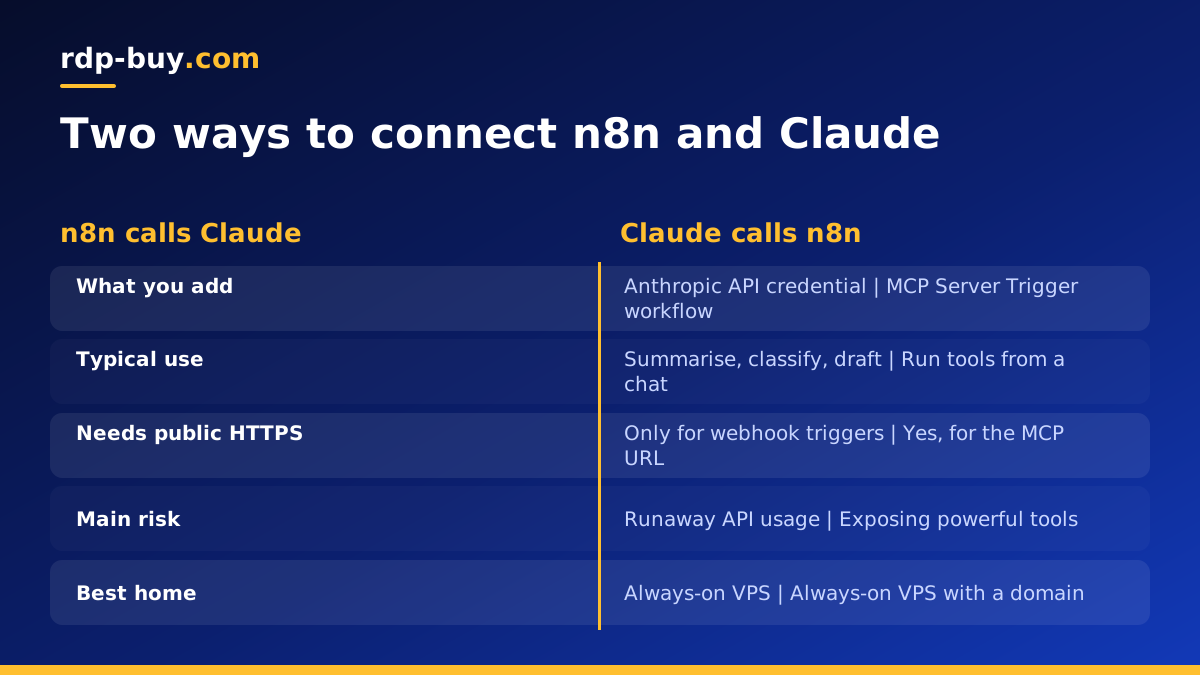
Two directions: n8n calls Claude, or Claude calls n8n
Before you start, decide which direction you need, because the setup is different.
In the first direction, n8n calls Claude. A workflow reaches a step where it needs language understanding, such as summarising an email, classifying a ticket or drafting a reply, and sends that text to a Claude model through the Anthropic API. The answer flows back into the next node. This is the most common setup and needs only an API key.
In the second direction, Claude calls n8n. You chat with Claude in a client that supports the Model Context Protocol (MCP), and Claude can trigger n8n workflows as tools. For example, you ask Claude to create a CRM contact and it calls the workflow that does it. This needs n8n reachable over HTTPS, which is one reason self hosters move n8n onto a server.
Claude is made by Anthropic and n8n is a separate product. Neither is affiliated with rdp-buy.com; this guide simply shows how the published features fit together.
Before you begin
You need a few things in place.
- A running self hosted n8n instance, ideally a recent version, since AI and MCP nodes have improved quickly. Our guide to self hosting n8n covers installation if you have not done it yet.
- An Anthropic API key, created in the Anthropic Console under API keys. Usage is billed by Anthropic separately from your server.
- For the MCP method, a domain or subdomain pointing at your server and HTTPS through a reverse proxy such as Caddy, Nginx or Traefik.
- Admin access to n8n so you can create credentials and activate workflows.
Method 1: connect self hosted n8n to Claude with an API credential
This method lets any workflow send prompts to Claude and use the reply.
Open n8n and go to Credentials. Create a new credential and search for Anthropic. Paste your API key and save. n8n tests the key when you save, so an error here usually means a typo or a key that has been revoked.
Now open a workflow. For a full agent, add the AI Agent node and attach an Anthropic Chat Model sub-node as its model. Choose the credential you just created and pick a Claude model from the list. For simple one-shot tasks, a basic LLM chain node with the same chat model works and is easier to reason about.
Feed the node some input. A common pattern is a trigger such as a new email, form submission or webhook, followed by the AI node with a prompt that includes fields from the trigger, then a node that uses the answer, such as sending a Slack message or updating a spreadsheet.
- Write a clear system message describing the task and the output format you expect.
- Ask for structured output, such as JSON with named fields, when later nodes need to read specific values. An output parser node can enforce the format.
- Attach tools to the AI Agent node, such as an HTTP request or a database lookup, if Claude needs to fetch information while it works.
- Add memory only when the workflow is conversational, such as a chat bot. Batch tasks usually do not need it.
Method 2: let Claude call your n8n workflows over MCP
The Model Context Protocol is an open standard that lets AI clients discover and call tools on external servers. n8n supports it with an MCP Server Trigger node. Any workflow that starts with this trigger exposes its connected tools at an MCP address on your n8n instance.
Build a workflow that starts with the MCP Server Trigger and connect the tools you want Claude to use. These can be n8n tool nodes or calls to other workflows. Give each tool a clear name and description, because Claude reads them to decide when to call a tool. Activate the workflow and copy the production MCP URL shown in the trigger node.
In your Claude client, add a custom MCP connector or server entry using that URL. The exact steps depend on the client and change over time, so check Anthropic's current documentation for adding remote MCP servers. Once connected, Claude lists your n8n tools and can call them during a conversation, with your confirmation where the client asks for it.
- Protect the endpoint. Turn on authentication in the MCP Server Trigger, such as a bearer token or header auth, and keep the URL private.
- Expose only what is needed. Each tool is something Claude can run, so leave out anything destructive unless you truly need it.
- Make sure the URL is reachable from the internet over HTTPS. A laptop behind a home router will not work for remote clients.
Why self hosting matters for this setup
Both methods work on n8n Cloud as well, so why self host? Control is the main reason. Your workflow data, credentials and execution logs stay on a server you manage. You choose when to upgrade, which community nodes to install and how long to keep execution history.
Reachability is the second reason. The MCP method and any webhook triggers need an address that stays the same. A server with a dedicated IPv4 address and a domain gives Claude, and any other service, a dependable place to call. A laptop that sleeps or changes networks does not.
If you are new to containers, our guide on Docker vs VPS explains how n8n in Docker sits on top of a server.
Troubleshooting common problems
Most issues fall into a few groups.
- Authentication error from Anthropic: regenerate the key, update the credential and make sure there are no spaces around it.
- Model not listed: update n8n. Newer models appear in newer node versions.
- Claude cannot reach the MCP URL: check DNS, the reverse proxy and that the workflow is active. Test URLs only work while you are testing in the editor.
- Webhook URLs show localhost: set the WEBHOOK_URL environment variable in your n8n Docker configuration to your public HTTPS address and restart the container.
- Timeouts on long tasks: raise the timeout in the HTTP or AI node options, or break the task into smaller steps.
Keeping costs and risks under control
Every call to Claude is billed by Anthropic, so loops can become expensive if a workflow misfires. Add a limit on items processed per run, avoid sending whole documents when a summary will do, and test with small samples before activating a workflow on a busy trigger.
On the security side, store the API key only in n8n credentials, never in a Code node or a workflow you share. Run n8n behind HTTPS, restrict its admin interface where possible and keep the instance updated. If several people use the instance, create separate n8n users so actions are traceable.
Hosting n8n for Claude workflows
n8n itself is light, but AI workflows tend to grow: more triggers, more executions, sometimes a vector database or a second agent running beside it. A Linux VPS with Docker gives room for that growth and keeps everything reachable around the clock. The VPS for n8n page lists plans sized for it.
When you are ready, choose a server for your AI agents from rdp-buy.com. Each plan includes full root access, a dedicated IPv4 address for your domain and MCP endpoint, and a choice of 33 locations so you can sit close to the services you call. Billing is monthly, half-yearly or yearly, servers are ready in minutes, and 24/7 support is there if a setup step gets stuck.
