 Sign in
Cheap VPS to Run OpenClaw: What Specs You Really Need
OpenClaw itself is light: a small Linux VPS with modest memory, reliable storage and an always-on connection is enough for a personal assistant that calls hosted models. Spend where it counts and save elsewhere, then pick AI agent hosting that stays online when your laptop does not.
What OpenClaw does and why it needs a server
OpenClaw is an open source, self-hosted AI assistant. It runs a gateway process that connects a language model to the chat apps you already use, such as Telegram, Discord or WhatsApp, and to tools such as a browser, files and scheduled tasks. You message it like a person, and it acts on your behalf. You can read the official documentation at openclaw.ai. OpenClaw is an independent project and is not affiliated with rdp-buy.com.
Because OpenClaw listens for messages and runs scheduled jobs, it has to be running all the time. On a laptop it disappears whenever the lid closes or the Wi-Fi changes. A small server fixes that, and it also separates the assistant, along with the accounts and keys it holds, from the computer you use for everything else.
The good news for anyone searching for a cheap VPS to run OpenClaw is that the assistant does not do the heavy thinking itself in most setups. The language model usually runs at a provider such as Anthropic or OpenAI, and OpenClaw sends requests and handles the replies. That keeps server requirements modest.
Where a cheap VPS to run OpenClaw is fine
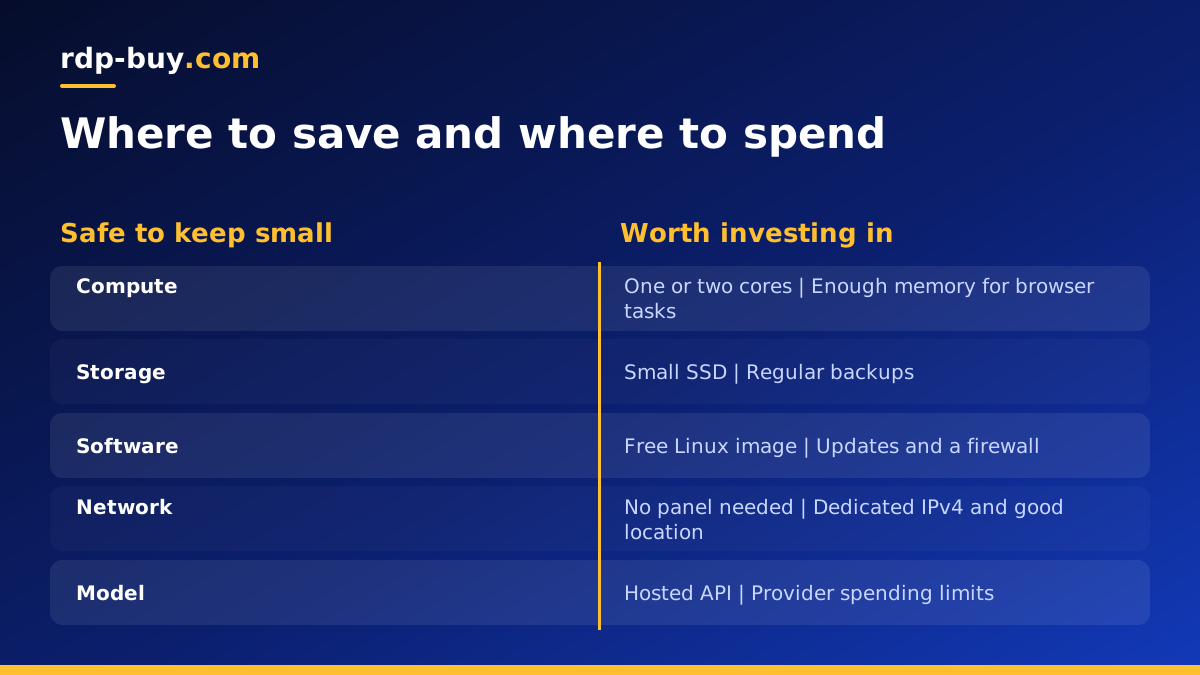
You can safely keep costs down on several parts of the server.
- CPU: one or two virtual cores are plenty for a personal assistant that calls hosted models. Most of the time the server is waiting for a reply from the model API.
- Storage size: OpenClaw, Node.js and its dependencies take little space. A small SSD covers the app, logs and memory files with room to spare.
- Operating system: a standard Linux image such as Ubuntu or Debian costs nothing to license and is what most OpenClaw guides assume.
- Control panel: you do not need one. SSH and a terminal are enough.
Where you should not cut corners
A few things make the difference between an assistant you trust and one you keep restarting.
- Memory: Node.js, a browser for web tasks and any extra skills can push memory use up. If you plan to let OpenClaw browse the web with a headless browser, choose more RAM than the bare minimum, because headless Chromium is the most memory hungry part of a typical setup.
- Reliability: the point of a server is that it stays up. A very cheap host that reboots often or loses network defeats the purpose.
- A dedicated IPv4 address: useful for webhooks, firewall allow lists and services that dislike shared addresses.
- Location: pick a region close to your model provider's API and to you, so replies feel quick and long tool chains do not time out.
- Full root access: you will install Node.js, maybe Docker, a browser and system packages. Restricted shared hosting will not work.
Hosted models vs local models
Your choice of model matters more for server cost than OpenClaw itself.
With a hosted model, such as Claude from Anthropic or a GPT model from OpenAI, the heavy computation happens at the provider and you pay them per use. Your VPS only needs to run the gateway, so a small plan is fine.
With a local model served through a tool such as Ollama on the same server, the VPS has to run the model too. Even small language models need far more memory and CPU than OpenClaw alone, and they respond more slowly on processors without a GPU. A cheap VPS is not the right home for that; a dedicated CPU server with generous memory is a better starting point.
For most people, a small VPS plus a hosted model is the most practical and cheapest combination.
Step by step: set up OpenClaw on a small VPS
Exact commands change between releases, so follow the current instructions on the official site. The overall shape looks like this.
- Create a Linux VPS, log in over SSH and update packages.
- Create a normal user for OpenClaw rather than running it as root.
- Install a supported Node.js version, or install Docker if you prefer containers.
- Install OpenClaw using the method in the official docs and run its onboarding step, which asks for your model provider key and the chat channels you want to connect.
- Connect a chat channel, for example by creating a Telegram bot token and adding it during onboarding.
- Run the gateway as a background service with systemd, or with a Docker restart policy, so it starts automatically after a reboot.
- Turn on a firewall that only allows SSH and any port you deliberately expose.
- Send your assistant a message and confirm it replies.
Keeping a low cost OpenClaw server safe
An assistant that can read messages, browse and run tools is powerful, so treat its server with care, whatever it costs.
Use SSH keys and disable password logins. Keep the gateway's admin interface off the public internet, and reach it through an SSH tunnel or a private network if you need it. Store API keys in environment variables or the app's config, readable only by the OpenClaw user. Review which tools and skills the assistant is allowed to use, and avoid granting shell access you do not need.
Keep the system and OpenClaw itself updated. Agent projects move quickly, and updates often include security fixes as well as features. A simple weekly routine of updating packages and pulling the latest release goes a long way.
Finally, set spending limits at your model provider. A misconfigured loop can send many requests, and a provider limit is the easiest safety net.
Signs you have outgrown a cheap plan
Watch memory and CPU for the first couple of weeks with a tool such as htop. You are ready for a larger plan if memory is regularly close to full, if the system starts using swap heavily, if browser tasks fail or crash, or if you add more agents to the same server.
Many people end up running several assistants or adding n8n and a database beside OpenClaw. At that point, a mid-size plan with Docker is cleaner than several tiny servers. If you deploy with Docker Compose from the start, moving to a bigger server later is a quick copy and restart. The Docker VPS page lists plans suited to that kind of stack.
OpenClaw compared with other self-hosted agents
If you are still deciding which assistant to run, Hermes Agent from Nous Research is the closest alternative, and our VPS for Hermes Agent page covers what it needs. For coding work, Claude Code (by Anthropic) is a different kind of tool that runs in a terminal; see the Claude Code VPS setup guide. All of them benefit from the same kind of always-on Linux server.
Choosing your OpenClaw server
For most personal setups, start with a small Linux plan, a hosted model and plenty of memory headroom if you want browsing. Our VPS for OpenClaw page shows plans that fit, and you can compare all hosting for AI agents in one place.
Every rdp-buy.com server includes full root access, a dedicated IPv4 address and a choice of 33 server locations, with monthly, half-yearly or yearly billing. Servers are ready in minutes, so your assistant can be answering messages shortly after you order, and 24/7 support is available if you get stuck during setup.
