 Sign in
VPS Hosting Tokyo: Who Needs a Japan Linux Server and Why
VPS hosting in Tokyo suits anyone whose users, partners or services are in Japan or the wider East Asia region. This guide explains who benefits, how to pick between Tokyo and Osaka, and how to buy VPS plans sized for your workload.
Why choose VPS hosting in Tokyo
Tokyo is one of the largest cities in the world and a major business and technology centre for Asia. A Linux server there sits close to millions of Japanese users and is a natural hub for traffic to and from South Korea, Taiwan and the rest of East Asia. When your server is near your audience, every page load, API call and remote session has less distance to travel.
A Tokyo VPS also gives you a Japanese IP address. That matters when you build services for the Japanese market, test how a site behaves for local visitors, or work with partners who expect connections from within the country. With a dedicated IPv4 address, that address belongs to you alone, which keeps whitelisting and email reputation simple.
We will not quote latency numbers, because they depend on the route and on where each user is, but the principle is simple: put the server near the people and systems it serves most.
Who needs a Tokyo VPS
A Japan Linux server suits many kinds of projects:
- Businesses selling to Japanese customers who want quick websites, shops and booking systems.
- App and SaaS teams running APIs, login services or backends for users in Japan.
- Developers and agencies building Japanese language sites who want staging and production close to the audience.
- Companies expanding into East Asia that want one regional server before adding more.
- Automation and AI users running n8n, scrapers of public data or AI agents that serve Japanese users around the clock.
- Travellers and remote workers who need a private VPN or proxy exit with a Japanese address.
Tokyo or Osaka?
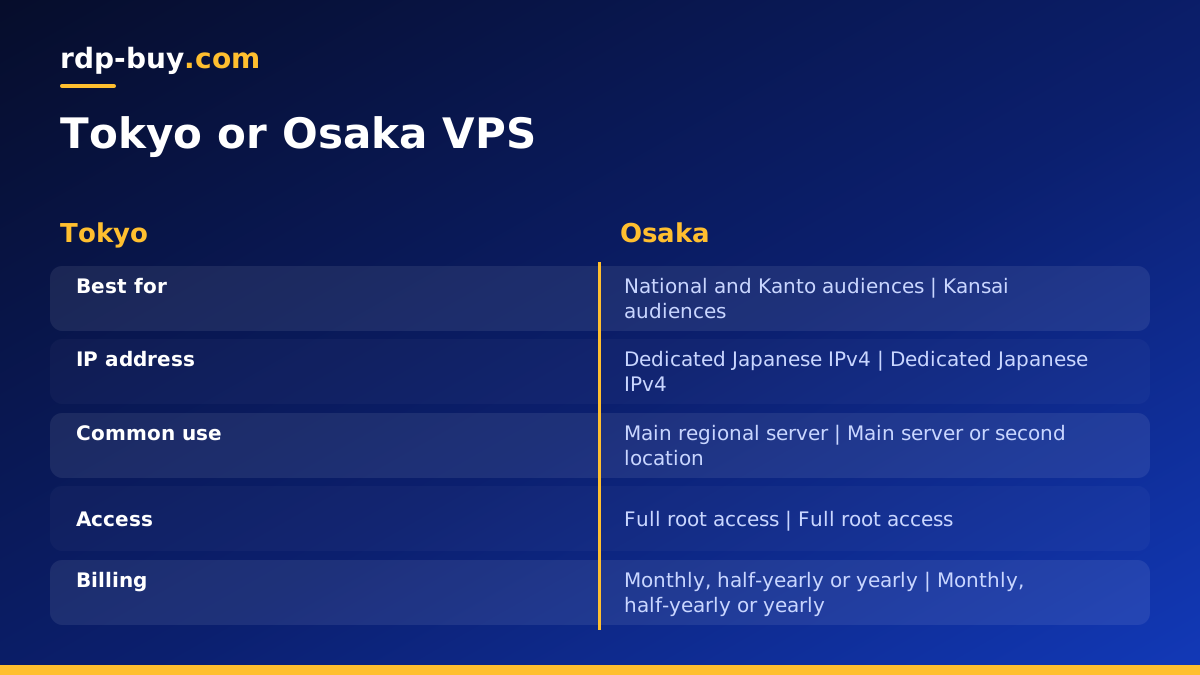
rdp-buy.com offers two Japanese locations, Tokyo and Osaka, among 33 locations listed on the server locations page. Both serve Japan well. Tokyo is the default choice for national audiences and the Kanto region. Osaka is a natural pick if your users and business are centred in the Kansai region, or if you want a second Japanese location alongside Tokyo for redundancy.
If you are not sure, start with Tokyo on monthly billing, measure how it feels for your real users, and adjust. Teams that need high availability sometimes run one server in each city and switch traffic if one has a problem.
Tokyo, Singapore or a US West Coast city
Not every Asia project belongs in Japan. If most users are in South East Asia, Singapore is often closer; Windows users can see Singapore RDP for that region. If your audience is split between Japan and North America, a West Coast US city may be a reasonable middle point, and a USA VPS in Los Angeles, Silicon Valley or Seattle is worth comparing.
Look at your analytics, find where the largest group of users is, and place the server closest to them. Use caching and compressed assets so visitors further away still get fast pages.
You can also combine regions. Some teams keep the main application in Tokyo and place a light cache or a second server in another region for distant visitors. Start simple with one well placed server, then add more only when your traffic shows a clear need.
Sizing a Tokyo Linux server
List everything the server will run: web server, database, cache, background workers, automation tools and containers. Estimate memory for each and add a margin, because memory is usually the first resource to run short. Size for your busiest hour; for Japanese audiences that may be lunchtime and evening in Japan time, which can be the middle of the night for a team elsewhere.
A small site, a VPN or a single bot is a light workload and fits an entry plan, including a cheap VPS. A site with a database, an automation tool and a few containers is a medium workload. A busy store, many containers or heavy data processing are heavy workloads and may suit a dedicated CPU server. Plan storage for a year of growth and turn on log rotation.
Setting up your Tokyo VPS
Your server is ready in minutes. Follow these steps for a secure, dependable base:
- Connect over SSH with your root details and create a normal user with sudo rights.
- Use SSH keys and disable password login.
- Enable a firewall that allows only SSH and the ports your apps need.
- Update the system and enable automatic security updates.
- Set the time zone to Asia/Tokyo if your logs and schedules should follow Japan time, or keep UTC if your team is global.
- Set the locale to support Japanese text in logs and apps where needed.
- Install your stack, or use Docker to keep each app in its own container. See the Docker VPS page.
- Add HTTPS with a free certificate and set up off server backups.
Building for Japanese users
A server in Tokyo is only part of a good experience. Japanese pages often carry large web fonts, so subset fonts or use system fonts where you can to keep pages light. Make sure your database and application use UTF-8 throughout, so names and addresses are stored correctly. Test forms with full width characters, and check that dates, currencies and address formats match local expectations.
Mobile use is high, so keep pages small, compress images and cache static files with long lived headers. These steps help every visitor, but they matter most when you want a Japanese audience to trust and return to your site.
Mistakes to avoid with a Japan server
A few common slips cause most of the trouble with a new Tokyo VPS:
- Choosing Japan for an audience that is elsewhere. Check your analytics first; a server far from most users slows everyone down.
- Ignoring time zones. Scheduled jobs, backups and maintenance windows should avoid peak hours in Japan, not in your own city.
- Mixed character encodings. Use UTF-8 in the database, the application and every config file to avoid broken Japanese text.
- Heavy fonts and images. Large font files and uncompressed images undo the benefit of a nearby server.
- Leaving defaults in place. Change login methods, enable a firewall and apply updates on day one.
- Backups on the same machine. Copy backups to another location so one failure cannot remove everything.
Running AI agents and automation from Tokyo
A Tokyo server is a good home for agents and workflows that serve Japanese users or call APIs hosted in the region. Tools such as n8n run comfortably on a modest Linux plan, and the VPS for n8n page shows a tailored setup. For other agents and coding tools, the AI agent hosting hub lists suitable plans. Run each tool as a service or container with a restart policy, and store API keys in environment files that only the service user can read.
Choose your Tokyo plan
Pick the plan that covers your busiest hour, choose Tokyo or Osaka as the location and select monthly, half-yearly or yearly billing. Every server includes full root access, a dedicated IPv4 address and 24/7 support, and you can pay by card, PayPal or crypto. Compare sizes and order on the Linux VPS hosting page. If your software needs Windows, read Windows or Linux server before you decide.
