 Sign in
How to Make VPS Server at Home, and When Renting Is Smarter
You can make a VPS server at home by installing a hypervisor on a spare computer and creating virtual machines, but keeping it online, reachable and secure is the hard part. This guide covers the home setup step by step and explains when it makes more sense to buy VPS hosting instead.
What a home VPS really is
A VPS is a virtual machine: a full operating system running on top of a hypervisor, sharing a physical computer with other virtual machines. When you build one at home, you are doing what a hosting company does, just on a smaller scale. You provide the hardware, the power, the network connection and the maintenance, and you get complete control in return.
That control is the main appeal. A home lab is a great place to learn Linux, networking, virtualisation and Docker. You can break things, rebuild them and try new tools without worrying about a bill. The trade off is that a home server is only as reliable as your home: your power, your internet line and your router.
How to make a VPS server at home step by step
Here is the general process most people follow:
- Pick the hardware. An old desktop, a small form factor PC or a mini computer works. Look for a processor with virtualisation support, plenty of memory and an SSD.
- Enable virtualisation in the firmware. Turn on the CPU virtualisation option in the BIOS or UEFI settings.
- Install a hypervisor. Popular free options include Proxmox VE, which is based on Debian, or a standard Linux install with KVM and a management tool.
- Create a virtual machine. Upload an Ubuntu or Debian installer image, assign memory, CPU cores and disk, then install the operating system.
- Set up networking. Bridge the virtual machine to your home network so it gets its own local address.
- Secure the VM. Create a normal user, use SSH keys, enable a firewall and apply updates.
- Decide how to reach it from outside. This is where most home setups get difficult, as the next section explains.
The hard parts: IP address, uptime and security
Building the virtual machine is the easy part. Making it behave like a real hosted server is harder.
Public IP address. Most home internet plans give you a dynamic address that changes from time to time, and many providers put customers behind shared addresses that cannot accept incoming connections at all. Some block common server ports. Workarounds exist, such as dynamic DNS or tunnels, but they add moving parts and do not give you a clean, fixed address to whitelist with partners.
Uptime. A power cut, a router restart, an internet outage or a family member unplugging the wrong cable all take your server offline. If you run a website, a trading bot or an AI agent that should work around the clock, every interruption matters.
Security. Opening ports on your home router exposes your home network. A mistake on the server can become a doorway to your laptops, phones and smart devices. You need careful firewall rules and network separation to stay safe.
Running costs. A computer that runs all day uses electricity, makes noise and heat, and its parts wear out. You also spend your own time on updates, backups and repairs.
When a home VPS makes sense
A home build is a good choice in several cases:
- Learning and labs. Practising Linux, Proxmox, Kubernetes or networking without time pressure.
- Private services for your household, such as a media server, file backups or a home automation hub that does not need to be public.
- Testing software before you deploy it to a real server.
- Local AI experiments that use hardware you already own and do not need to be reachable from the internet.
When renting a VPS is smarter
Renting wins when other people or other systems depend on your server. A hosted VPS comes with a dedicated IPv4 address that never changes, runs in a data centre with reliable power and networking, and is reachable from anywhere without opening anything on your home router. You also skip the hardware, the electricity and the noise.
Common cases where renting is the better buy:
- Public websites and online shops that need to be reachable at all hours.
- Trading bots and copiers that must not stop when your internet does.
- AI agents and automation, such as n8n or coding agents, that run around the clock. See the AI agent hosting hub.
- APIs and webhooks that partners call and that need a fixed address for whitelisting.
- Servers in another country, for example a US or European IP address. rdp-buy.com offers 33 locations on the server locations page.
- VPN exit points away from home, such as a private US VPN.
AI agents at home or on a VPS
AI agents are a popular reason people ask how to make a VPS server at home. Tools such as n8n, OpenClaw, Hermes Agent and Claude Code (by Anthropic) are often set up first on a laptop or a home box. That works for trying them out, but agents that answer messages, watch inboxes or run scheduled jobs need to stay reachable all day. If the home connection drops overnight, webhooks fail and scheduled runs are missed without anyone noticing.
Most of these agents call hosted AI APIs rather than running models locally, so they need little hardware but steady uptime and a stable address. That is exactly what a modest rented VPS provides. Keep heavy local model experiments at home if you own suitable hardware, and run the always on agent on a server. The VPS for n8n and VPS for Claude Code pages show setups for two common cases.
Home server vs rented VPS side by side
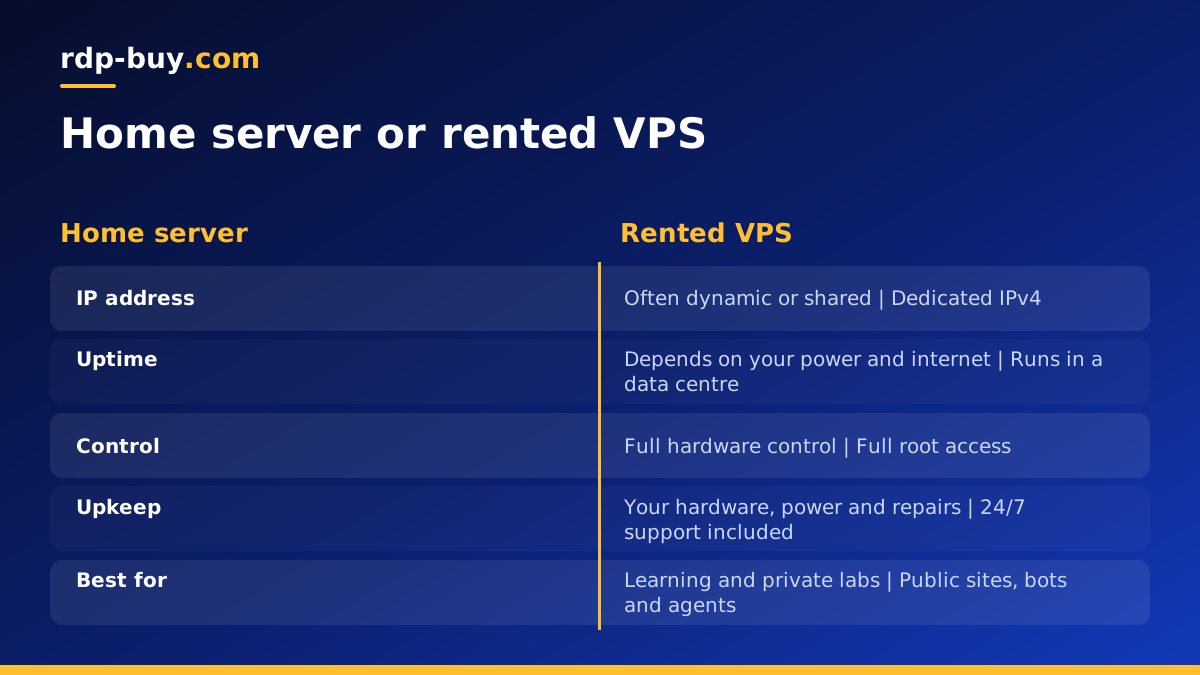
It helps to compare the two on the things that matter day to day. A home server gives you full control over the hardware and no monthly rent, but you are responsible for power, internet, cooling, spare parts and security. Its IP address may change or may not accept incoming connections, and it is offline whenever your home is.
A rented VPS gives you full root access too, plus a dedicated IPv4 address, a professional network, 24/7 support and a server that is ready in minutes. You pay a regular fee on monthly, half-yearly or yearly billing, but you do not buy hardware or pay for electricity, and you can move to another city or plan whenever you need.
Many people use both: a home lab for learning and testing, and a rented server for anything that needs to be online for others.
Moving from a home lab to a rented server
If you have already built something at home, moving it to a VPS is straightforward. Package your apps as Docker containers or write down the install steps in a script. Export your databases, copy configuration files and test the setup on the new server before you switch your domain. The Docker VPS page explains how containers make that move simple.
Choose a plan with at least as much memory as your home VM used, pick the location closest to your users, and secure the new server before you point traffic at it.
Pick the right rented plan
If your project needs to be online for other people, renting is usually the calmer choice. List your workload, pick a nearby city and choose the plan that covers your busiest hour. Every server includes full root access, a dedicated IPv4 address and 24/7 support, and you can pay by card, PayPal or crypto. Compare sizes on the Linux VPS plans page, or start small with a cheap VPS while you move things across. If you need Windows instead, see Windows or Linux server.
