 Sign in
VPS Chicago: Who Needs a Midwest Server and How to Choose One
A VPS in Chicago gives you a Linux server with root access in the US Midwest, a natural base for projects whose users, partners or markets are in the central and northern United States. Here is who it suits, how to size it and how to buy a VPS in the USA with Chicago as your location.
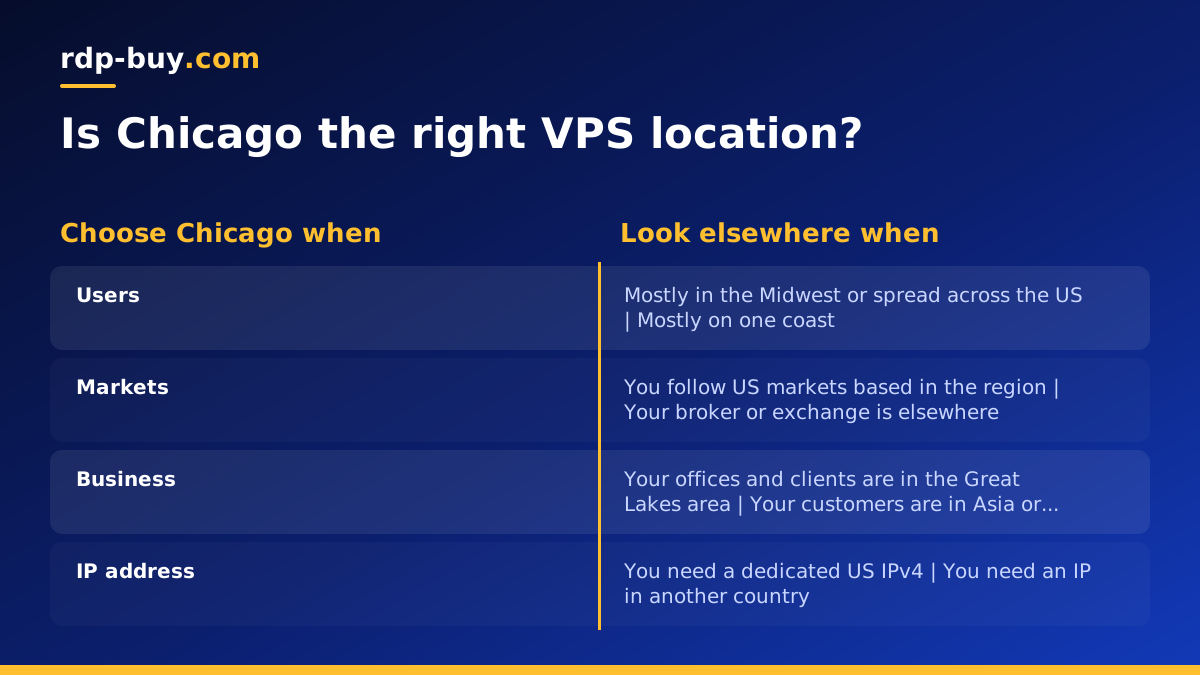
What a VPS in Chicago gives you
A virtual private server is a slice of a physical machine that behaves like your own computer. You choose the operating system, you get root access, and you can install whatever software you need: web servers, databases, Docker containers, trading tools, scripts or AI agents. Unlike shared hosting, nobody else's website can change your settings, and unlike a laptop, the server is designed to stay on day and night.
Picking Chicago decides where that server lives. Your VPS gets a dedicated IPv4 address in the United States and sits in one of the country's most connected cities, a long time hub for finance, logistics and business. If your visitors, your APIs or your counterparties are in the Midwest or Great Lakes region, putting your server in the same area is the simplest way to keep the path between them short.
Every USA VPS from rdp-buy.com comes with full root access, a dedicated IPv4 address and 24/7 support, and you can pay monthly, half-yearly or yearly.
Who should choose a Chicago VPS
Location matters most when the systems you talk to are fixed in one place. Chicago makes sense for these buyers:
- Futures and options traders who run trading software, bots or data collectors and want them close to the US markets they follow. A VPS keeps the strategy running when your home computer is off. Be aware that location only shortens the route; it does not guarantee any particular result.
- Businesses in the Midwest whose customers are in Illinois, Wisconsin, Michigan, Indiana, Ohio, Minnesota and nearby states, and who want their website or app hosted close to them.
- Developers and agencies who host staging sites, APIs or internal tools for US clients and want a central location that serves both coasts reasonably well.
- Automation users running n8n workflows, scrapers, monitoring tools or AI agents that call US services all day.
- Anyone needing a US IP address for accounts and dashboards that expect to be accessed from the United States.
Chicago or another US location?
rdp-buy.com has several US cities, including New York, Los Angeles, Dallas, Chicago, Miami, Atlanta, Seattle, Silicon Valley and Honolulu, out of 33 locations worldwide. The server locations page lists them all.
The simplest way to decide is to ask where the thing you connect to most often lives. If it is in the Midwest, choose Chicago. If it is in the Northeast, New York is the closer match. If your audience is in the South, Dallas, Atlanta or Miami may fit better, and West Coast users are best served from Los Angeles, Seattle or Silicon Valley. When your users are scattered across the whole country, Chicago or Dallas are both sensible central options.
Because servers are ready in minutes, you can also run a second VPS in another city if you later find you need presence on more than one side of the country.
How to size a Chicago VPS
Size your plan for peak load. Think about everything that will run at the same moment, then leave headroom for updates and growth.
- Small websites, bots and single scripts: an entry plan with modest memory is usually fine. The cheap VPS plans exist for exactly this.
- Trading tools and data collectors: pick enough memory to hold your software and its data comfortably, plus a spare core so updates do not interrupt it.
- Docker stacks and automation: each container needs its own memory, so add up what you plan to run. A Docker VPS guide can help you plan.
- Databases and busy sites: prioritise memory and storage, since databases work best when their working data fits in memory.
Buying a VPS in Chicago, step by step
The whole process is designed to take less time than setting up a new laptop.
- Open the US VPS plans and choose a size from the list you made above.
- Select Chicago as the location and choose your Linux distribution. If you are unsure which one, a widely used long term support release such as Ubuntu or Debian is a safe start.
- Pick monthly, half-yearly or yearly billing.
- Pay by card, PayPal or crypto. If you want to keep payments in crypto, see buying a VPS with crypto.
- Within minutes you receive the IP address and root login details.
First steps after your Chicago VPS is live
Connect over SSH from a terminal with the IP address and root password you were given. Then spend a few minutes on security before you install anything else. These steps protect the server for its whole life.
- Update all packages so you start with the latest security fixes.
- Create a normal user with sudo rights and log in with SSH keys instead of a password.
- Turn on a firewall and open only the ports you actually need, such as SSH and your web ports.
- Set the server time zone to match the market or audience you serve, which makes logs and schedules easier to read.
- Install your software, and set it to start automatically with systemd or Docker restart policies so it comes back after a reboot.
Keeping the server running around the clock
A VPS only delivers its value if the software on it keeps running. Schedule updates for quiet hours, keep a simple backup of configuration files and data, and check disk space now and then so logs do not fill the drive. For trading tools, test a full restart once so you know everything comes back without you. If anything is unclear, 24/7 support can help you get back into the server.
Picking your Chicago VPS plan
If your users, markets or partners are in the US Midwest, a Chicago VPS is a practical choice that keeps your services close to them while giving you a US IP address and full control. Start with the smallest plan that fits your peak load, watch how it performs for a few weeks, and upgrade if you need more.
When you are ready, compare sizes and order a US VPS in Chicago. If you are weighing Windows against Linux first, read Windows or Linux server: which to rent.
