 Sign in
RDP Dallas: Who Needs a Texas Windows Server and How to Buy It
An RDP Dallas server is a Windows machine in Texas that you control from any device, and it suits people whose users, tools or trading accounts sit in the central United States. This guide explains who benefits, how to size it and how to buy RDP in the USA with a Dallas location.
What an RDP Dallas server actually is
RDP stands for Remote Desktop Protocol. When you rent an RDP server you get a full Windows desktop running on a machine in a data centre, and you open it from your laptop, phone or tablet with a Remote Desktop app. Everything you install runs on the server, not on your own computer, so it keeps working when you close the lid or switch off your home internet.
Choosing Dallas simply means that the server lives in Texas. Your desktop, your browser sessions and any software you leave running all use a United States IP address and sit in the middle of the country. For many buyers that location is the whole point: it is a central spot that reaches both coasts reasonably evenly, and it gives you a US presence without having to pick between East and West.
With rdp-buy.com, a USA RDP plan in Dallas comes with full administrator access, a dedicated IPv4 address and the Windows licence already included in the price, so there is nothing extra to activate.
Who benefits from RDP in Dallas
A Dallas server is not the right answer for everyone. It helps most when the people, services or markets you deal with are in the United States, and especially when they are spread across the country rather than clustered on one coast.
- Traders who run platforms, expert advisors or charting tools that need to stay online around the clock and want a US location for their sessions.
- Remote teams and freelancers who need a shared Windows desktop that colleagues across several US time zones can open with similar responsiveness.
- Ecommerce and marketplace sellers who manage US storefronts and prefer to log in from a stable US IP address instead of a different address every time they travel.
- Automation and bot users who run browser automation, scheduled scripts or AI agents that call US based services and should never sleep.
- Businesses in Texas and nearby states who want their remote desktop close to their own offices and customers.
Dallas versus other US RDP locations
rdp-buy.com offers several US cities, including New York, Los Angeles, Dallas, Chicago, Miami, Atlanta, Seattle, Silicon Valley and Honolulu. You can see them all on the server locations page. The right choice depends on where the things you connect to actually are.
Pick Dallas when your traffic is spread across the country, when you serve customers in Texas and the South, or when you simply want a central US base. Pick New York or another East Coast city if almost everything you touch is in the Northeast. Pick Los Angeles, Seattle or Silicon Valley if your users or services are mostly on the West Coast. Distance still matters on the internet, so the shortest route to the systems you use most usually gives the most responsive experience.
If you are unsure, start with the location closest to the service you depend on most. Because servers are ready in minutes, it is easy to order a second location later and compare how each one feels in daily use.
How to size your Dallas RDP plan
Plans differ by CPU cores, memory and storage. A good rule is to size for the heaviest thing you will run at the same time, not the average. Windows itself needs a share of memory before any of your software starts, so leave room for it.
- Light use: a browser, an office suite and one trading or management tool. A small plan is usually enough.
- Several apps at once: multiple browser profiles, a trading terminal plus charting, or a shared desktop for two or three people. Move up to a mid sized plan with more memory.
- Heavy automation: many browser sessions, data processing or AI agents running in parallel. Choose more cores and more memory so tasks do not queue behind each other.
- Storage: count installers, logs, downloads and any files your team keeps on the desktop, then add headroom for updates.
How to buy RDP in Dallas, step by step
Buying is quick, and you can be logged in to your new desktop soon after you pay.
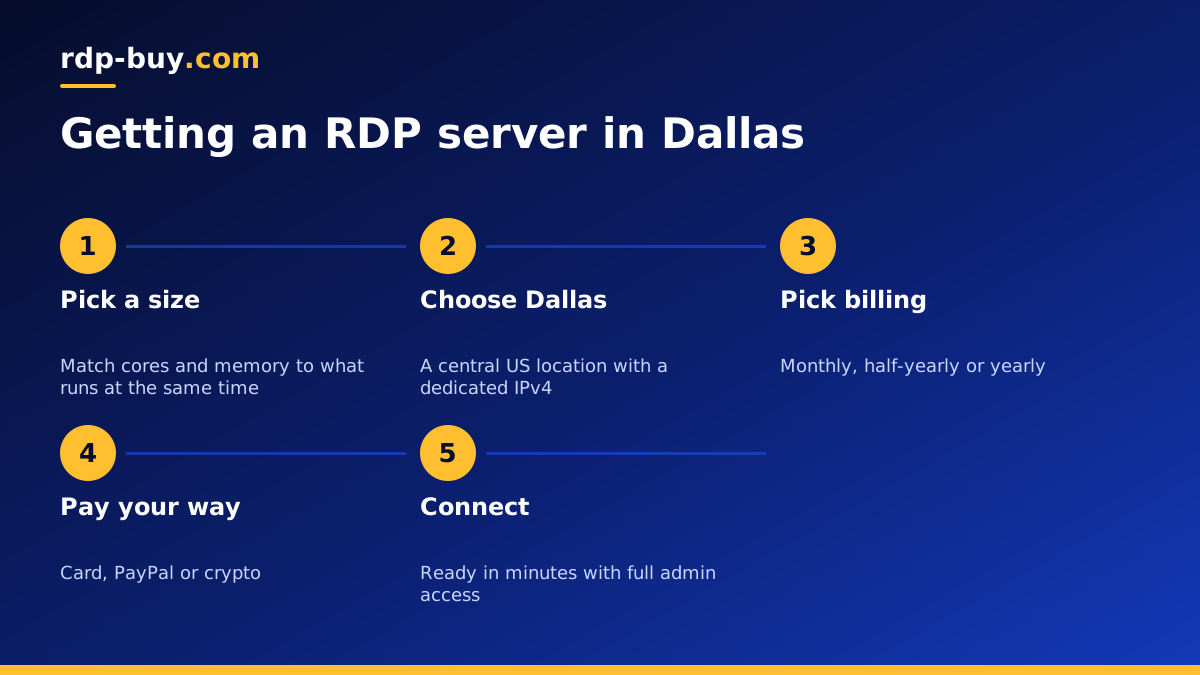
- Open the US RDP server plans and choose a size that matches the workload you listed above.
- Select Dallas as the location and pick your Windows version.
- Choose monthly, half-yearly or yearly billing. Longer terms suit a server you already know you will keep.
- Pay by card, PayPal or crypto. If you prefer a specific method, see buying RDP with PayPal, buying RDP with a card or buying RDP with crypto.
- Wait a few minutes while the server is built, then use the login details you receive to connect.
Connecting and securing your new server
On Windows, open the built in Remote Desktop Connection app, type your server IP address and sign in with the administrator username and password you were given. On a Mac, iPhone or Android device, install Microsoft's Remote Desktop app and add the server the same way. Our guide on how to connect to your RDP server walks through each device.
Once you are in, change the administrator password to a long unique one, run Windows Update, and create a separate user account for daily work if several people will log in. Keep only the software you need, and enable automatic restarts for your important programs so they come back after updates. These steps take a few minutes and prevent most of the problems new server owners run into.
Keeping your Dallas desktop online 24/7
The main reason to rent a server rather than leave a home PC running is that the server stays on. To get the most from that, set your key programs to start automatically when Windows starts, disable sleep and hibernation inside Windows, and schedule updates for a quiet time of day so a restart never lands in the middle of a trading session or a long automation run.
If something does go wrong, you have full administrator rights to fix it yourself, and 24/7 support is available if you need help reaching the server or rebuilding it.
Choosing the right Dallas RDP plan for you
Start by writing down what will run on the server at the same time, who will log in and where they are. If the answer is a mix of users and services across the United States, Dallas is a sensible central choice. If you want more detail on matching a plan to a workload, read which RDP plan do you need.
When you are ready, compare sizes and order a US RDP server in Dallas. If budget is the main concern, the cheap RDP plans are a good starting point that you can upgrade later.
