 Sign in
Best VPS for AI: How to Size a Server for Agents and Automation
The best VPS for AI is the one sized for what your AI work actually does, not the biggest plan you can find. This guide breaks AI workloads into types and shows how to match each to the right AI agent hosting plan.
Start With the Question: Where Does the Model Run?
Before looking at any plan, answer one question. Will the AI model run on your server, or will your server call a model hosted by a provider through an API?
Most people building agents and automations today call a hosted model. The heavy thinking happens at the provider, and your server sends requests and handles the results. In that case, the server does not need a graphics card or a huge amount of memory. It needs to be reliable, reachable and big enough for your code and tools.
If instead you want to run an open model yourself, the picture changes completely. Running large models on your own hardware usually calls for a GPU server with plenty of video memory, which is a different kind of product from a standard VPS. This guide focuses on the first and far more common case, while noting where self hosted models fit.
The Main Types of AI Workload
Different AI jobs put very different loads on a server. Sorting yours into one of these groups is the fastest way to size it.
- Light agents and bots: a chat bot or simple agent that receives messages, calls a model API and replies. Mostly waiting on the network, so light on CPU and memory.
- Workflow automation: tools such as n8n that run many small workflows with AI steps. Load grows with the number of workflows running at the same time.
- Coding agents: tools such as Claude Code (by Anthropic) running in a terminal on a server. They run builds, tests and package installs, which use CPU and memory in bursts.
- Browser based agents: agents that control a real browser to read and act on websites. Browsers are memory hungry, so these need more.
- Data and retrieval: agents with a vector database, document parsing or indexing. Need extra memory and fast storage.
- Self hosted models: running the model itself. Usually needs a GPU and is outside the scope of a standard VPS.
How to Size CPU for an AI VPS
For agents that mostly call APIs, CPU is rarely the limit. A small number of cores handles a lot of waiting on network requests. CPU becomes important when the server does real computation: running builds and tests for a coding agent, parsing large documents, compressing files or running several workers in parallel.
A good sign that you need more CPU is tasks that take noticeably longer when several run at once, or the server showing high CPU use for long periods. If CPU use is low most of the time, adding cores will not make your agent faster. For steady, heavy computation, a plan with dedicated cores can help. Our dedicated CPU server plans exist for that case.
How to Size Memory
Memory is the resource AI workloads run out of most often. Every process, container, browser tab and database takes its share, and when memory runs out the server slows down sharply or programs crash.
Add up what will run at the same time: the operating system, your agent or agents, any database, any browser instances and tools such as Docker. Leave headroom on top, because usage spikes when several tasks start together. Browser based agents and retrieval setups need the most memory, while light API agents need the least.
The safest approach is to start with a mid sized plan, then watch memory use over a week of normal work. If it stays high or the server starts using swap, move up a size.
How to Size Storage
AI projects collect files quietly. Logs, execution history, downloaded documents, container images, vector indexes and backups all take space. A full disk is one of the most common reasons an agent stops without warning.
Choose enough storage for your current files plus room to grow, and set up log rotation and clean up tasks from the start. If you keep large datasets or indexes, size storage for those first and treat everything else as extra.
Linux or Windows for AI Hosting
Most AI tools are built for Linux. Python and Node.js agents, n8n, Docker and coding agents all run naturally on a Linux VPS, and Linux leaves more of the plan free because there is no desktop to run.
Windows makes sense when the agent needs Windows software, a desktop browser you want to watch, or tools that only run on Windows. Our page on Windows RDP for AI agents covers that setup. If you are unsure, our guide to choosing Windows or Linux helps you decide.
Other Features the Best AI VPS Should Have
Beyond raw resources, a few features make a real difference for AI work.
- Full root or admin access so you can install any runtime, container or tool.
- A dedicated IPv4 address for webhooks, firewall allow lists and stable API access.
- A choice of locations so the server sits near the APIs and users it serves. rdp-buy.com offers 33.
- Fast setup so you can test an idea the same day. Our servers are ready in minutes.
- Flexible billing so you can start monthly and move to half-yearly or yearly once the plan is proven.
- 24/7 support for problems that happen while your agent runs overnight.
Matching Common Tools to a Plan
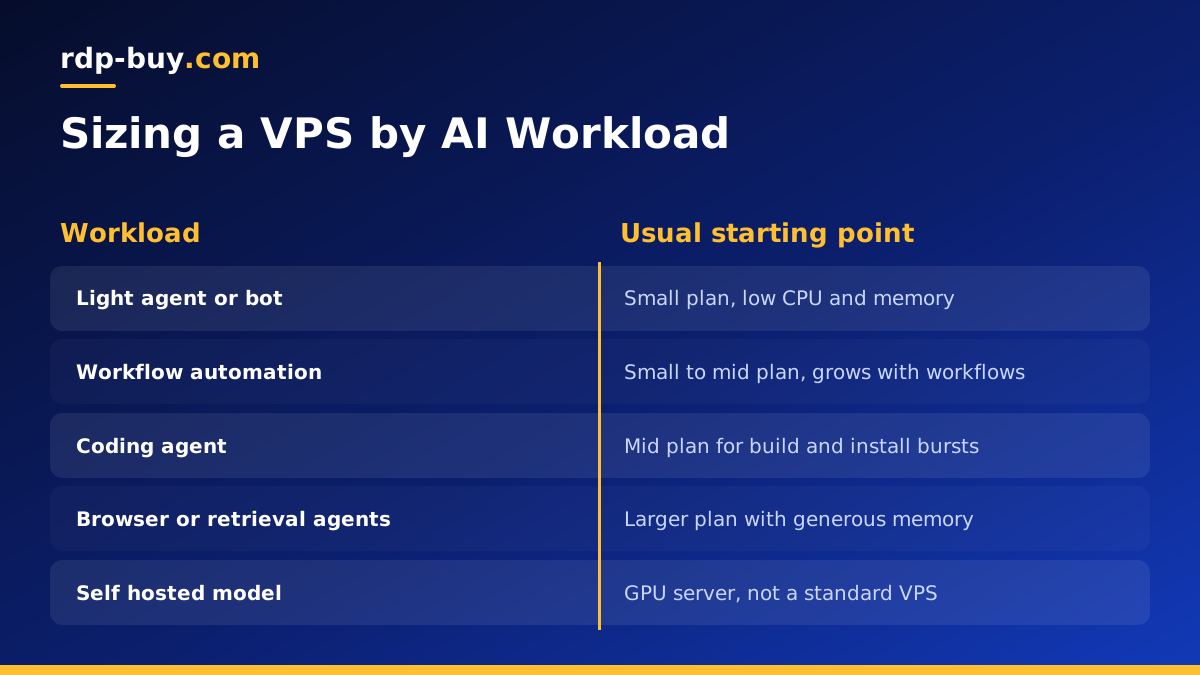
Here is how popular tools usually map to plan sizes. Treat these as starting points and adjust after watching real use.
A single chat agent or bot calling a hosted model fits a small plan. A self hosted n8n server with a database fits a small to mid sized plan, growing with workflow volume. A coding agent on a Claude Code VPS fits a mid sized plan, since builds and installs use bursts of CPU and memory. Several agents in containers on a Docker VPS, or any setup with browsers or retrieval, needs a larger plan with generous memory.
Choosing Your AI VPS
To find the best VPS for AI in your case: decide where the model runs, identify your workload type, size memory first, then CPU and storage, and choose a location near the services you call. Start on monthly billing and resize once you have real numbers from your own monitoring.
rdp-buy.com servers include root or admin access, a dedicated IPv4 and 24/7 support, with payment by card, PayPal or crypto. Compare plans on our hosting for AI agents page, or look at Linux VPS plans for general AI projects.
