 Sign in
RDP for USA or VPS? Choosing the Right US Server to Buy
If you need a server in the United States, the first real choice is between a Windows RDP and a Linux VPS. This guide compares the two for US based work so you can decide whether to buy a USA RDP or a US VPS with confidence.
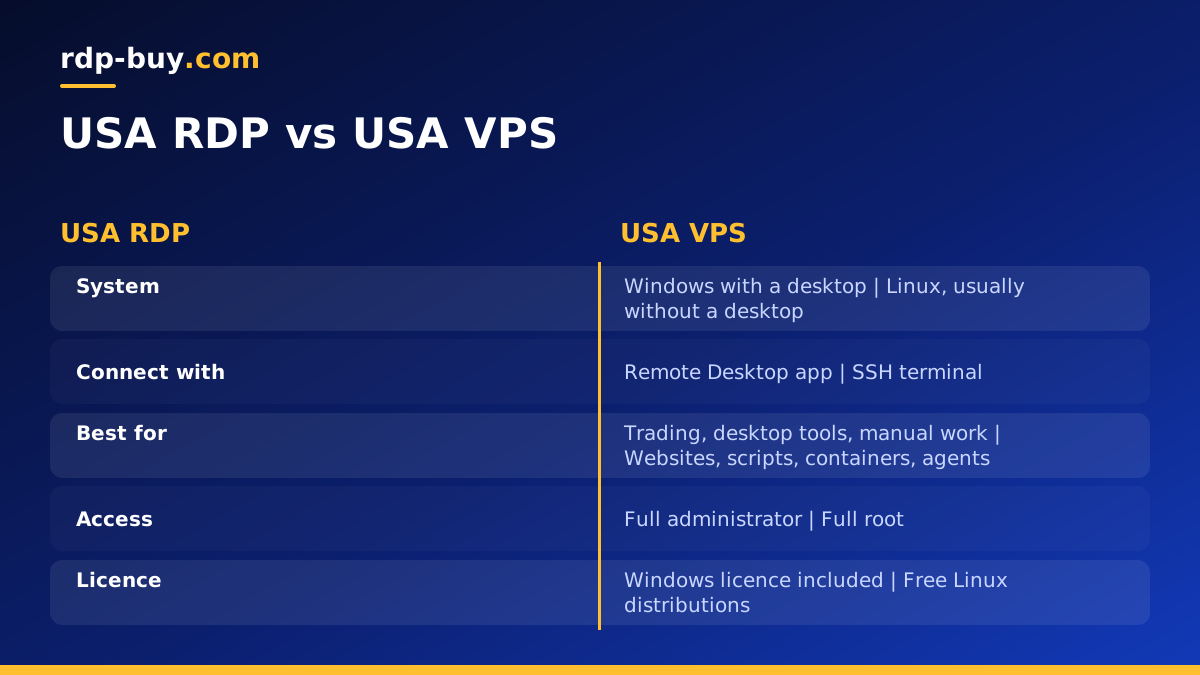
Two Ways to Get an RDP for USA Work
People looking for an RDP for USA work usually want the same outcome: a machine in the United States that runs all day, has a US IP address and can be reached from anywhere. There are two main ways to get it.
A Windows RDP is a Windows server you control through Remote Desktop. You see a full desktop with a Start menu, a browser and any Windows programs you install. It feels like using a normal PC, only the PC sits in a US data centre.
A Linux VPS is a Linux server you manage mostly through a terminal over SSH. There is no desktop by default. Instead, you run services, scripts, containers and web applications from the command line.
Both give you a dedicated United States IPv4 address and run 24/7. The difference is in what you can run and how you work with the machine. Our general guide on the difference between RDP and VPS covers the basics; this article focuses on US use cases.
When a USA RDP Is the Better Choice
Choose a Windows RDP when the work depends on Windows software or a visual desktop.
- Trading platforms such as MetaTrader or other Windows terminals that should run close to US brokers.
- Desktop browsers you need to use by hand, for example to manage US ad accounts or check how pages look from inside the country.
- Windows only business tools, such as accounting software or industry specific applications.
- Shared team desktops where several people need the same programs from different countries.
- Mac or Chromebook users who need Windows software without buying another computer.
- Non technical users who would rather click than type commands.
When a USA VPS Is the Better Choice
Choose a Linux VPS when the work is mostly services and code rather than a desktop.
- Websites and web apps serving users in the United States.
- APIs, bots and scripts that run on their own and do not need a screen.
- Docker containers and self hosted tools such as n8n.
- AI agents written in Python or JavaScript that call US based APIs.
- VPN or proxy setups for your own legitimate use.
- Developers comfortable with SSH who want a lean server without a desktop.
Side by Side: What Changes in Daily Use
The choice affects how you spend your time with the server, not just what it runs.
Connecting. With a USA RDP you open a Remote Desktop app and see a desktop. With a VPS you open a terminal and connect over SSH, or use a web panel for the apps you install.
Installing software. On Windows you download installers and click through them, just like on a home PC. On Linux you install packages from the command line or run containers.
Resource use. A Windows desktop uses some memory and CPU for the operating system and graphical interface itself. A Linux server without a desktop leaves more of the same plan free for your applications. That is why the same workload can often fit on a smaller Linux plan.
Licensing. Windows needs a licence. At rdp-buy.com it is included in every Windows price, so there is nothing extra to buy. Linux distributions are free to use.
Access level. Both come with full control: administrator access on Windows and root access on Linux.
Factors That Affect What You Pay
Without quoting figures, it helps to know which choices push the cost of a US server up or down, so you can compare plans fairly.
- Operating system: Windows plans include the licence, so they usually cost more than a Linux plan of the same size.
- Memory and CPU: the biggest factors in plan size. Match them to your heaviest program or service.
- Storage: more space for files, logs and databases moves you up a tier.
- Billing term: monthly, half-yearly or yearly. Longer terms suit servers you know you will keep.
- Workload type: a workload that runs headless on Linux can often use a smaller plan than the same job on a Windows desktop.
Security and Upkeep for Each Option
Both kinds of server need looking after, but the tasks differ. On a USA RDP, the main jobs are keeping Windows Update running, using a strong administrator password, limiting who can sign in over Remote Desktop and keeping your installed programs current. Windows Defender is built in and should stay switched on.
On a USA VPS, the main jobs are installing security updates, using SSH keys instead of passwords, running a firewall that allows only the services you need and updating the applications or containers you host. Many updates can be automated, so a well set up Linux server needs little day to day attention.
In both cases, take regular backups of anything you cannot easily rebuild, and store a copy away from the server. Our guides to Linux server best practices and connecting to a Windows server cover the first hour of setup for each.
A Quick Self Test
If you still cannot decide, answer these questions honestly. Each yes points one way.
- Will you mostly click around a desktop and use Windows programs? Choose a USA RDP.
- Will the server mostly run on its own while you are away, with no screen needed? Choose a USA VPS.
- Do you need to run a specific Windows trading or business application? Choose a USA RDP.
- Will you host a website, an API or Docker containers? Choose a USA VPS.
- Are you new to servers and uncomfortable with a terminal? A USA RDP is usually the easier start.
Which US City for Each
Whichever you choose, location matters in the same way. Put the server close to the services it talks to most: brokers for traders, APIs for bots and agents, and your users for websites. rdp-buy.com offers 33 locations, including several US cities across the East Coast, the centre of the country and the West Coast. See all of them on our server locations page.
If there is no clear service to be close to, pick based on where you connect from. The East Coast is generally closer to Europe, and the West Coast and Pacific are closer to Asia and Oceania.
Can You Use Both?
Some projects benefit from one of each. A trader might run a USA RDP for the trading terminal and a small Linux VPS for a website or alert bot. A marketing team might use a Windows desktop for manual account work and a Linux server for automation that runs in the background.
If you are unsure, start with the one that matches your main task. You can add the other later without changing the first. Our guide on choosing Windows or Linux can help if you are still undecided.
Buying Your US Server
To decide quickly: if the work needs Windows programs or a desktop you use by hand, choose a USA RDP. If the work is websites, scripts, containers or agents that run on their own, choose a USA VPS.
Both come with a dedicated IPv4, full access, 24/7 support and servers ready in minutes, with payment by card, PayPal or crypto. Compare Windows plans on our USA RDP page, or see Linux options on our USA VPS page.
