 Sign in
AI Agent Hosting Platform: VPS vs Managed Services
An AI agent only helps if it keeps running when you close your laptop. This guide compares managed agent platforms with your own VPS, so you can pick the setup that fits your control, cost and uptime needs.
What an AI agent is and why hosting matters
The ai agent meaning is simple. An AI agent is a program that uses a language model to decide what to do next, then acts on that decision with tools: it calls APIs, reads and writes files, sends messages, runs commands or fills in forms. A chatbot answers a question and stops. An agent keeps working toward a goal, often on a schedule or in response to events.
That difference is why hosting matters. A workflow that waits for a webhook at night, an agent that watches an inbox, or a coding agent that runs a long task all need a machine that is awake and online. If the agent lives on your laptop, it stops when the lid closes, the Wi-Fi drops or the battery dies.
So the real question is not whether to host an agent somewhere else. It is where, and who looks after the machine. That is the choice between a managed service and a server you control.
What an AI agent hosting platform actually means
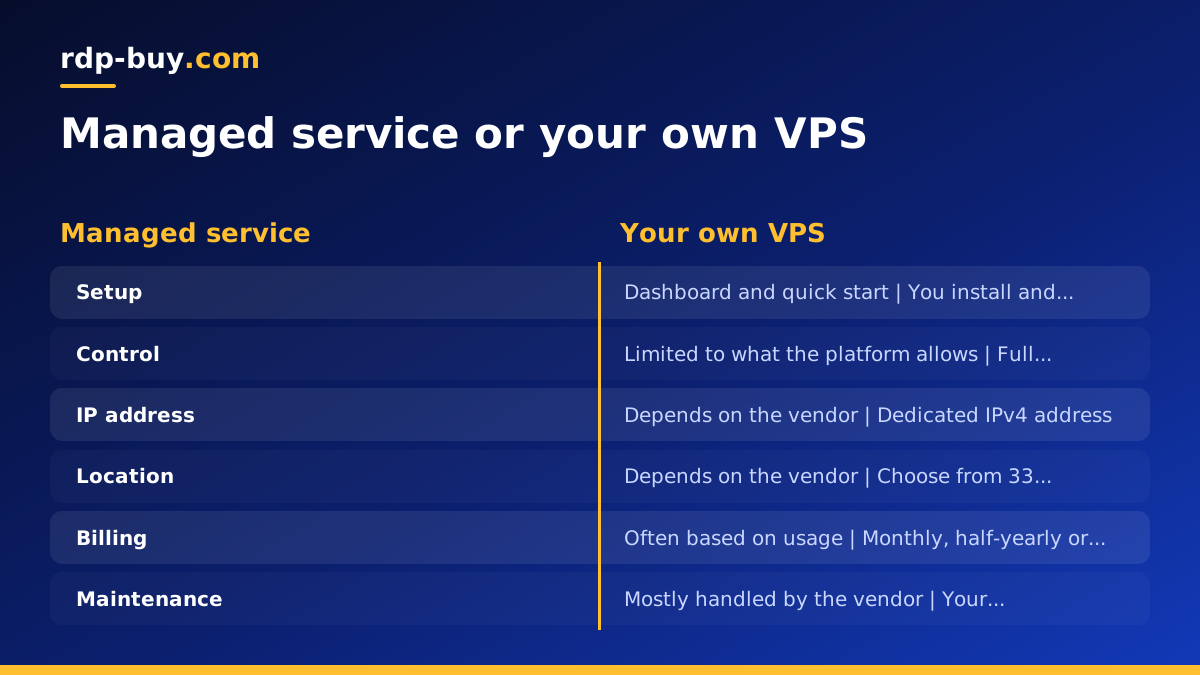
People use the phrase ai agent hosting platform for two quite different things. The first is a managed service: a vendor runs the infrastructure, gives you a dashboard, and you deploy or configure your agent inside their environment. The second is a self-managed server: you rent a VPS or an RDP server, install the agent software yourself, and you decide how it runs.
Both can work well. They trade convenience against control. A managed ai agent hosting service removes setup and maintenance work, but you accept the vendor's rules about what you can install, where it runs and how it is billed. A VPS gives you a blank machine and the freedom to build exactly what you need, but you take on updates, security and monitoring.
For a wider overview of the self-managed route, see the AI agent hosting hub.
Managed services: where they fit
Managed platforms are attractive when you want to start quickly and do not want to touch a terminal. Typically the vendor handles the operating system, restarts, and the basic runtime. You get a web interface, and the first working agent can be live in a short session.
They tend to suit a few situations well:
- You are testing an idea and want to see whether it is useful before investing in infrastructure.
- Nobody on the team is comfortable with Linux administration, firewalls or backups.
- Your agent fits neatly inside what the platform supports, with no unusual dependencies.
- You prefer a single vendor to contact when something breaks.
Managed services: the limits to check
The trade-offs usually appear later. Check each of these before committing, because the answers differ from vendor to vendor and you should read the current terms rather than assume.
Software you can install. If your agent needs a specific browser, a local database, a custom Docker image or a system package, a managed environment may not allow it.
Where it runs. Some platforms let you choose a region and some do not. If your agent talks to APIs or users in one part of the world, the location of the server affects how responsive it feels.
Pricing model. Many managed services bill by usage, such as runs, tasks or executions. That is comfortable at low volume, but an agent that runs constantly can make the bill hard to predict. Always model your expected activity before you decide.
Portability. If your workflows live in a proprietary format, moving them later can be work. Open source tools such as n8n let you export and self-host, which keeps the exit door open.
A VPS server for AI agents: what you gain
A vps server for ai agents is a virtual machine that is yours alone to configure. It stays on around the clock, has its own address on the internet, and does not depend on your own hardware or home connection. On rdp-buy.com, a Linux VPS comes with root access and a dedicated IPv4 address, and the server is ready in minutes.
What that means in practice:
Root access lets you install anything the agent needs: Docker, a headless browser, a reverse proxy, a database, a process manager. You are not asking permission from a platform.
A dedicated IPv4 address means outbound requests come from one stable address. That helps when a third party wants to allow list the source of your agent's calls, and it makes inbound webhooks easier to point at a fixed host.
You choose the location. rdp-buy.com offers 33 server locations, so you can place the agent near the APIs and people it talks to. See the full list on the server locations page.
- Run several agents and tools on one server, for example an automation engine plus a coding agent.
- Keep logs, files and state on a disk you control.
- Change the setup whenever the project changes, without waiting for a vendor feature.
Control and root access in real terms
Root access sounds abstract until you need it. Say you run n8n and want it behind HTTPS with a proper domain. On a VPS you install a reverse proxy, point DNS at the dedicated IP, and the job is done. Say you use Claude Code (by Anthropic) for long coding tasks. You can install it on the server, keep a persistent session open, and let it work while your own computer is off. The VPS for Claude Code page covers that setup, and the official documentation at anthropic.com explains how the tool itself works.
The same applies to containers. Many agent projects ship as Docker images, and a server where you control Docker removes most compatibility surprises. Our Docker VPS page explains the approach, and the official Docker site has the installation guides.
If your agent needs a graphical desktop, for instance to drive a Windows-only application or a visible browser session, a Windows RDP server is the better fit. It comes with full admin access and the Windows licence is included in Windows prices. Read Windows RDP for AI agents, and if you are unsure which family to pick, the guide on choosing a Windows or Linux server walks through it.
Cost: compare the shape, not just the number
Any honest comparison starts by looking at how each option charges, since the numbers change over time. A VPS is billed per period. rdp-buy.com offers monthly, half-yearly or yearly billing, so the cost of the server is predictable regardless of how busy your agent is. Remember that the model API your agent calls is billed separately by whichever provider you use, on any hosting option.
Managed services often add a usage layer on top. That is not bad. It can be cheaper when your agent runs rarely. But for an agent that is always working, a flat server bill is easier to plan around.
The hidden cost on the VPS side is your own time. Updating packages, checking logs and fixing the occasional failure takes effort. If you value that time highly and the agent is simple, a managed service can be the better deal. If you already maintain servers, or want to learn, the VPS cost of ownership is small.
Uptime and the laptop problem
The most common reason people move an agent off a laptop is uptime. A laptop sleeps, restarts for updates and moves between networks. A server in a data centre does none of that. That is the core value of a 24/7 machine: the agent is there when the trigger fires.
Both options can give you this, but responsibility differs. With a managed platform, the vendor owns keeping the runtime healthy. With a VPS, you own keeping your own software healthy, and rdp-buy.com provides the server and 24/7 support. Do not rely on any single promise about availability. Build for failure instead:
- Run your agent as a service or container with an automatic restart policy, so it recovers after a reboot.
- Add a simple external check that alerts you if a webhook endpoint stops answering.
- Back up workflow definitions, configuration and any local database on a regular schedule.
- Keep secrets in environment variables or a secrets file with tight permissions, not in the workflow text.
What about a free VPS for an AI agent?
Searches for a free vps for ai agent are common, so it is worth being direct. Free tiers can be fine for a short experiment or for learning how to deploy. They usually come with strict limits on resources and conditions about how long and how heavily you can use them, and the terms can change. Check the current terms of any free offer before you rely on it.
For an agent you depend on, a free plan is a risky foundation. If it is reclaimed, throttled or limited at a bad moment, your automation silently stops. A paid server with a dedicated IP and support behind it is a more sensible home for anything that matters. Use free options to practise, and move to a proper server when the agent starts doing real work.
Decision checklist: managed service or VPS
Answer these questions honestly. If most answers point one way, that is your starting point.
Choose a managed service if:
- You want the fastest possible start and have no server experience.
- Your agent runs occasionally, so usage billing is likely to stay small.
- You do not need custom software, a specific region or a fixed outbound IP.
- You are comfortable with the vendor's terms and format.
- Choose a VPS if:
- Your agent runs continuously, or you cannot predict how often it will run.
- You need root access to install tools, browsers or containers.
- A fixed IP address matters for allow lists or webhooks.
- You want to pick a location close to your APIs and users.
- You want to run several agents and tools together and keep your data on a server you control.
- Choose a Windows RDP if your agent needs a desktop or a Windows-only application.
How to get started on a VPS in a few steps
If the checklist points to a VPS, the path is short.
First, pick the platform and the operating system. Linux suits most agents and automation tools. Windows suits desktop-based work. The guide on RDP versus VPS helps if you are undecided.
Second, choose a location near the services your agent calls most, then order. The server is ready in minutes, and you receive the access details.
Third, log in over SSH, update the system and create a non-root user for daily work. Enable a firewall that allows only the ports you need.
Fourth, install Docker and run your agent or automation tool as a container with a restart policy. For n8n, follow the official instructions at docs.n8n.io, and see our VPS for n8n page for hosting notes.
Fifth, add HTTPS, set up backups and add a basic uptime check. Then test by rebooting the server and confirming that everything comes back by itself.
Once that works, you have a self-managed ai agent hosting platform that you fully control, and you can add more agents without changing providers.
