 Sign in
Bare Metal Server for Rent: When Renting Beats Buying Hardware
Renting a bare metal server gives you a whole physical machine without buying, shipping or maintaining hardware. This guide explains how renting compares with owning or colocating a server, who it suits and what to check before you rent bare metal hosting.
What renting a bare metal server means
A bare metal server is a physical computer that only you use. There is no hypervisor shared with other customers: your operating system runs directly on the hardware. When you rent one, the provider owns the machine, keeps it in a data centre with power, cooling and network connectivity, and hands you full control of the operating system.
You pay a recurring fee instead of buying the hardware. The provider looks after failed parts, the building, the power supply and the network. You look after the software. It is the same split of responsibilities as a VPS, but with an entire machine instead of a slice. If you want to compare it with other dedicated options, read bare metal server vs dedicated server, or go straight to the bare metal server plans.
Three ways to get a physical server
If your project needs a whole machine, you have three broad options:
- Buy and host it yourself: you purchase hardware and run it in your office or home. You control everything, but you also handle power, cooling, internet, noise and repairs.
- Buy and colocate: you purchase hardware and place it in a data centre that provides rack space, power and connectivity. You still own and repair the machine, and visiting it means travelling to the data centre.
- Rent bare metal: the provider owns and maintains the hardware in its data centre. You order online, receive access and manage the operating system and applications.
Why renting often beats buying
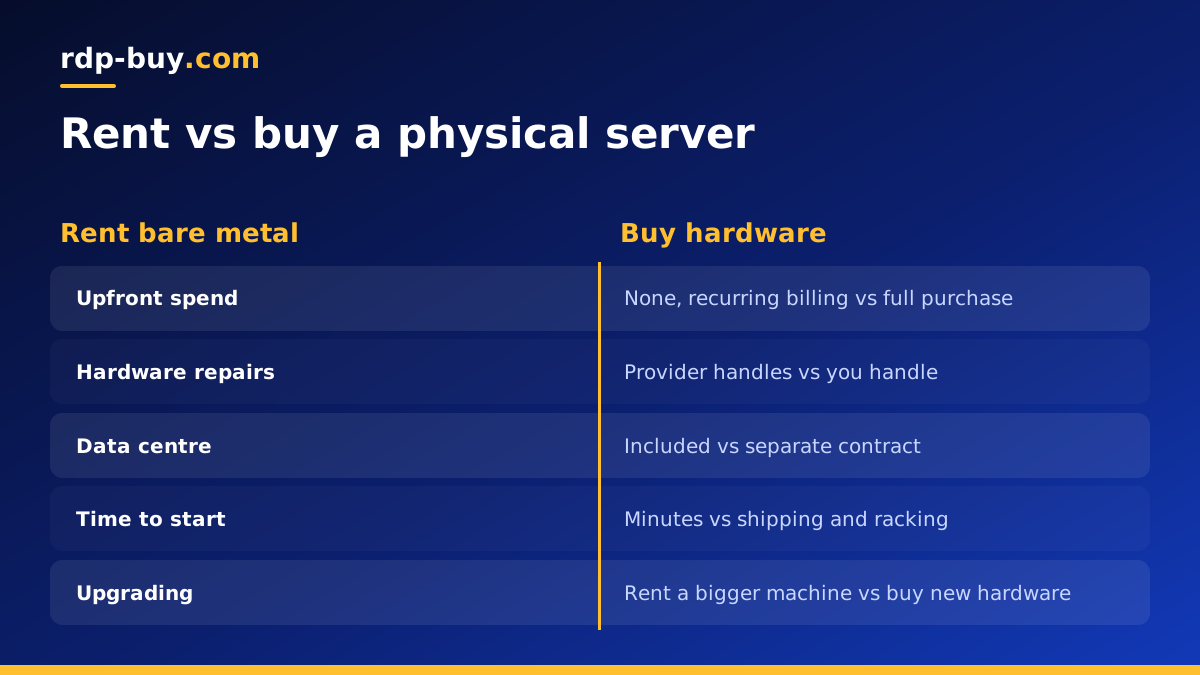
Buying a server looks attractive on paper because you pay once. In practice, ownership carries costs and risks that renting avoids:
- No large upfront spend: renting turns a big purchase into a predictable recurring bill on monthly, half-yearly or yearly terms.
- No hardware repairs: when a disk or power supply fails, replacing it is the provider's job.
- No data centre contracts: power, cooling, physical security and network are included.
- Faster start: you do not wait for hardware to ship and be racked. Ready servers can be online in minutes.
- Choice of location: you can place the server near your users without opening an account in another country.
- Easier upgrades: when you outgrow the machine, you rent a bigger one instead of selling old hardware.
- No ageing hardware: owned servers lose value and become outdated; with renting, that risk sits with the provider.
When buying or colocation may still make sense
Renting is not right for everyone. Owning hardware can make sense when you need very specialised components the provider does not offer, when regulations require you to own the physical equipment, or when you run a large, stable fleet for many years and have staff to maintain it.
For most businesses, developers, game communities and AI projects, those conditions do not apply. The flexibility and lower effort of renting usually outweigh the theoretical savings of owning.
Who rents bare metal servers
Bare metal is the right tool when you need the whole machine. Typical renters include:
- Teams running their own virtualisation with Proxmox or KVM to split one machine into many virtual servers.
- Companies with large databases or analytics jobs that use every core and all memory for long periods.
- Game networks hosting many servers together on one powerful machine.
- AI and automation teams running many agents, browsers and Docker containers side by side, as described in our AI agent hosting hub.
- Businesses with compliance rules that require single tenant hardware.
- Developers who need hardware level features, such as nested virtualisation or specific drivers.
Bare metal vs a VPS when renting
If you are renting anyway, you might wonder whether a VPS would do. A VPS is easier to resize and usually the most economical way to run light or medium workloads. Bare metal is the better choice when the workload is heavy and constant, when you need the whole machine's resources, or when you want no shared components at all.
A practical approach: start on a VPS or a dedicated CPU server while you learn how your application behaves. Move to bare metal when your measurements show you need it. Our guide to buying a dedicated server covers how to size the workload first.
What to check before you rent
Ask these questions about any bare metal offer:
- Is it truly single tenant? Make sure the whole machine is yours, not a virtual slice.
- Which operating systems are available? Linux distributions, Windows Server, or both. On rdp-buy.com the Windows licence is included in Windows prices.
- What access do you get? Full root or administrator access should be standard.
- Is a dedicated IPv4 address included? You will need one for DNS and services.
- Where can it be located? Look for a choice of locations close to your users.
- How is support handled? Hardware issues can happen at any hour, so 24/7 support matters.
- What billing terms exist? Monthly terms are useful for testing; longer terms suit stable projects.
Choosing the right location for a rented server
Location is one of the biggest advantages of renting over owning. If you buy hardware, it usually ends up wherever you are, which may be far from the people who use it. When you rent, you can place the machine where it does the most good.
Start with your users. A website, game server or application feels quicker when the server is close to the people using it, because every request travels a shorter distance. If most of your audience is in one region, pick a data centre there. If your audience is spread out, choose a central location, or consider a second server later.
Then think about the services your server talks to. AI agents and automation tools call model APIs, payment gateways and other services all day. Trading tools talk to broker servers. Placing your server near those services reduces delay on every call.
Finally, consider data rules. Some businesses must keep certain data inside a particular country or region. Renting in the right location lets you meet those rules without building your own presence there. You can browse all 33 options on the server locations page before you order.
Setting up a rented bare metal server
Once the server is ready, the first steps are similar to any server. Log in, update the operating system, create a non-root user, set up SSH keys or a strong administrator password and enable a firewall. On bare metal, also check the disk layout. If the machine has several drives, decide whether to use software RAID for redundancy before you store data.
Next, decide how to use the hardware. You can install applications directly, run them in Docker, or install a hypervisor and create your own virtual machines. Set up monitoring for CPU, memory, disk health and temperature where available, and an off-server backup routine. Hardware is replaced by the provider when it fails, but your data is your responsibility.
Planning for growth and failures
One physical server is a single point of failure, however reliable the hardware. For important services, plan what happens if the machine goes offline. Options include keeping recent backups ready to restore on a new server, running a second machine in another location, or splitting critical parts of your stack across a bare metal server and a VPS.
Keep your setup reproducible with scripts, configuration files or Docker Compose files stored in version control. That makes moving to a bigger machine, or recovering from a failure, a matter of hours rather than days.
Renting your bare metal server
Renting bare metal gives you the full power and isolation of a physical machine without the cost, delay and maintenance of owning one. It suits heavy, steady workloads, virtualisation and projects with strict isolation needs, and it lets you choose a location close to your users.
When you are ready, rent a bare metal server in one of 33 locations. You get full root or admin access, a dedicated IPv4 address, 24/7 support, monthly, half-yearly or yearly billing and a server ready in minutes.
