 Sign in
Docker vs VPS: What Is the Difference and Do You Need Both?
Docker and a VPS are not rivals. A VPS is the server, and Docker is a way to package and run applications on that server. This guide explains the difference, when each matters and why most people end up running Docker on a VPS hosting plan.
Why people compare Docker and VPS
Both Docker and a VPS involve isolation and the word virtual, so it is easy to see them as alternatives. In reality they sit at different layers. A VPS virtualises a whole computer: it gives you an operating system, CPU, memory, disk and an IP address. Docker virtualises at the application level: it packages a program with everything it needs and runs it as an isolated process inside an existing operating system.
So the real question is rarely Docker or VPS. It is usually: where will my Docker containers run? For anything that needs to stay online, the answer is almost always a server such as a Linux VPS.
What a VPS is
A virtual private server is a virtual machine running on a physical host in a data centre. A hypervisor gives it a slice of the host's resources and isolates it from other customers. You get your own kernel and operating system, full root access, a dedicated IPv4 address and the freedom to install anything. It runs 24/7 whether or not you are connected. Our explainer What Is a VPS? covers this in more depth.
What Docker is
Docker is a platform for building and running containers. A container image bundles an application with its libraries, runtime and configuration. When you start it, Docker runs it as an isolated process that shares the host operating system's kernel but has its own file system, network and process space.
Because containers do not each need a full operating system, they start in seconds and use far fewer resources than separate virtual machines. You can run many containers side by side on one server: a web app, a database, a cache and a background worker, each in its own box. The official documentation at docs.docker.com is the best place to learn the details.
Docker vs VPS: the key differences
Here is how they compare:
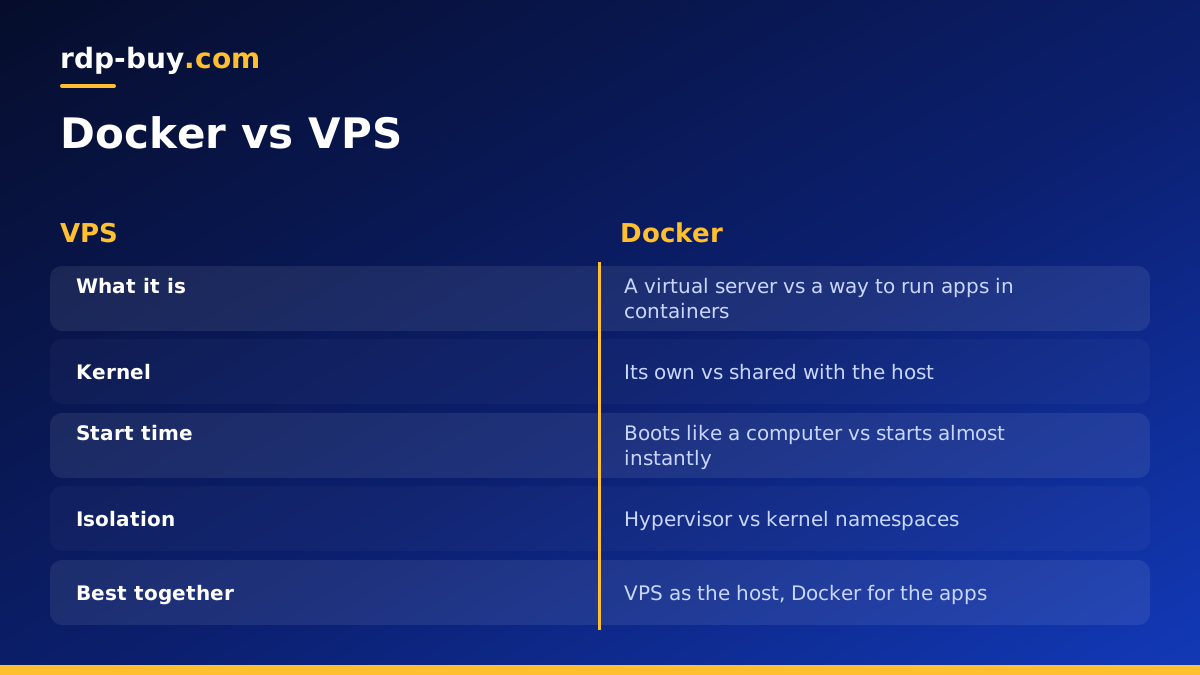
- Layer: a VPS is infrastructure, a whole server; Docker is software that runs applications on a server.
- What is virtualised: a VPS virtualises hardware and runs its own kernel; Docker containers share the host kernel.
- Isolation: a VPS is isolated by a hypervisor; containers are isolated by kernel features such as namespaces and cgroups.
- Start time: a VPS boots like a computer; a container starts almost instantly.
- Resource use: each VPS carries a full operating system; containers are lightweight.
- Persistence: a VPS is a long lived server; containers are designed to be replaced, with data kept in volumes.
- Where it runs: a VPS lives in a data centre; Docker runs wherever you install it, including on a VPS.
How Docker and a VPS work together
The most common setup is simple: rent a VPS, install Docker, and run your applications as containers. The VPS provides the always on machine, the public IP address and the location. Docker provides clean packaging, easy updates and isolation between apps.
This combination is popular because it removes a lot of pain. Instead of installing each application's dependencies directly on the server, where versions can clash, each app brings its own. Updating an app means pulling a new image and recreating the container. Moving everything to a new server means copying a Compose file and the data volumes.
Our Docker VPS page shows how this works on our servers.
What you can run with Docker on a VPS
Almost anything with a container image. Popular examples include:
- Automation platforms like n8n, explained in our guide to self hosting n8n with Docker.
- AI agents such as OpenClaw or Hermes Agent, and development tools like Claude Code (by Anthropic) running inside a container.
- Websites and APIs with a reverse proxy such as Nginx, Caddy or Traefik in front.
- Databases like PostgreSQL, MySQL or Redis for your own applications.
- Monitoring dashboards, uptime checkers and log collectors.
- Self hosted tools for notes, files, password management or analytics.
Can you use Docker without a VPS?
Yes. You can run Docker on your own laptop or desktop with Docker Desktop, which is great for development and testing. The limits appear when the containers need to be available to others or run all the time. A laptop sleeps, changes networks and sits behind a home router without a stable public IP. Webhooks fail, scheduled jobs miss their time and users cannot reach your apps.
There are also managed container platforms that run containers for you without exposing a server. They can be convenient, but they usually limit what you can run, how long processes may live and how storage works. A VPS gives you the full Docker engine with no such restrictions.
Containers vs virtual machines for isolation
A fair question is whether containers are isolated enough. For running your own applications on your own server, they are. Docker keeps apps from interfering with each other's files and processes, and you can limit memory and CPU per container.
Virtual machines provide a stronger boundary because each has its own kernel. That is why hosting providers sell VPS plans rather than raw containers to separate customers. On your own VPS, using containers inside it gives you both layers: the VPS isolates you from other customers, and containers isolate your apps from each other.
How to set up Docker on a VPS
On a fresh Ubuntu or Debian VPS, the steps are short:
- Connect over SSH, update packages and create a sudo user.
- Install Docker Engine and the Compose plugin using the official instructions on docs.docker.com.
- Add your user to the docker group so you can run commands without sudo, then log out and back in.
- Create a folder per project with a compose.yaml file describing the containers, ports and volumes.
- Run docker compose up -d to start everything in the background.
- Put a reverse proxy with automatic HTTPS in front of web apps, and open only ports 80, 443 and SSH in the firewall.
- Back up your volumes regularly, since containers can be rebuilt but data cannot.
Common mistakes when running Docker on a VPS
A few mistakes come up often when people first move containers onto a server, and each one is easy to avoid.
The first is publishing database ports to the internet. If a Compose file maps a database port to the host, Docker can open it publicly even when a firewall such as UFW appears to block it, because Docker manages its own firewall rules. Keep databases on an internal Docker network and only publish the ports your reverse proxy needs.
The second is storing data inside containers. When a container is recreated, anything not in a volume is lost. Always mount volumes for databases, uploads and configuration, and include those volumes in your backups.
The third is using the latest tag everywhere. It makes updates unpredictable, because a restart can pull a very different version. Pin image versions in your Compose file and update them on purpose, after reading the release notes.
The fourth is ignoring logs and disk space. Container logs grow quietly until the disk fills. Set log size limits in the Docker daemon configuration and remove unused images now and then with docker system prune, after checking what it will delete.
How big should a Docker VPS be?
Size the VPS for the total of everything you run. Each container uses memory for its application, and databases and AI agents tend to need the most. Start with a plan that fits your current containers with headroom, watch usage with docker stats, and move up when memory gets tight. Choose a location near your users or near the APIs your containers call, and pick Linux, which runs Docker natively.
Getting a VPS for your containers
Docker and a VPS are partners, not alternatives. The VPS gives you an always on server with a public IP in the right location. Docker makes it easy to run, update and move many applications on that server.
To get started, buy VPS hosting with root access in any of 33 locations, install Docker and deploy your first Compose file. Every server includes a dedicated IPv4 address, 24/7 support and is ready in minutes, with monthly, half-yearly or yearly billing.
