 Sign in
Bare Metal Server vs Dedicated Server: What Is the Difference?
The terms bare metal server and dedicated server are often used as if they meant the same thing, but providers draw the line in different places. Here is how they differ in practice, and when renting a bare metal server is worth it over dedicated resources.
Why the two terms get confused
For years, a dedicated server simply meant a physical machine in a data centre rented to one customer. Then cloud platforms arrived and started selling virtual machines with reserved processor cores, also called dedicated CPU instances. At the same time, the phrase bare metal became popular to describe physical servers that you can provision as quickly as a cloud instance, with no hypervisor between you and the hardware.
The result is overlapping language. Some providers use dedicated server to mean a physical box, and others use it for a virtual server with dedicated cores. Bare metal almost always means the whole physical machine, with your operating system running directly on the hardware. To compare offers fairly, look at what is actually delivered rather than the label.
What a bare metal server is
A bare metal server is a physical computer that belongs to you for as long as you rent it. Your operating system is installed straight onto the hardware. There is no virtualisation layer shared with other customers, so every processor core, every gigabyte of memory and every disk is yours.
This single tenant design has three main effects. Performance is fully predictable, because nobody else uses the hardware. You get access to hardware level features, such as running your own hypervisor or using specific CPU instructions. And isolation is as strong as it gets, which can matter for compliance or sensitive data.
Modern bare metal hosting adds cloud-like convenience: you order online, choose an operating system image and receive login details without waiting for someone to rack a machine by hand.
What a dedicated server usually means today
On many hosting sites, including ours, a dedicated server refers to a dedicated CPU server: a virtual machine whose processor cores are reserved for you alone. Other customers may share the same physical host, but they cannot use your cores, so you avoid the noisy neighbour effect that can slow a standard VPS.
You still get your own operating system, full root or administrator access and a dedicated IPv4 address. Because it runs on a hypervisor, a dedicated CPU server is quick to deploy and simple to resize, and you do not have to think about the physical hardware at all. You can compare plans on the dedicated CPU server page.
Bare metal server vs dedicated server: the key differences
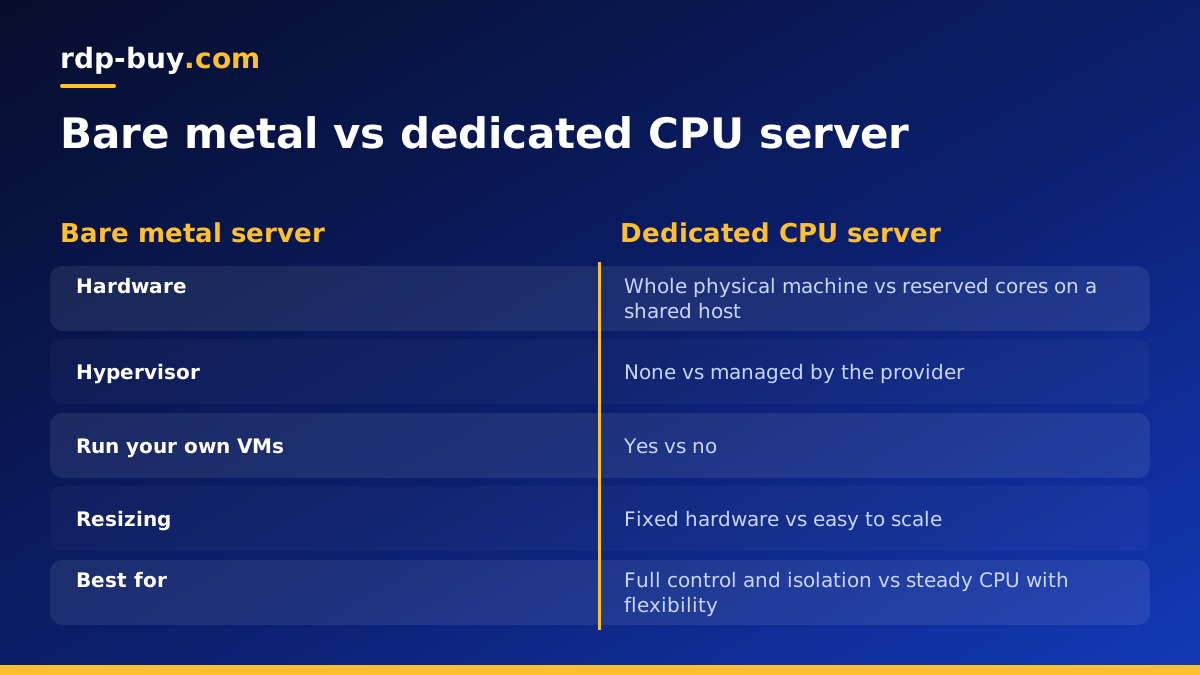
When the dedicated option is a dedicated CPU virtual machine, the differences look like this:
- Hardware: bare metal gives you the whole physical machine; a dedicated CPU server gives you reserved cores on a shared host.
- Virtualisation layer: none on bare metal; a hypervisor on the dedicated CPU server.
- Performance consistency: both are steady for CPU work; bare metal also avoids any sharing of memory bandwidth, disks or network cards.
- Hardware features: bare metal lets you run your own hypervisor, nested virtualisation or specialised drivers; a virtual server cannot.
- Flexibility: dedicated CPU servers are easy to resize; bare metal is fixed to the hardware you chose.
- Isolation: both isolate you from other customers; bare metal adds physical separation.
When bare metal is the better choice
Bare metal earns its place when you need the whole machine or direct hardware access. Typical cases include:
- Running your own virtualisation platform, such as Proxmox or KVM, to host many virtual machines.
- Large databases or analytics jobs that use every core and all available memory for long periods.
- Workloads with strict compliance or isolation needs, where sharing a host is not acceptable.
- Software licensed per physical server, or that needs specific hardware features.
- High traffic game networks or media platforms that want no shared components at all.
When a dedicated CPU server is enough
For many teams, a dedicated CPU server gives most of the benefit with less commitment. It suits:
- Production websites and APIs that need steady response times.
- Game servers for Palworld, ARK, Minecraft or similar titles.
- CI runners, build servers and encoding jobs that are CPU bound.
- Several AI agents or automation tools running side by side, such as those described in our AI agent hosting hub.
- Projects that are growing and may need to resize without migrating.
Where a VPS fits in
A standard VPS shares CPU time between customers on the same host. It is the most economical choice for light and medium workloads, and it is perfectly fine for a personal website, a single n8n instance or a small agent. If you are not sure you need dedicated resources at all, start with our explainer What Is a VPS? and the guide to buying a dedicated server, then move up the ladder only when measurements show you need it.
A sensible path for most projects is VPS first, dedicated CPU server when CPU becomes the bottleneck, and bare metal when you need the whole machine.
Questions to ask any provider
Because labels vary, ask the same questions whichever product you consider:
- Is this a physical machine for me alone, or a virtual machine with reserved cores?
- Do I get full root or administrator access?
- Is a dedicated IPv4 address included?
- Which locations can I choose, and can I pick one near my users?
- Which billing terms are available: monthly, half-yearly or yearly?
- Is support available 24/7 if something fails at night?
Hidden trade offs beyond the spec sheet
Raw hardware is only part of the decision. Bare metal gives you everything, but it also asks more of you. If a disk fails, you depend on the provider replacing it and on your own RAID or backup plan to protect data. Upgrading usually means moving to a different machine, which takes planning. Snapshots and quick resizing, which are routine on virtual servers, may not be available or may work differently.
A dedicated CPU server hands those hardware concerns to the provider. If the underlying host has a problem, the virtual machine can often be moved to healthy hardware. Resizing is a matter of choosing a bigger plan. The trade off is that you cannot touch the hardware itself, so anything that needs direct device access is off the table.
Think also about your team's skills. Running your own hypervisor or storage layout on bare metal is rewarding but takes time to learn. If your goal is simply to run an application quickly and reliably, a dedicated CPU server lets you focus on the application instead of the machine.
Moving between the two later
Your first choice does not have to be permanent. Many teams begin on a dedicated CPU server, learn how their workload behaves, then move to bare metal once they know they need the whole machine. Others start on bare metal for a heavy core service and add smaller virtual servers around it for supporting tools.
Moving is easiest when your setup is reproducible. Keep configuration in scripts or Docker Compose files, store data in volumes you can back up and restore, and point users at a domain name rather than a raw IP address. That way, switching from one bare metal server to another, or between product types, becomes a routine migration rather than a rebuild.
Setting up either type of server
The first hour on either server looks the same. Log in, update the operating system, create a non-root user, secure SSH or Remote Desktop, and enable a firewall. On bare metal you may also configure RAID or a hypervisor before installing applications. On a dedicated CPU server, you can go straight to installing your stack, often with Docker. In both cases, set up monitoring and off-server backups before you move real traffic across.
Choosing between bare metal and dedicated
If you need the entire machine, hardware level control or physical isolation, choose bare metal. If you need steady CPU performance with easy resizing and quick deployment, a dedicated CPU server is usually the smarter starting point.
When you have decided, you can rent bare metal hosting or compare dedicated server plans. Both come with full root or admin access, a dedicated IPv4 address, a choice of 33 locations, 24/7 support and servers ready in minutes.
