 Sign in
VPS Hosting vs Web Hosting: Which One Do You Actually Need?
Web hosting usually means shared hosting: a simple, managed space for a website. VPS hosting gives you your own virtual server with root access. This guide compares the two side by side so you know when shared hosting is enough and when it is time to buy VPS hosting.
What people mean by web hosting
When a provider sells web hosting, it almost always means shared hosting. Your website lives on a server alongside many other customers' sites. Everyone shares one operating system, one web server and one pool of resources, and the host manages the machine. You get a control panel, an upload area for files, email accounts and usually a one click installer for WordPress.
Shared hosting is designed to be easy. You never log in to a command line, never install system updates and never configure a firewall. The trade off is that you can only do what the host allows. You cannot install your own software, keep programs running in the background or change server settings beyond a few options in the panel.
What VPS hosting gives you
VPS hosting gives you a virtual private server: an isolated virtual machine with its own operating system, its own reserved memory and storage, and full root access. Nobody else's site shares your environment. You choose the operating system, install any software and run any process you like, around the clock.
A VPS is closer to owning a computer in a data centre than to renting space on someone else's. It also comes with a dedicated IPv4 address, which matters for email reputation, API allow lists and SSL setups. If you want a refresher on how virtual servers work, read What Is a VPS?. When you are ready to compare plans, see our Linux VPS options.
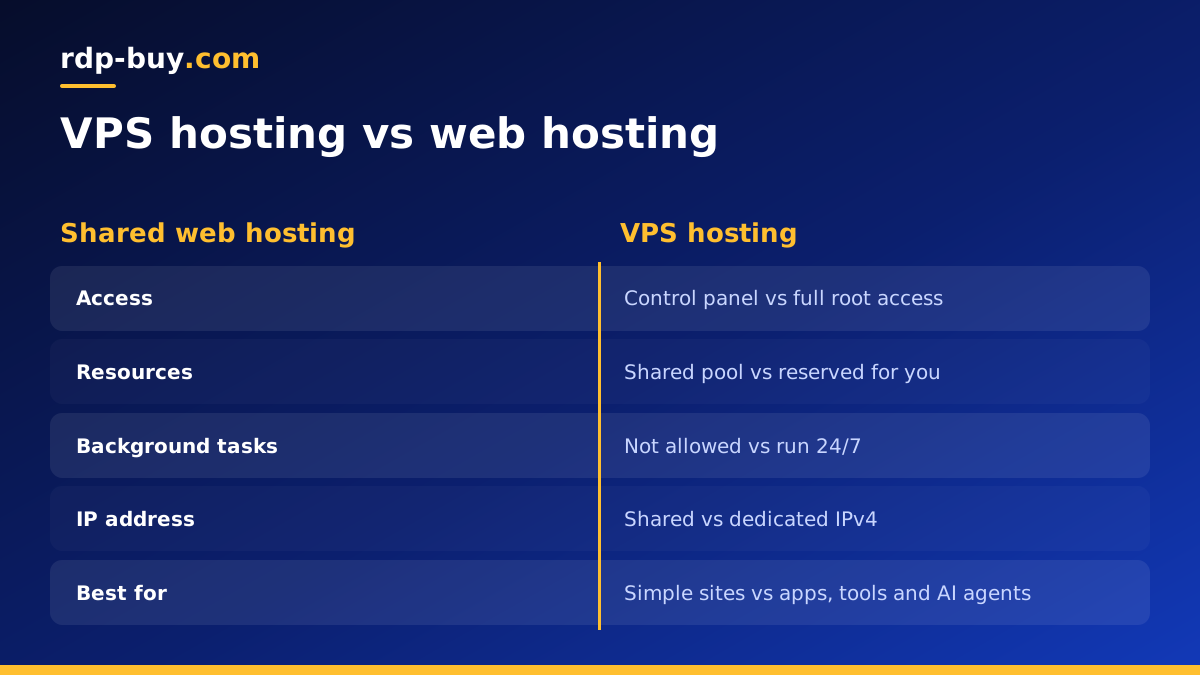
VPS hosting vs web hosting side by side
The differences come down to control, isolation and responsibility:
- Control: shared hosting limits you to a control panel; a VPS gives root access to change anything.
- Software: shared hosting supports the languages and versions the host picks; on a VPS you install what you need.
- Background processes: shared hosting stops long running tasks; a VPS runs bots, workers and agents 24/7.
- Resources: shared hosting pools CPU and memory across many sites; a VPS reserves them for you.
- IP address: shared hosting usually shares an IP with other sites; a VPS includes a dedicated IPv4 address.
- Maintenance: the host maintains shared servers; on an unmanaged VPS you handle updates and security.
- Skills: shared hosting needs almost none; a VPS needs basic command line comfort or a willingness to learn.
Performance: why neighbours matter
On shared hosting, hundreds of websites can compete for the same processor and memory. When one of them gets a burst of traffic or runs a heavy script, others can slow down. Hosts set limits to protect everyone, which is why shared plans often suspend or throttle sites that use too many resources.
A VPS reserves a set amount of memory and CPU for your server. Your site or application gets predictable resources, and you can tune the web server, database and caching yourself. For busy WordPress sites, online shops or applications with steady traffic, that predictability is often the main reason to switch.
Security and isolation
Shared hosting providers work hard to isolate customers, but you still share an operating system with strangers. If another account is compromised, a misconfiguration could expose more than it should. You also depend on the host to patch the server on their schedule.
On a VPS, your environment is fully separate. You decide which ports are open, which software is installed and when updates happen. That is a strength and a responsibility: a well maintained VPS is more secure than shared hosting, while a neglected one is not. Simple habits, like key based SSH logins, a firewall and automatic security updates, cover most of the risk.
When shared web hosting is enough
Shared hosting is a sensible choice when:
- You run a small brochure site, blog or portfolio with modest traffic.
- You only need a website and email, nothing that runs in the background.
- You prefer not to manage a server at all.
- Your platform, such as a standard WordPress install, is fully supported by the host.
Clear signs it is time for a VPS
Most people outgrow shared hosting for one of these reasons:
- Your site slows down at busy times or the host warns about resource limits.
- You need software the host does not allow, such as Node.js, Python apps, Redis or a specific database version.
- You want to run Docker containers, scheduled jobs or long running workers. A Docker VPS makes this simple.
- You want to self host tools such as n8n for automation, covered in our guide to self hosting n8n.
- You plan to run AI agents like OpenClaw, Hermes Agent or Claude Code (by Anthropic) that must stay online all day.
- You need a dedicated IP address for email sending, allow lists or SSL.
- You host several sites and want them under one server you control.
What about cloud and managed WordPress hosting?
Between shared hosting and a self-managed VPS there are other products. Managed WordPress hosting runs on isolated containers or VPS-like environments but hides the server from you. Cloud platforms offer virtual machines similar to a VPS, often with more services around them and more complex billing.
If you want the freedom of root access with simple, predictable billing, a VPS is the most direct route. If you want no server administration at all and only run WordPress, managed hosting can make sense. Our article what you can run on an RDP or VPS shows how much more a VPS can do beyond websites.
Thinking about cost the right way
Shared hosting is usually the cheapest way to put a website online, and that is a fair reason to start there. Still, comparing plans only by the monthly bill can mislead. A shared plan that throttles your site during a sale, or blocks the tool you need, costs you in lost visitors and in workarounds such as paying for extra third party services.
A VPS often replaces several separate subscriptions. The same server can host your website, run an automation platform, keep a database, send scheduled reports and host a small AI agent. When you add up what those would cost as individual hosted services, one VPS can be the more economical option, as well as the more flexible one.
Billing terms matter too. Starting on monthly billing lets you test a VPS without a long commitment, and moving to half-yearly or yearly billing later suits projects that have settled down. Choose the term that matches how sure you are about the project, not the one that looks smallest on the page.
How to move from web hosting to a VPS
Moving is less daunting than it sounds. A common path looks like this:
- Choose a VPS in a location close to your visitors and install a Linux distribution such as Ubuntu.
- Secure the server: update packages, create a sudo user, set up SSH keys and enable a firewall.
- Install your stack, for example Nginx or Apache, PHP and MariaDB, or a control panel if you prefer a graphical interface.
- Copy your files and export and import your database from the old host.
- Test the site using a temporary hosts file entry before changing DNS.
- Update your DNS records to point to the VPS IP address, then keep the old hosting for a few days in case you need to roll back.
Choosing a VPS plan after shared hosting
If your site and tools fit comfortably within a shared plan and you never want to touch a server, stay where you are. If you need more control, steady performance, background tasks or a dedicated IP, a VPS is the natural next step, and it opens the door to automation and AI tools that shared hosting cannot run.
When you decide to move, compare our VPS hosting plans by memory and storage, pick one of 33 locations near your audience, and choose monthly, half-yearly or yearly billing. You get root access, a dedicated IPv4 address, 24/7 support and a server ready in minutes. US based audiences can also look at our USA VPS page.
