 Sign in
What Is a VPS? How a Virtual Private Server Works in 2026
A VPS, or virtual private server, is a slice of a physical server that behaves like your own machine, with its own operating system, resources and root access. This guide explains how a VPS works, who it suits and what to check before you buy VPS hosting.
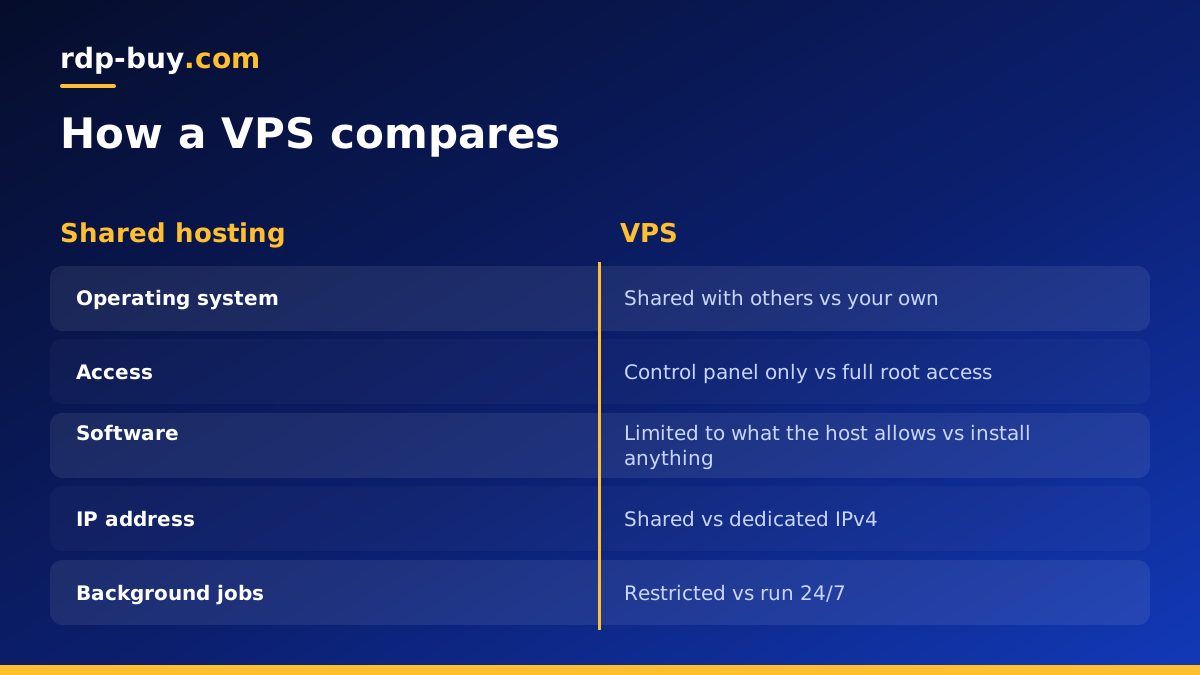
What a VPS actually is
A VPS is a virtual machine that runs on a powerful physical server in a data centre. Software called a hypervisor splits that physical machine into several isolated virtual servers. Each one gets its own share of CPU, memory and storage, its own operating system and its own network address. From the inside, a VPS looks and behaves like a normal computer that you control completely.
The word private is the important part. On shared hosting, many websites live inside one operating system and share the same files, processes and limits. On a VPS, your environment is walled off. Other customers on the same hardware cannot see your files, and you can install whatever software you need without asking anyone.
Most people who rent a VPS use Linux, such as Ubuntu or Debian, because it is light, free to run and well suited to servers. If you want a Windows desktop you reach over Remote Desktop, that is usually sold as a Windows RDP server instead, which you can read about in our RDP vs VPS guide. If you already know you want a Linux machine, you can buy a Linux VPS and have it ready in minutes.
How a VPS works under the hood
When you order a VPS, the provider creates a new virtual machine on one of its host servers, installs the operating system image you chose and assigns it an IP address. You then receive login details, usually a root password or an SSH key, and connect to the server over the internet.
The hypervisor keeps each virtual server separate. It decides how much processor time, memory and disk each VPS can use, and it stops one customer's workload from reading another customer's memory. Because the resources are set aside for you, a VPS gives far more predictable behaviour than shared hosting, where a busy neighbour can slow everyone down.
- CPU: a number of virtual cores that your processes can use.
- RAM: memory reserved for your operating system and applications.
- Storage: a virtual disk, usually on fast SSD or NVMe drives.
- Network: a public IP address so the server can be reached from anywhere.
- Access: root on Linux or administrator on Windows, so you can change anything.
VPS vs shared hosting vs dedicated server
It helps to place a VPS between the two other common choices. Shared hosting is the simplest and most limited option: you upload a website, but you cannot install system software or run background programs. A dedicated server is the other end of the scale: a whole physical machine that belongs to you alone.
A VPS sits in the middle. You get the control of a dedicated machine, with root access and your own operating system, but you only pay for a portion of the hardware. That makes it the default choice for developers, small businesses and anyone running tools that need to stay online all day.
If your workload grows to the point where it needs consistent heavy CPU use, a dedicated CPU server or a bare metal machine may be the next step. For most projects, a VPS is enough and much easier to scale up gradually.
What people run on a VPS
Because a VPS is a full server that is always switched on, it can host almost anything that runs on Linux. Common uses include:
- Websites and web applications built with WordPress, Node.js, Python or PHP.
- Automation tools such as n8n, which can run workflows around the clock on a VPS for n8n.
- AI agents like OpenClaw, Hermes Agent or Claude Code (by Anthropic), which need a machine that never sleeps.
- Docker containers for databases, APIs and background workers, using a Docker VPS.
- VPN servers, game servers, monitoring tools, mail relays and development environments.
- Scrapers, bots and scheduled jobs that should not depend on a laptop staying on.
Why a VPS beats running things on your own computer
Many people start by running scripts or tools on their own laptop or desktop. That works until the machine sleeps, restarts for updates, loses Wi-Fi or travels with you. A VPS removes those problems because it lives in a data centre with stable power and connectivity.
A VPS also gives you a dedicated IPv4 address that does not change, which matters for webhooks, API allow lists and DNS records. You can choose a server location close to your users or close to the APIs your software calls, which helps keep responses quick. With 33 locations available, you can place the server where it makes the most sense for your project.
Managed vs unmanaged VPS
With an unmanaged VPS, you receive a clean server and full root access, and you handle software installation, updates and security yourself. This gives the most freedom and suits anyone comfortable with the command line or willing to follow a guide.
A managed VPS adds help from the provider with tasks such as setup or troubleshooting. Even on a self-managed plan, it is useful to have 24/7 support available if something goes wrong at the network or hardware level. Decide how much you want to handle yourself before you order.
How to choose the right VPS
Start from what you plan to run, not from the biggest plan. A small website or a single automation tool needs far less than a set of Docker containers or an AI agent that processes lots of data. Then check these points:
- Operating system: Linux for most server software, Windows if you need a desktop or Windows-only apps. Our Windows or Linux guide covers the choice.
- Resources: enough RAM for your applications to run without swapping, and enough disk for data and logs.
- Location: close to your audience or the services your software talks to.
- Access: full root access so you are not limited in what you install.
- Billing: flexible terms such as monthly, half-yearly or yearly so you can start small.
- Support: help available around the clock if the server stops responding.
Getting started with your first VPS
Once your server is ready, connect with SSH from a terminal using the IP address and credentials you received. Update the system packages first, create a regular user with sudo rights, and set up SSH keys so you can turn off password logins. Then enable a firewall that only allows the ports you need.
From there, install your software. Many people install Docker straight away because it makes running and updating applications simple. If you are not sure where to begin, our guide to what you can run on an RDP or VPS has ideas for common projects.
Picking a VPS plan that fits
A VPS is the right choice when you need a server that stays online, gives you full control and costs less than renting a whole machine. Choose Linux for most server work, pick a location near your users or APIs, and start with a plan that matches your current workload. You can always move up later.
When you are ready, compare the VPS hosting plans by RAM, CPU and storage, choose one of the 33 locations, and your server will be ready in minutes with root access and a dedicated IPv4 address.
