 Sign in
Bare Metal vs VPS: Isolation, Control and When to Upgrade
Bare metal vs VPS is really a question of whether you share a physical machine or own all of it. This guide explains the difference in plain terms, lists the workloads that justify a bare metal server, and shows how to tell when a VPS is still the smarter choice.
The meaning of bare metal and VPS
A bare metal server is a physical computer in a data centre that is rented to a single customer. Your operating system is installed directly on the hardware. There is no hypervisor and no other tenant: every core, every stick of memory and every disk belongs to your workload.
A VPS, or virtual private server, is a virtual machine. A hypervisor runs on a large physical host and divides it into many virtual servers. Each VPS has its own operating system, its own root or administrator access and its own IP address, so from the inside it feels like a full server. Underneath, it shares the physical processor, memory bus, disks and network card with other virtual machines.
Both are real servers you control. The difference is the layer underneath, and that layer decides how much isolation, consistency and hardware access you get.
How the two compare in practice
For many projects you would never notice the difference. For some, it decides whether the project works at all. These are the points that matter.
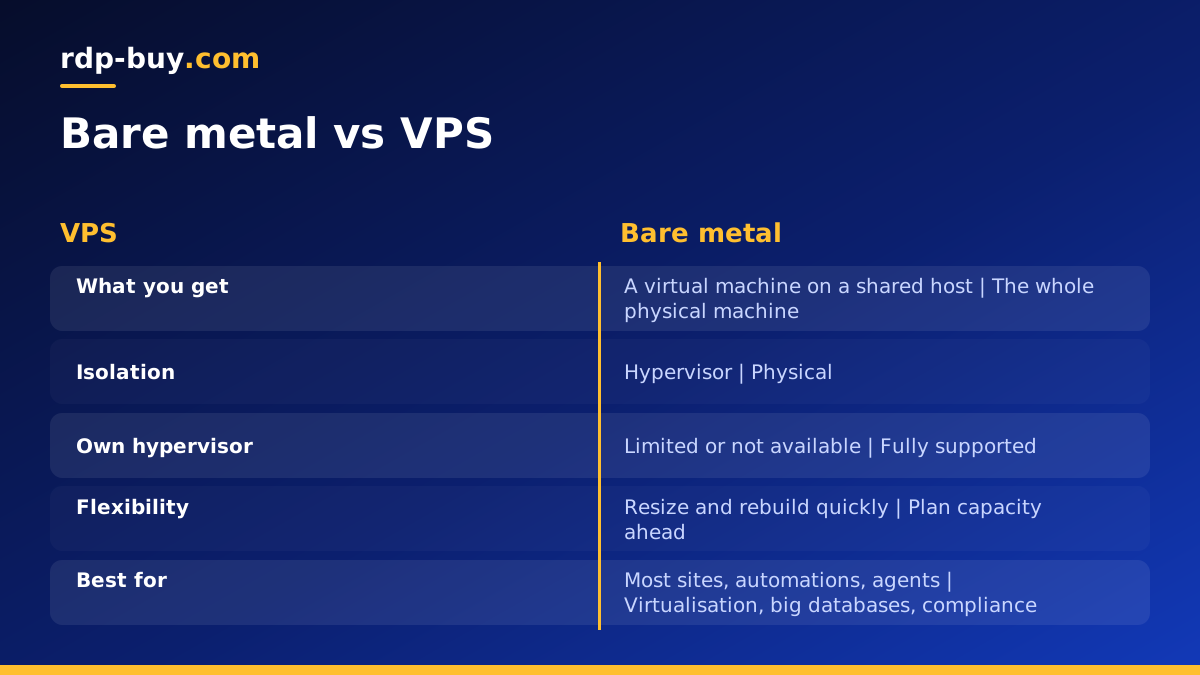
- Isolation: a VPS is isolated by the hypervisor, which is strong for everyday use. Bare metal is isolated physically, which some compliance policies and security teams require.
- Consistency: on a VPS, neighbours can affect processor, disk and network timing. On bare metal, the only load on the machine is yours.
- Hardware access: bare metal exposes the real processor features, disks and firmware. A VPS sees virtual devices chosen by the provider.
- Nested virtualisation: running your own hypervisor, such as Proxmox or KVM, is natural on bare metal and limited or unavailable on most VPS plans.
- Speed of change: a VPS can be resized, snapshotted and rebuilt quickly. Bare metal changes involve real hardware, so plan capacity a little further ahead.
- Starting point: a VPS is the usual first server. Bare metal is usually the step taken when a workload has proven it needs a whole machine.
Workloads that justify bare metal
Bare metal is not automatically better. It is better for workloads that either use the whole machine or need guarantees a shared host cannot give.
Running your own virtualisation platform is the classic case. If you want to host several of your own virtual machines with Proxmox, VMware or plain KVM, you need direct access to the processor's virtualisation features, which bare metal provides. Large databases are another, because they are sensitive to disk and memory timing and often grow to fill whatever server they live on. Busy game hosting for many communities, heavy build farms, media transcoding at scale and analytics clusters all keep hardware busy around the clock, which is exactly where sharing a host stops making sense.
Compliance can also decide it. Some contracts or internal policies require that customer data never shares physical hardware with another organisation. A bare metal server satisfies that requirement in a way that is easy to explain to an auditor. Finally, some licensed software is priced per physical processor or per host, and running it on hardware you fully control can make licensing simpler.
When a VPS is the better choice
Most websites, APIs, automation tools and AI agents do not keep a server busy. They wake up for a request, do some work and wait again. On a VPS, that pattern is efficient, and you keep the flexibility to resize as you learn what you need.
A VPS is also the right choice when you are not sure yet. You can deploy in minutes, test real traffic, and move up only when the numbers tell you to. Tools like n8n, Claude Code (by Anthropic), OpenClaw and Docker based stacks run comfortably on a well sized Linux VPS. If you are still deciding which operating system suits you, our guide to choosing a Windows or Linux server helps.
The middle ground: dedicated CPU
Between a standard VPS and bare metal sits the dedicated CPU server. It is still a virtual machine, so it keeps the flexibility of a VPS, but its processor cores are reserved for you and are not shared with other tenants. That removes most of the timing jitter that pushes people toward bare metal, without the jump to a whole physical machine.
If your problem is uneven processor performance, a dedicated CPU server is often enough. If your problem is that you need the hardware itself, for nested virtualisation, firmware access, physical isolation or the full capacity of a large machine, bare metal is the answer.
How to tell which one you need
Answer these questions honestly and the choice usually becomes clear.
- Do you need to run your own hypervisor or access hardware features directly? If yes, choose bare metal.
- Does a policy or contract require physical separation from other customers? If yes, choose bare metal.
- Is the processor busy most of the day, and does uneven performance hurt your users? If yes, choose dedicated CPU or bare metal.
- Is the workload bursty, early stage or still growing? If yes, start on a VPS.
- Do you need to resize often or rebuild quickly from snapshots? If yes, a VPS or dedicated CPU server is easier.
Moving from a VPS to bare metal
If you decide to move, treat it like any server migration. Start by writing down everything the current server runs: services, ports, scheduled jobs, users and data locations. If you already use Docker Compose or configuration management, the move is much simpler because the setup is described in files.
Deploy the new machine in the same region or one closer to your users, harden it with SSH keys and a firewall, and install your stack. Copy data with rsync or a database dump, then run the old and new servers side by side while you test. When everything checks out, lower the DNS time to live, switch DNS to the new dedicated IPv4 address, and keep the old server for a short period as a fallback. Our guide to the first steps on a new server covers the hardening part.
Choosing your bare metal or VPS plan
On rdp-buy.com you can choose any of these levels. Standard VPS plans suit most projects, dedicated CPU plans suit busy workloads that need steady cores, and when your project needs the entire machine you can rent a bare metal server directly. Each option includes full root or administrator access, a dedicated IPv4 address, 33 server locations, 24/7 support and monthly, half-yearly or yearly billing.
A good rule is to choose the smallest option that runs your workload smoothly with room to grow, and to move up when real usage, not guesswork, tells you it is time.
