 Sign in
Dedicated Server Explained: Uses, Benefits and Signs You Need One
A dedicated server is a server whose processing power belongs to one customer instead of being shared with neighbours. This guide explains how a dedicated server works, how it compares with a VPS, and how to tell when it is time to buy a dedicated server for your workload.
What a dedicated server actually is
The phrase dedicated server describes how resources are allocated rather than what the machine looks like. On shared hosting, hundreds of websites can live inside one server account and compete for the same processor, memory and disk. On a standard VPS, one physical host is split into several virtual machines, and each virtual machine gets a slice of the processor time. On a dedicated server, the compute you pay for is reserved for you and nobody else can borrow it.
In practice the term is used in two ways. Some providers mean a whole physical machine rented to one customer, which is also called bare metal. Others mean a virtual server whose processor cores are pinned to one customer, often sold as a dedicated CPU server. Both give you predictable performance because no other tenant is drawing on the same cores, and both give you full administrator or root control of the operating system.
The important idea is consistency. When a workload is sensitive to sudden slowdowns, such as a busy game world, a database under steady load, or a build server compiling code all day, shared processor time can cause jitter. Reserved cores remove that variable, so the performance you test on day one is the performance you get on day ninety.
How a dedicated server works behind the scenes
Every server, dedicated or not, lives in a data centre with redundant power, cooling and network links. What changes is the layer between the hardware and your operating system.
With a VPS, a hypervisor schedules many virtual machines across the same physical cores. The scheduler is fair, but if a neighbour runs a heavy job at the same moment as you, both of you wait a little longer for processor time. With a dedicated CPU server, the hypervisor still exists, but it assigns specific cores to your machine and does not hand them to anyone else. With bare metal, there is no hypervisor at all: your operating system talks directly to the hardware.
- Shared hosting: many customers inside one operating system, no root access, lowest control.
- VPS: your own virtual machine and operating system, processor time shared fairly with other virtual machines.
- Dedicated CPU server: your own virtual machine with cores reserved for you, so performance stays steady.
- Bare metal server: the entire physical machine is yours, with no virtualisation layer in between.
Dedicated server vs VPS: the practical differences
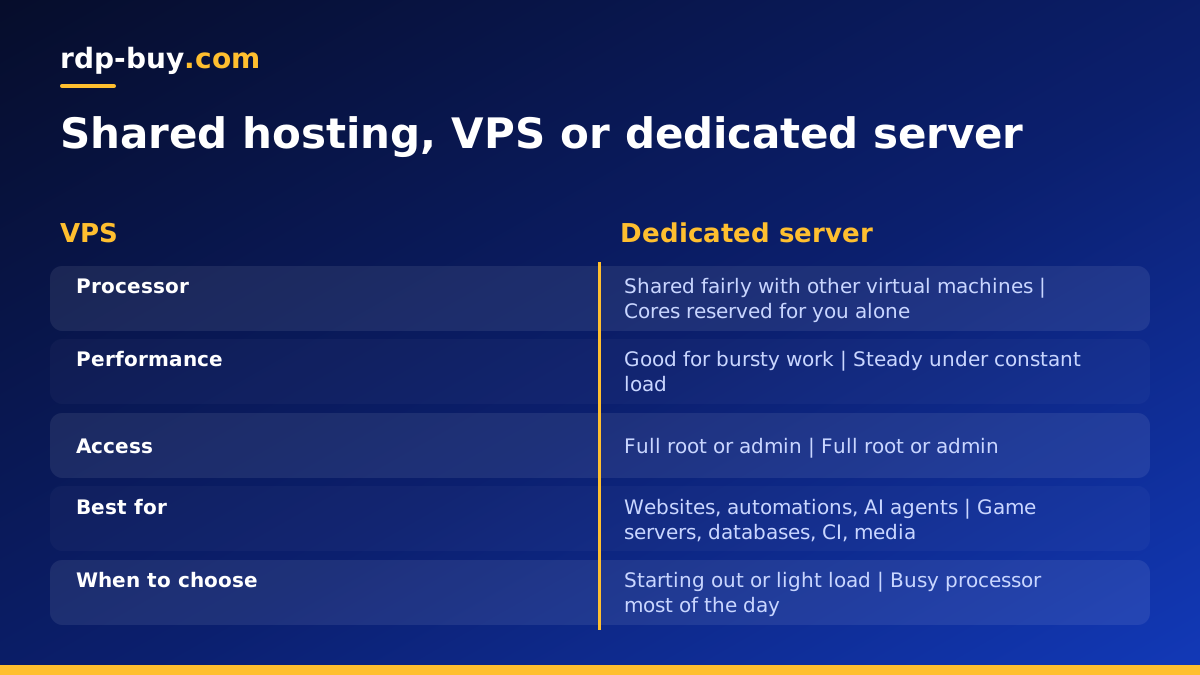
For most people the real choice is between a regular VPS and a dedicated server. Both give you root or administrator access, your own IP address and your own operating system. The difference is how the processor is shared and how much headroom you get.
A VPS is ideal for websites, small APIs, automation tools such as n8n, and most AI agent setups that spend their time waiting on remote APIs. These jobs are bursty: they sit idle, then do a little work, then sit idle again. Sharing processor time is efficient for that pattern, which is why a VPS is the sensible starting point. If that is your situation, our guide on RDP vs VPS and the Linux VPS plans are a better fit.
A dedicated server makes sense when the processor is busy most of the time. Game servers with many players, video encoding, continuous integration pipelines, local language model inference on the processor, large databases and analytics jobs all fall into this group. On shared cores they can feel uneven. On reserved cores they behave the same every hour of the day.
Common uses for a dedicated server
A dedicated server is a general purpose machine, so the list of uses is long. These are the workloads where reserved resources make the clearest difference.
- Multiplayer game servers: worlds such as Palworld, ARK or Minecraft tick many times a second, and steady processor time keeps the simulation smooth for every player.
- Databases: PostgreSQL, MySQL and similar engines benefit from consistent processor and disk access, especially under steady write load.
- Build and test pipelines: self hosted runners for continuous integration finish jobs in a predictable time when cores are not shared.
- Media processing: transcoding, image processing and rendering keep every core busy for long stretches.
- AI workloads: running several agents in parallel, vector databases, or small local models on the processor all need steady compute.
- Many containers on one host: a Docker host with a dozen services can outgrow a small VPS, and a dedicated server gives room to grow.
Signs you have outgrown a VPS
Many projects start on a VPS and move to a dedicated server later. You do not need to guess when; the server itself will tell you. Watch for these signals over a week or two of normal use.
First, look at processor steal time. On Linux, the top command shows a value labelled st. If it is regularly above zero while your own processes are busy, other virtual machines are taking turns on the same cores. Second, look at load average compared with the number of cores. A load that stays above your core count means work is queuing. Third, notice whether performance changes by time of day even when your own traffic does not, which also points to shared contention.
If you see these signs and the workload matters to you or your customers, moving to reserved cores is usually the cleanest fix. If the server is simply running out of memory or disk, a larger VPS may be enough, so check memory and disk use before deciding.
What to check before you choose a dedicated server
Once you know you need dedicated resources, a few questions decide which plan fits. Write the answers down before you compare providers so the decision rests on your workload rather than on marketing pages.
- Cores and memory: count the busy processes you will run at the same time and size cores to match, then add memory for caches and databases.
- Storage: check how much disk your data needs today and plan for growth, and keep backups somewhere other than the same server.
- Location: place the server close to your players, users or the APIs it calls. rdp-buy.com offers 33 server locations, so you can choose a region near your audience.
- Operating system: decide between Linux and Windows. If you are unsure, read Windows or Linux server: which to rent.
- Access: make sure you get full root or administrator access so you can install any software and change any setting.
- Billing: monthly billing suits testing, while half-yearly or yearly billing suits a workload you know will run for a long time.
Setting up a new dedicated server
The first hour on a new server sets the tone for its whole life. Treat it the same way you would treat a new VPS, with a little extra care because the machine will often carry more important work.
Start by connecting over SSH on Linux or Remote Desktop on Windows, then update every package. Create a normal user for daily work, add your SSH key, and turn off password logins once the key works. Enable a firewall and open only the ports your application needs. Install your runtime, whether that is Docker, a game server binary, a database or a language toolchain, and run it as a service so it restarts after a reboot. Finally, set up automatic backups and a simple uptime check so you hear about problems before your users do.
Our guide to the first steps on a new Linux server walks through the hardening part in detail, and it applies to a dedicated server just as well.
Choosing a dedicated server plan on rdp-buy.com
If your workload is busy most of the day and you want performance that does not change with your neighbours, the next step is to compare plans by core count and memory. On rdp-buy.com every dedicated server plan comes with full root or administrator access, a dedicated IPv4 address, 24/7 support and billing that can be monthly, half-yearly or yearly. Servers are ready in minutes, so you can deploy, test your workload, and size up if needed.
If you need the entire physical machine, for licensing or isolation reasons, look at the bare metal server plans instead. If your workload is lighter and bursty, start with a VPS and move up later. The right choice is the smallest option that runs your workload smoothly today with room to grow.
