 Sign in
How to Host AI Agents on a VPS: A Practical Walkthrough
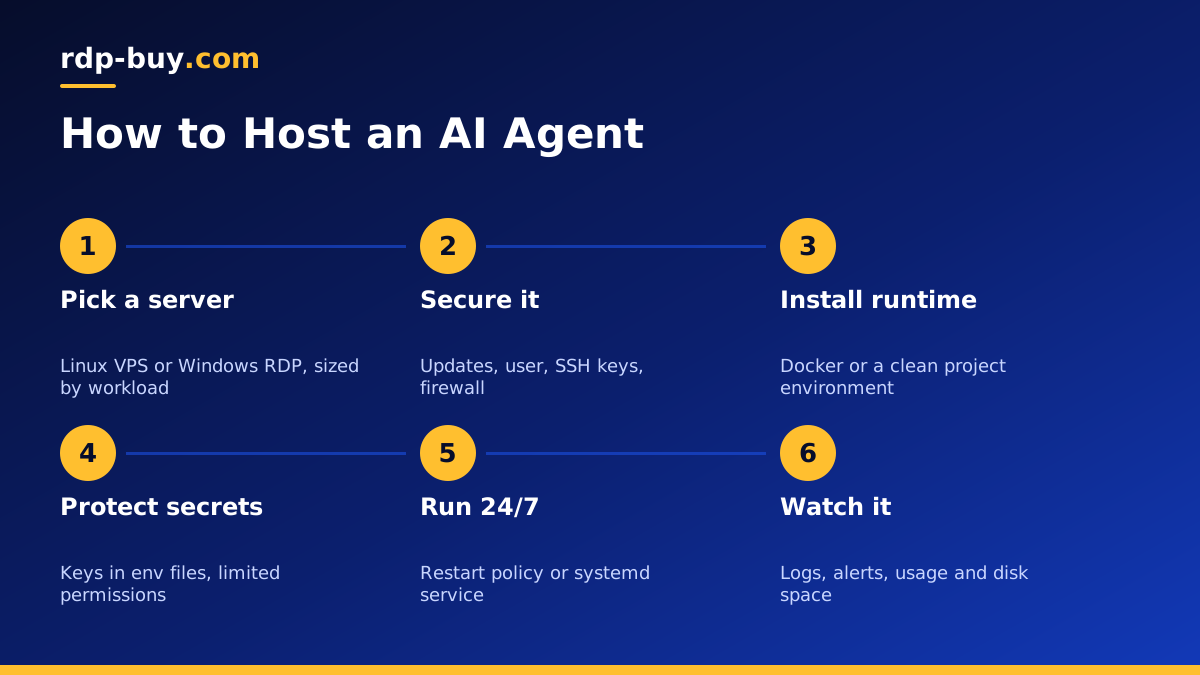
Knowing how to host AI agents comes down to five things: a server that stays on, a clean runtime, safe storage for API keys, a way to restart each agent automatically and logs you actually read. This walkthrough covers each one, starting with choosing AI agent hosting that fits.
What Hosting an AI Agent Really Means
An AI agent is a program that uses a language model to decide what to do next, then acts by calling tools, APIs or other programs. Some agents answer messages in a chat app, some run tasks on a schedule, some watch inboxes or websites and react to changes, and some write and run code.
Running an agent on your laptop is fine while you build it. The trouble starts when you want it to work while you sleep. Laptops go to sleep, lose Wi-Fi, restart for updates and change IP address. An agent that handles messages, webhooks or scheduled jobs needs to be reachable and running all the time.
Hosting an AI agent means moving it to a machine designed to stay on: a VPS or RDP server in a data centre. The model itself usually stays with the AI provider and is reached over an API, so the server does not need special hardware. It needs to be reliable, secure and close to the services the agent calls.
Step One: Pick the Right Kind of Server
Most agents are written in Python or JavaScript and run happily on Linux. For these, a Linux VPS is the natural home. If your agent drives Windows software, a browser on a desktop or tools that only run on Windows, choose a Windows RDP instead. Our page on Windows RDP for AI agents covers that case.
Size the server by what the agent does, not by the model. An agent that sends prompts to a hosted model and processes text needs modest resources. An agent that runs a browser, processes documents, keeps a vector database or runs several workers at once needs more memory. Start mid sized on monthly billing and adjust after a week of real use.
Choose a location close to the APIs your agent calls most and the users it serves. rdp-buy.com has 33 locations, and every server includes root or admin access and a dedicated IPv4 address.
Step Two: Secure the Server Before Anything Else
An agent often holds keys that can spend money or read private data, so security comes first. Do these basics before you copy any code across.
- Update the system so you start from current packages.
- Create a normal user for the agent instead of running it as root.
- Use SSH keys and turn off password logins.
- Enable a firewall that allows only SSH and, if the agent receives webhooks, web traffic through a reverse proxy.
- Turn on automatic security updates so patches arrive without you having to remember.
- Our guide to Linux server best practices covers each of these in detail.
Step Three: Install the Runtime
There are two common ways to run an agent: directly on the server, or inside a container. Containers are usually the cleaner choice because the agent, its libraries and its settings travel together, and upgrades or rollbacks are a matter of swapping one image for another.
To use containers, install Docker Engine and the Compose plugin following the official guide on docker.com, then describe your agent in a Compose file. Our Docker VPS page explains why this setup suits agents. If you prefer to run directly, install the language version your agent needs, create a virtual environment or project folder, and install dependencies from a lock file so the server matches your development machine.
Many ready made agents publish install steps on github.com. Follow the project's own instructions rather than older copies, since agent projects change quickly.
Step Four: Store API Keys and Secrets Safely
Your agent needs keys for the model provider and for every tool it uses. Never paste these into your code or commit them to a repository. Put them in an environment file that only the agent's user can read, or in your container platform's secrets feature, and load them at start up.
Give each key the smallest set of permissions it needs. If a tool lets you create a key limited to one project or one action, use that. Set spending limits with your model provider where possible, so a bug that loops forever cannot run up a large bill.
Keep a private record of which key is used where. When you rotate a key, you will know exactly which service to update.
Step Five: Keep the Agent Running 24/7
An agent that stops when you close the terminal is not hosted yet. You need something that starts it on boot and restarts it if it crashes.
With containers, set a restart policy in your Compose file so Docker brings the agent back after a crash or a server reboot. Without containers, create a systemd service that runs the agent as its own user, restarts on failure and starts at boot. Both approaches mean you can log off and the agent keeps working.
If the agent receives webhooks or serves a small web interface, put a reverse proxy such as Caddy or Nginx in front of it, point a domain at the server's dedicated IP and use HTTPS. Never expose an agent's admin panel to the open internet without a password.
Step Six: Watch Logs, Costs and Behaviour
Agents can fail quietly. A changed API, an expired key or a prompt that confuses the model can leave the agent running but doing nothing useful. Build a habit of checking a few signals.
- Logs: write clear logs for each task the agent starts and finishes, and check them daily at first.
- Alerts: send yourself a message when a task fails or when the agent has not completed anything for a while.
- Usage: review your model provider's usage page regularly to catch unexpected spikes.
- Disk space: logs, caches and downloaded files grow. Rotate logs and clean old files.
- Human review: for agents that send emails, post content or spend money, keep an approval step until you trust them.
Hosting Popular Agents and Tools
The same steps apply whichever agent you run, but some tools have dedicated guides. For workflow automation with AI steps, see VPS for n8n. For coding agents such as Claude Code (by Anthropic), see VPS for Claude Code, which explains running it in a persistent terminal session on a server. For OpenClaw and Hermes Agent, see VPS for OpenClaw and VPS for Hermes Agent.
rdp-buy.com is not affiliated with any of these projects. We provide the server, and you install and run the software under its own licence and terms.
Running Several Agents on One Server
Once the first agent is stable, many people add more. One server can host several agents if you keep them separate. Give each agent its own folder, its own environment file and, ideally, its own container, so a crash or a bad update in one does not affect the others.
Watch memory as you add agents. If the server is busy most of the time or tasks start to queue, either move a heavy agent to its own server or step up to a larger plan. Keeping agents in separate containers makes that move simple, since you only copy the folder and start it on the new machine.
Choosing Your AI Agent Server
To recap how to host AI agents: pick Linux or Windows based on what the agent runs, size the server by its workload, secure it, install the runtime in a container, keep secrets out of code, set automatic restarts and watch the logs.
rdp-buy.com servers are ready in minutes with full root or admin access, a dedicated IPv4, 24/7 support and monthly, half-yearly or yearly billing. Compare plans on our hosting for AI agents page and pay by card, PayPal or crypto.
