 Sign in
USA RDP Locations: How to Pick the Right US City for Your Server
The United States is a big country, and where your USA RDP sits inside it changes how the server behaves for your work. This guide shows how to choose between East Coast, Central and West Coast cities before you buy a USA RDP.
Why the City Matters for a USA RDP
Many buyers decide they need a server in the United States and stop there. That is a good first step, but the country spans several time zones and thousands of kilometres. A Windows server in New York and one in Los Angeles are both inside the United States, yet they are a long way apart on the network.
When you work on a USA RDP, two kinds of distance matter. The first is between you and the server, which affects how smooth the remote desktop feels while you click and type. The second, and usually the more important one, is between the server and the services it talks to: a broker, an exchange, an API, an ad platform or your customers. Programs running on the server make many requests, and shorter trips add up to a more responsive setup.
The good news is that you do not need exact network figures to make a sound choice. A simple rule works for most people: put the server close to the thing it talks to most. rdp-buy.com offers 33 locations worldwide, including several United States cities, so you can follow that rule. Every option is listed on our server locations page.
The Three Broad US Regions
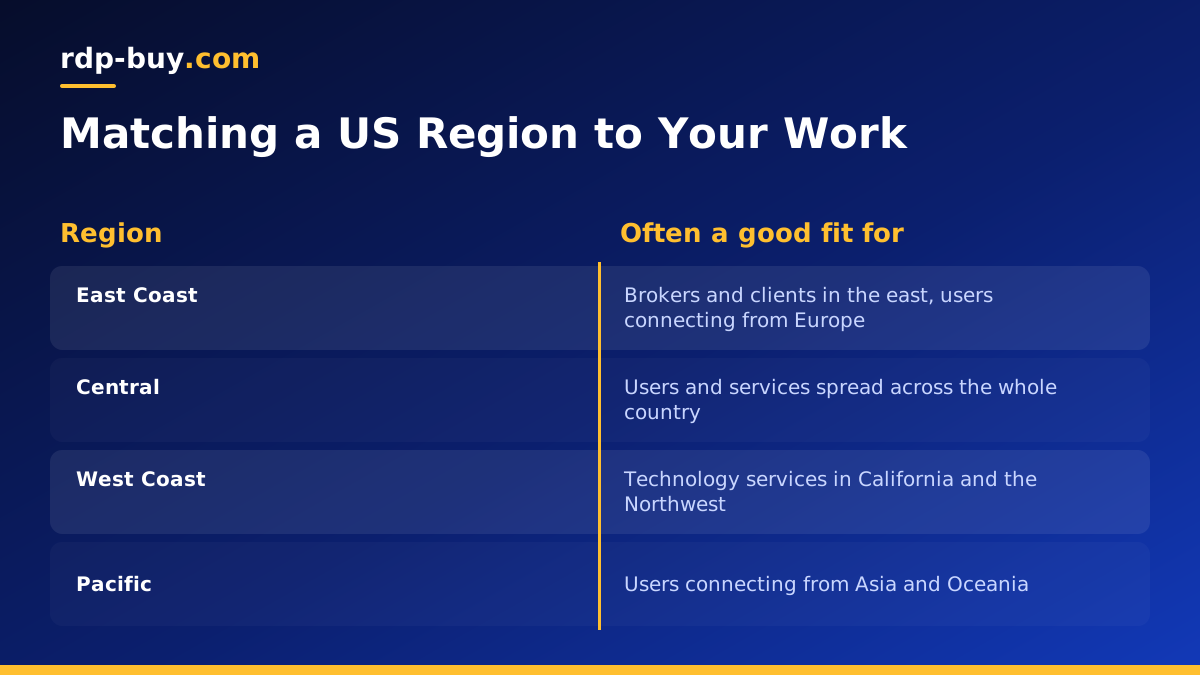
It helps to think about the United States as three broad regions. Each one suits a different kind of work.
- East Coast, including New York, Atlanta and Miami: home to many financial firms and a large share of the population, and closer to Europe and South America.
- Central, including Chicago and Dallas: a middle point between both coasts, useful when your users or services are spread across the whole country.
- West Coast and Pacific, including Los Angeles, Silicon Valley, Seattle and Honolulu: close to many technology companies and a natural bridge towards Asia and Oceania.
Picking a USA RDP City for Trading
Traders are often the most location sensitive buyers. A trading platform sends orders, receives prices and updates charts all day. The closer the server is to the broker's trading servers, the shorter each of those trips.
Start by asking your broker where its servers are. Many brokers publish this in their help pages or will tell you through support. If the answer is New York or the East Coast, choose a New York or nearby East Coast RDP. If the broker is based in Chicago, a Chicago server is a natural fit. If you trade with several brokers in different places, pick the location that serves the one you use most.
For a deeper look at running platforms like MetaTrader on a Windows server, see our forex RDP page, which covers the setup traders usually need.
Picking a City for Marketing, Accounts and Remote Work
If you mainly need a stable United States IP address for ad accounts, client portals or company systems, the exact city matters less than for trading. Any United States location gives you a dedicated US IPv4 address.
In this case, choose the city that best matches the people or business you represent. A team working with East Coast clients may prefer New York or Atlanta. A company focused on California may prefer Los Angeles or Silicon Valley. Matching the region also makes local time zones, local search results and regional content easier to check.
Also think about where you are. If you connect from Europe, an East Coast server will usually feel more responsive to work on. If you connect from Asia or Australia, a West Coast or Honolulu server is generally the closer choice.
Picking a City for Bots, Automation and AI Agents
Automation tools and AI agents spend most of their time talking to other services rather than to you. A scheduler that checks websites, a bot that calls an API or an agent that sends requests to a language model all benefit from being close to the endpoints they use.
Look at the services your automation depends on and note where they are hosted, if that is published. Many large API providers run in several regions, in which case a central or coastal city is fine. If one critical service is clearly tied to one region, put your server there.
If your automation runs on Windows, such as a desktop based bot or a browser automation tool, a USA RDP is the right base. If it runs as scripts or containers, consider a USA VPS instead, and read our Windows RDP for AI agents page for the Windows option.
A Simple Decision Process
If you are still torn between cities, follow these steps in order. Most buyers have an answer by the third one.
- List what the server talks to: brokers, APIs, ad platforms, client systems or customers.
- Find where the most important one is: check its documentation or ask its support team.
- Pick the closest United States city from the locations available.
- If there is no clear answer, choose based on where you or your team connect from: East Coast for Europe, West Coast for Asia and the Pacific, Central for a mix.
- Test on monthly billing for a few weeks and check that everything feels right before committing to a longer term.
Common Mistakes When Choosing a USA RDP Location
A few mistakes come up again and again when people pick a United States city. Avoiding them saves time and a server move later on.
- Choosing the city closest to you instead of your services: the remote desktop may feel slightly smoother, but the programs on the server spend far more time talking to brokers and APIs than to you.
- Picking a city because it sounds familiar: a well known city is not automatically the right one. Check where your key service actually runs.
- Ignoring time zones: scheduled tasks, logs and reports follow the server clock. Set the Windows time zone to the one you work in so schedules run when you expect.
- Buying a long term before testing: start monthly, confirm the location works for you, then switch to half-yearly or yearly billing.
- Forgetting the people who share the server: if a team connects from several countries, choose a region that is reasonable for all of them rather than ideal for one.
Can You Change City Later?
Your choice is not permanent. If you find that another city suits your work better, you can order a new server in that location, move your programs and files across, and cancel the old one at the end of its billing period. Because servers are ready in minutes, the new one can be set up while the old one is still running, so there is no gap.
To make a future move easy, keep a simple list of the software you install and the settings you change. Store important files in a cloud drive or export them regularly. That way, rebuilding on a new server takes far less time.
Some people also run two servers in different regions, for example one on the East Coast and one on the West Coast, when their work truly spans both. That is worth considering only once you know a single server is not enough.
Ordering Your USA RDP
Once you have chosen a city, the rest of the decision is about plan size. Match CPU and memory to your heaviest program, leave storage room for updates and logs, and start on monthly billing if you are unsure. Our guide to which RDP plan you need explains sizing step by step.
Every Windows server from rdp-buy.com includes full administrator access, a dedicated IPv4 address, the Windows licence in the price and 24/7 support. When you are ready, choose your city and order RDP in the USA, paying by card, PayPal or crypto. If you want to pay a particular way, see buying RDP with a card.
