 Sign in
OpenClaw Hosting for Free: What Works and When to Pay
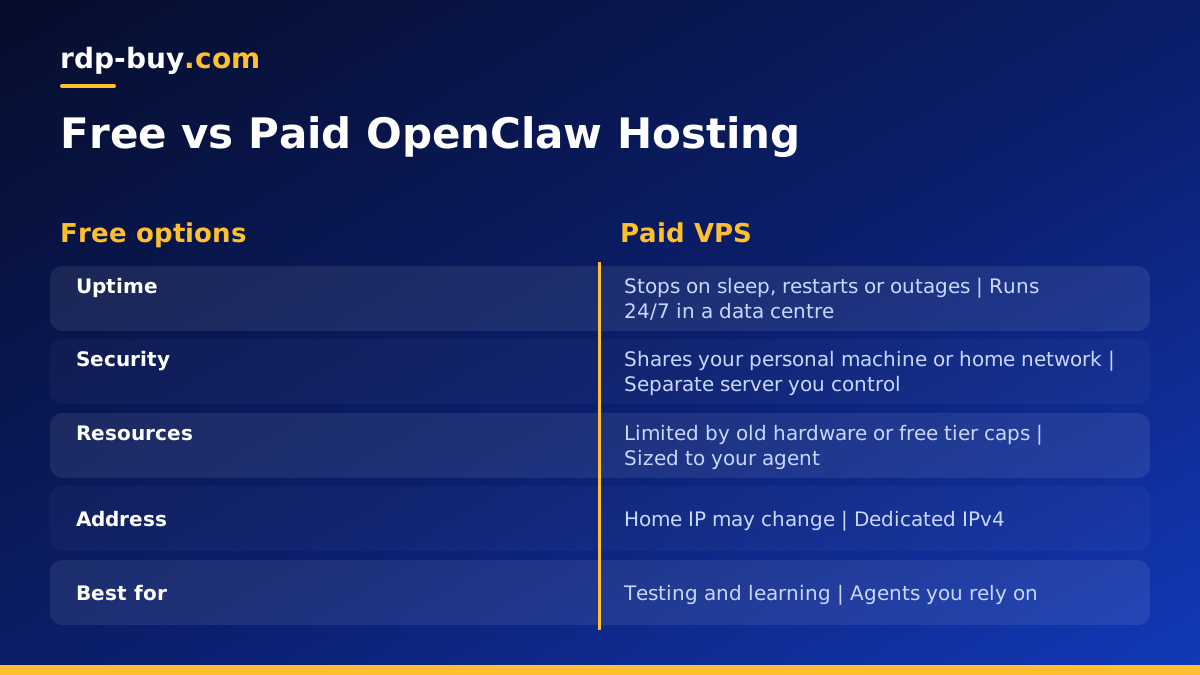
OpenClaw hosting for free is possible for testing, but free options usually fail on uptime, security or resources once you rely on the agent. This guide compares the free routes honestly and shows when moving to paid AI agent hosting is worth it.
What OpenClaw Needs From a Host
OpenClaw is an open source AI agent that you run yourself. It connects to a language model through an API and to the apps you use, and then carries out tasks on your behalf. Because it acts for you, the machine it runs on matters: it has to be online when messages or tasks arrive, it holds your API keys and app connections, and it needs enough memory for the tools it uses.
Put simply, any host for OpenClaw needs four things. It must stay on, ideally 24/7. It must be secure enough to hold keys and private data. It must have enough resources for the agent and its tools. And it must be reachable by the services that talk to it. The official project pages on openclaw.ai and github.com list the current software requirements, so check those before you choose.
With those needs in mind, here is how the common free options compare.
Free Option One: Your Own Laptop
The easiest free way to run OpenClaw is on the computer you already use. Install it, connect your model key and start testing. For learning how the agent behaves, building skills or trying prompts, this is ideal.
The limits show up quickly once you want the agent to work while you are away. A laptop sleeps when the lid closes, restarts for updates, drops off Wi-Fi when you travel and changes IP address between networks. Every one of those events stops the agent. There is also a privacy point: an agent with broad access to your personal machine can reach your personal files, which is a bigger risk than an agent on a separate server.
Verdict: perfect for development, not suitable for an agent you rely on.
Free Option Two: A Spare PC or Home Server
An old desktop, a mini PC or a small single board computer at home can run OpenClaw around the clock without a monthly bill. Many hobbyists start this way, and it is a good step up from a laptop.
It is not entirely free, though. The machine uses electricity all day, and you are responsible for the hardware. More importantly, a home connection was not built for hosting. Power cuts, router restarts and changing home IP addresses interrupt the agent, and exposing a home machine to the internet for webhooks means opening ports on your home network, which needs care.
Verdict: workable for a personal agent if you accept occasional downtime and manage the security of your home network.
Free Option Three: Free Cloud Tiers and Trial Credits
Some cloud platforms offer free tiers or trial credits that can run a small server or container. These can host OpenClaw for a while at no cost, and they give you a real data centre connection.
The catch is in the details. Free tiers often have very small amounts of memory, which may not be enough for the agent and its tools. Some put idle apps to sleep, which is the opposite of what an always on agent needs. Trial credits end, and when they do you either pay that platform's rates or move everything. Free plans may also limit outbound connections or require a card to sign up.
Verdict: useful for a short trial, but read the limits carefully, and plan for what happens when the free period ends.
The Hidden Costs of Free OpenClaw Hosting
Free hosting rarely costs nothing. The costs simply show up in other places.
- Downtime: missed messages and tasks every time the machine sleeps, restarts or loses connection.
- Your time: hours spent fixing a home network, restoring a sleeping container or migrating when a trial ends.
- Security risk: an agent with access to your personal computer, or a home server with open ports.
- Resource limits: an agent that slows down or crashes because the free tier has too little memory.
- Model costs still apply: the API usage for the language model is billed by the model provider whichever host you use.
When to Move OpenClaw to a Paid VPS
There is a clear point where paying for a small server becomes the sensible choice. Move to a VPS when any of these are true.
- You rely on OpenClaw for real tasks and missed runs cause problems.
- The agent needs to receive webhooks or messages at any time of day.
- You want the agent kept away from your personal files and home network.
- Your free tier is running out of memory or putting the agent to sleep.
- A trial is ending and you would have to migrate anyway.
Setting Up OpenClaw on a VPS
Once you have a server, the setup follows a familiar pattern. Connect over SSH, update the system, create a normal user for the agent and use SSH keys instead of passwords. Turn on a firewall that allows only what you need.
Next, install OpenClaw following the current instructions on openclaw.ai or the project's github.com page. Running it in Docker, where supported, keeps the install tidy and makes updates easy. Store your model API key and app tokens in an environment file that only the agent's user can read.
Finally, make sure OpenClaw starts on boot and restarts after a crash, using a Docker restart policy or a systemd service. Check the logs after the first day to confirm it is handling tasks. Our guide to what you can run on an RDP or VPS gives more ideas for the same server, and the Docker VPS page explains the container approach.
Keeping a Hosted OpenClaw Agent Safe
Moving OpenClaw to a server removes many of the risks of running it on a personal machine, but an agent that acts on your behalf still deserves careful setup. Start by giving it only the app connections it truly needs. If a task only reads a calendar, there is no reason for the agent to have permission to send email.
Keep the agent's control interface private. If it offers a web dashboard, protect it with a strong password and serve it only over HTTPS through a reverse proxy, or reach it through an SSH tunnel instead of exposing it at all. Review the list of connected apps from time to time and remove any you no longer use.
Finally, update both the server and OpenClaw regularly. Agent projects move quickly and updates often include security fixes. Take a backup of the agent's configuration and data folder before each update, so you can roll back if a new version changes how something behaves.
Set spending limits with your model provider as well. A misconfigured task that repeats in a loop can send a large number of requests, and a limit stops that before it becomes a surprise on your bill.
Choosing a Paid Plan for OpenClaw
For most personal OpenClaw setups, a small to mid sized Linux VPS is enough, because the language model runs at the provider and the server only runs the agent and its tools. Pick a location close to the APIs and apps the agent uses, start on monthly billing and adjust the size after a week.
rdp-buy.com servers come with root access, a dedicated IPv4, 24/7 support and are ready in minutes. See our VPS for OpenClaw page for suitable plans, or compare all options on our hosting for AI agents page. If cost is the main concern, our cheap VPS plans are a good starting point. rdp-buy.com is not affiliated with the OpenClaw project.
