 Sign in
Claude Code MCP Server Setup: Running MCP Tools on a VPS
A Claude Code MCP server gives Claude Code (by Anthropic) new tools, from databases to issue trackers. This guide explains when to run those servers on your own machine, when to move them to a VPS, and how to set up AI agent hosting that keeps them available and secure.
What a Claude Code MCP Server Is
Claude Code is a coding agent that works in your terminal. It reads and edits code, runs commands and can be extended with extra tools through the Model Context Protocol, usually shortened to MCP. MCP is an open standard that describes how an AI application talks to a tool server.
An MCP server is a small program that offers tools to the agent. One server might let Claude Code query a database, another might read tickets from an issue tracker, another might control a browser or search documentation. Claude Code acts as the client: it connects to the server, sees which tools it offers and calls them when they help with a task.
MCP servers come in two broad kinds. Local servers run on the same machine as Claude Code and talk to it directly through standard input and output. Remote servers run somewhere else and are reached over HTTP. That difference is what decides where each one should live. The official documentation on anthropic.com explains how to add servers with the claude mcp commands and the supported connection types.
Which MCP Servers Belong on Your Own Machine
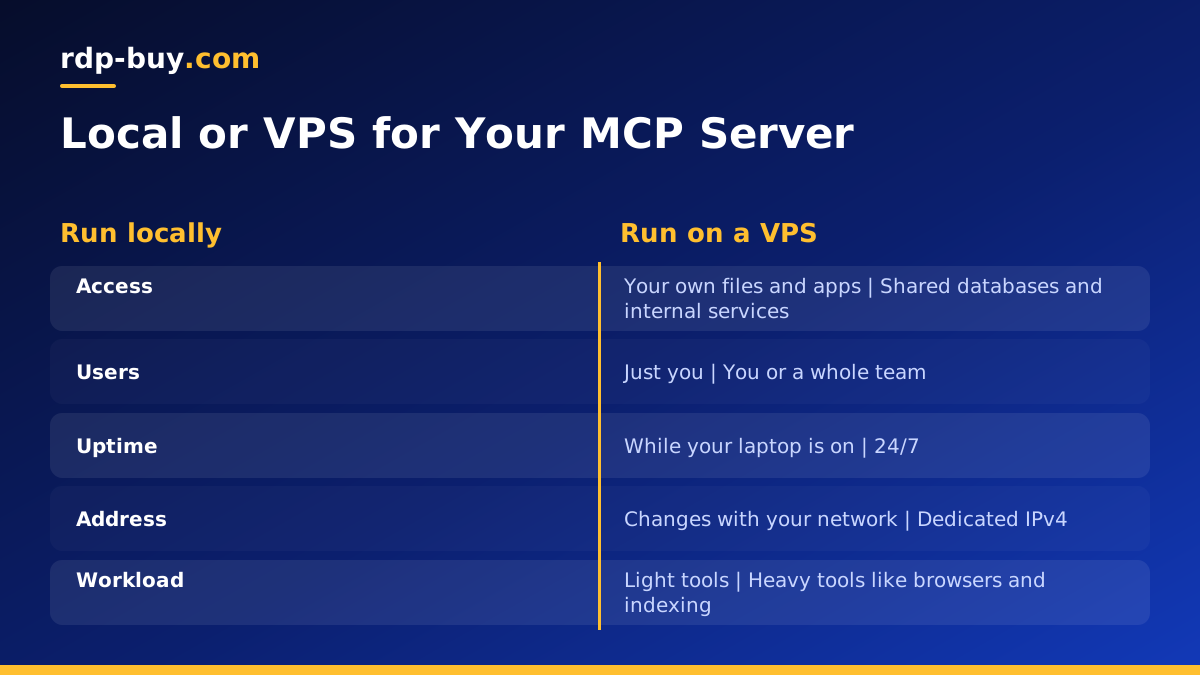
Some MCP servers make the most sense close to where you work. Keep these local when Claude Code runs on your laptop.
- File and project tools that need direct access to the code you are editing.
- Tools tied to local apps, such as a browser you watch while the agent works.
- Short lived experiments you are testing and will remove later.
- Anything with access to personal files that should not leave your computer.
When to Run a Claude Code MCP Server on a VPS
Other MCP servers work better on a server that is always on. Moving them to a VPS makes sense in several common situations.
You run Claude Code itself on a server. Many developers keep Claude Code running in a persistent terminal session on a VPS so long tasks continue while their laptop is closed. In that case, its local MCP servers run on the same VPS. Our VPS for Claude Code page and the guide to building a remote dev box cover that setup.
A team shares the same tools. Instead of every developer installing and configuring the same MCP server, one remote server on a VPS can serve the whole team, with one place to update and secure it.
The tool needs to reach private systems. If an MCP server talks to a database or internal service that only accepts connections from a known address, a VPS with a dedicated IPv4 gives you a fixed address to allow.
The tool is heavy. Browser automation, document processing or indexing large codebases can use a lot of memory. Running them on a server keeps your laptop responsive.
How to Judge the Best MCP Servers for Your Work
There is no single best Claude Code MCP server. The right ones depend on the systems you work with every day. A useful way to decide is to look at the tasks where you keep copying information into the conversation by hand, such as database schemas, ticket descriptions or documentation pages. A tool server that fetches that information for the agent saves the most time.
When comparing options, prefer servers that are actively maintained, clearly documented and limited in scope. A focused server that does one job well is easier to secure and debug than a large one that tries to do everything. Check whether a server can run read only, since many tasks only need to look things up.
Start with one or two servers, use them for a week, and add more only when you hit a clear gap. Each extra server adds tools the agent has to choose between, so a short, relevant list usually works better than a long one.
Setting Up the VPS
Start with a Linux VPS, since nearly all MCP servers are written in Python, TypeScript or Go and run naturally on Linux. Prepare it the usual way before installing anything.
- Update packages and enable automatic security updates.
- Create a normal user for Claude Code and MCP servers rather than working as root.
- Use SSH keys and turn off password logins.
- Enable a firewall that allows SSH and, only if you host a remote MCP server, HTTPS.
- Install the runtimes your MCP servers need, such as Node.js or Python, or install Docker so each server runs in its own container. See our Docker VPS page for the container approach.
Adding MCP Servers to Claude Code on the VPS
With Claude Code installed on the server, add each MCP server using the claude mcp add command as described in the official documentation. For a local server, you give it the command that starts the server and any environment variables it needs. Claude Code will start it when needed and talk to it directly.
Decide on the scope of each server. Some belong to a single project and can be stored in that project's configuration, so everyone who works on the repository gets the same tools. Others are personal and should stay in your user settings. Keeping this tidy makes it obvious which tools each project relies on.
After adding servers, start a Claude Code session and check that the tools appear. If one is missing, run its start command by hand to see the error. Missing dependencies and wrong paths are the most common causes.
Hosting a Remote MCP Server Safely
A remote MCP server reached over HTTP is a web service, and it needs the same care as any other. Remember that its tools may be able to read data or take actions on your systems.
- Always use HTTPS. Put a reverse proxy such as Caddy or Nginx in front of the server and point a domain at the VPS.
- Require authentication. Use the authentication method the server supports, and never leave a remote MCP server open to anyone who finds the address.
- Limit network access. If only your team uses it, restrict the firewall to known addresses or reach it through a private tunnel.
- Grant the least access. Give the server database users and API keys with only the permissions its tools need.
- Keep secrets out of code. Store keys in environment files readable only by the service user.
- Log tool calls. A record of which tools were called and when helps you spot mistakes and misuse.
Keeping MCP Servers Running
A remote MCP server needs to start on boot and recover from crashes. Run it in Docker with a restart policy, or as a systemd service that restarts on failure. Watch its logs for errors after each update, and pin versions so a new release does not change tool behaviour without you noticing.
Only install MCP servers from sources you trust. Read the code or documentation on github.com before adding a new one, since a tool server runs with whatever access you give it.
Back up the configuration of each MCP server, along with any data it keeps, so you can rebuild quickly on a new server if needed.
Choosing a Server for Claude Code and MCP
For one developer running Claude Code with a few local MCP servers, a mid sized Linux VPS is usually enough. If you add browser tools, indexing or a shared remote MCP server for a team, choose a plan with more memory. Pick a location close to the services your tools call and to where your team works.
rdp-buy.com servers are ready in minutes, with root access, a dedicated IPv4, 24/7 support and monthly, half-yearly or yearly billing. Browse Claude Code VPS plans or compare everything on our hosting for AI agents page. rdp-buy.com is not affiliated with or endorsed by Anthropic.
