 Sign in
Dedicated Server vs VPS: How to Choose the Right One in 2026
A VPS gives you a slice of a shared physical machine, while a dedicated server gives you resources that nobody else touches. This guide explains the real differences, the trade offs, and how to decide whether a VPS is enough or it is time to buy a dedicated server.
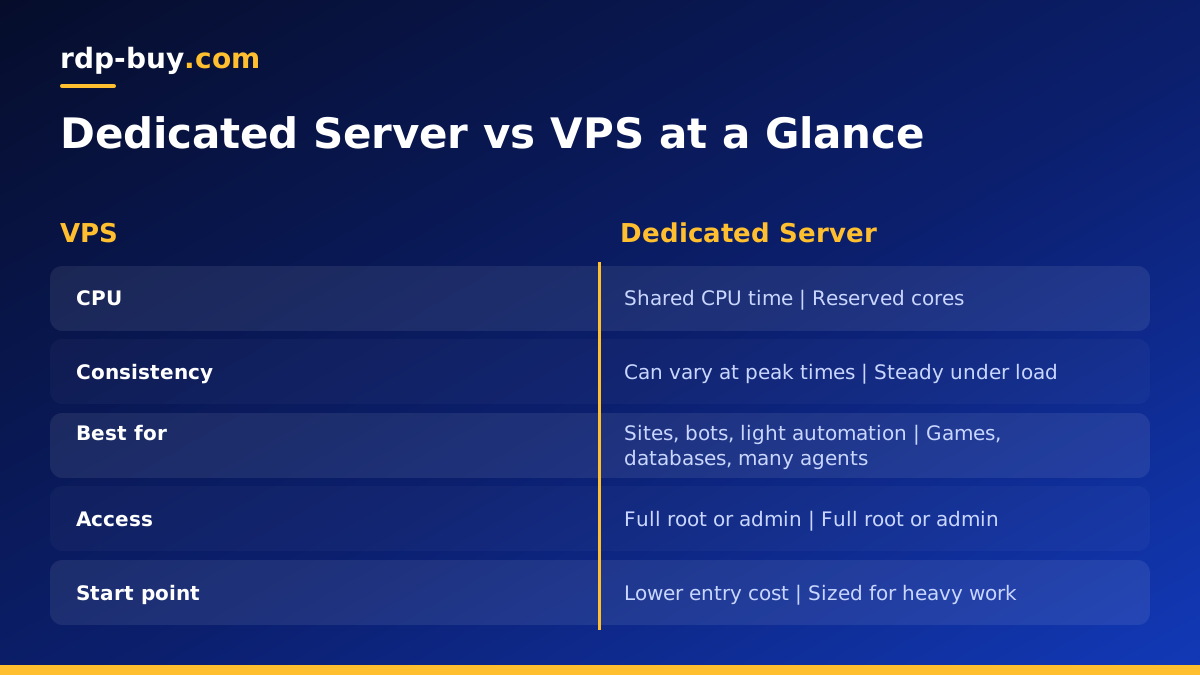
Dedicated Server vs VPS: The Short Answer
A virtual private server (VPS) is a virtual machine. A hypervisor splits one physical host into several isolated environments, and each customer gets a share of the CPU, memory and storage. You get your own operating system, root or admin access and your own IP address, but you share the underlying hardware with other tenants.
A dedicated server, in the sense most hosts use today, means the compute resources are reserved for you. On a dedicated CPU server, the processor cores assigned to you are not shared with neighbours, so the work you run gets consistent access to them at all times. A bare metal server goes one step further and hands you the entire physical machine.
For most people the decision comes down to one question: does your workload suffer when other tenants are busy? If the answer is no, a VPS is usually the sensible starting point. If the answer is yes, or you cannot afford to find out in production, a dedicated server is the safer choice.
How a VPS Works
When you order a VPS, the provider creates a virtual machine on a host that already runs other virtual machines. The hypervisor enforces limits so that one customer cannot read another customer's memory or disk. From inside the server it looks and behaves like a normal computer: you can install packages, run services, open ports in your firewall and reboot whenever you like.
The trade off is that CPU time on a standard VPS is often shared. If several tenants on the same host run heavy jobs at once, each of them can see small slowdowns. For websites, bots, small databases, development environments and most automation tools, this rarely matters. For workloads that need steady, predictable processing, it can.
If you are weighing a VPS against a Windows remote desktop instead, our guide on the difference between RDP and VPS explains how the two products relate.
- Good for: websites, APIs, n8n workflows, chat bots, staging servers, small databases, VPN endpoints.
- Strengths: quick to deploy, easy to resize, lower entry cost, full root access.
- Limits: shared CPU time on standard plans, less predictable under heavy sustained load.
How a Dedicated Server Works
A dedicated server reserves compute for a single customer. With dedicated CPU plans, your virtual machine is pinned to cores that are not handed to anyone else, which removes the noisy neighbour problem for processing. You still get the convenience of a virtual server, such as fast provisioning and easy rebuilds, but with consistent performance.
With a bare metal server you rent the whole physical box. There is no hypervisor layer shared with other tenants, so you control every resource, from the CPU to the disks. This suits workloads that need maximum isolation, specific kernel settings or hardware level access. Our post Bare Metal vs VPS explains when that extra step is worth it.
Either way, the core promise of a dedicated server is predictability. The performance you measure on a quiet afternoon is the performance you get during a busy evening, because nobody else is competing for your cores.
- Good for: game servers, busy databases, CI build runners, video processing, multiple AI agents running in parallel, trading platforms.
- Strengths: consistent CPU performance, stronger isolation, room for sustained heavy work.
- Limits: higher cost than an entry VPS, and more capacity than small projects need.
Key Differences Side by Side
It helps to compare the two options on the points that actually affect your day to day work, rather than on marketing terms.
- Resource sharing: a VPS shares CPU time with other tenants; a dedicated server reserves cores for you alone.
- Performance consistency: a VPS can vary when the host is busy; a dedicated server stays steady.
- Isolation: both isolate your data, but dedicated and bare metal plans reduce the shared surface further.
- Access: both give you full root access on Linux or admin access on Windows.
- Scaling: a VPS is easy to upgrade in small steps; a dedicated server is sized for larger, steady workloads.
- Cost: a VPS is the cheaper way to start; a dedicated server costs more because the hardware is reserved.
When a VPS Is Enough
Many projects run happily on a VPS for years. If your server spends most of its time waiting for requests rather than crunching numbers, shared CPU time is rarely a bottleneck. A personal website, a WordPress blog, a Discord bot, a self hosted n8n instance or a small API all fall into this group.
A VPS is also the right choice when you are still learning what your workload needs. Start small, watch your CPU and memory graphs for a few weeks, and only move up when the numbers tell you to. Our guide on setting up a new VPS walks you through the first secure steps after you log in.
Signs You Have Outgrown a VPS
The clearest signal is CPU steal time. On Linux, tools like top and htop show a value labelled st. If it regularly climbs while your own processes are busy, the host is giving your CPU time to other tenants, and a dedicated server will fix that.
Other signs are less technical but just as real. Players complain about lag spikes on your game server at peak times. Scheduled jobs that used to finish overnight now run into the morning. A database that feels fast at quiet hours becomes sluggish during the day. Several AI agents running at once slow each other down. When these patterns repeat, the problem is usually contention, not your code.
- High or rising CPU steal time in top or htop.
- Performance that changes with the time of day, even when your own traffic is flat.
- Long running jobs such as builds, encoding or backups that keep getting slower.
- Workloads that must respond in a steady, predictable time, such as trading platforms or game servers.
Dedicated Servers for AI Agents and Automation
AI agents are a growing reason people move up from a VPS. A single agent that calls an API and waits for a reply uses little CPU. But when you run several agents at once, add a local vector database, run browser automation or build containers with Docker, the CPU stays busy for long stretches. That is exactly the pattern where reserved cores help.
A dedicated server also keeps everything running around the clock without a laptop that has to stay switched on. You get a dedicated IPv4 address, which helps when APIs or webhooks need a stable origin, and you can pick a location close to the services your agents talk to. If agents are your main use case, our AI agent hosting hub covers the options in more detail.
Choosing Your Plan
If your workload is light, bursty or still being tested, start with Linux VPS hosting and upgrade when the data tells you to. If you already see steal time, lag at peak hours or slow scheduled jobs, go straight to a dedicated server with reserved CPU so you are not chasing the same problem again in a month.
Whichever you choose, rdp-buy.com servers come with full root or admin access, a dedicated IPv4 address, a choice of 33 server locations and 24/7 support. Servers are ready in minutes, and you can pay monthly, half-yearly or yearly, so it is easy to test a plan before you commit for longer. Pick the location closest to your users or the APIs your software calls, and size up only when your workload asks for it.
