 Sign in
Cheap VPS for Hermes Agent: What You Need to Run It 24/7
Hermes Agent, the open source agent from Nous Research, runs happily on a small Linux server because the heavy model work usually happens through an API. This guide explains what a cheap VPS for Hermes needs, where saving money is safe, and how AI agent hosting keeps it online around the clock.
Can You Run Hermes Agent on a Cheap VPS?
Yes, in most setups. Hermes Agent is an agent framework: it plans tasks, keeps memory, uses tools and talks to you through a terminal or a messaging app. The language model that does the thinking normally runs elsewhere, through a provider API or an endpoint you point it at. That means the server only has to run the agent process, its tools and its storage, which is light work for a modest machine.
The picture changes if you want to run the model on the same server. Local models need far more memory and processing power, and a budget VPS is not the right home for them. For most people, the sensible split is a small, always on VPS for the agent and a hosted model API for the reasoning.
Before you install, read the current requirements and setup steps in the official Hermes Agent documentation from Nous Research on nousresearch.com and the project's GitHub repository, since supported platforms and install methods can change between releases. rdp-buy.com is not affiliated with Nous Research.
Why Run Hermes on a VPS Instead of Your Laptop
An agent is most useful when it is always available. If Hermes lives on your laptop, it stops when the lid closes, loses its scheduled jobs when the machine sleeps, and drops off your messaging apps when your home internet blips. On a VPS it keeps running, so scheduled tasks fire on time and you can message it from your phone at any hour.
A server also gives the agent a stable environment. It has a dedicated IP address, a fixed location close to the APIs it calls, and no risk of it touching personal files on your own computer. You can give it exactly the access it needs and nothing more.
- Always on: scheduled tasks and chat gateways keep working while you sleep.
- Separation: the agent's tools run on a server, not on your personal machine.
- Stable address: a dedicated IPv4 address helps with allowlists and webhooks.
- Location choice: place the server near the model API or services it uses most.
What Specs a Cheap VPS for Hermes Needs
Because Hermes mostly waits on API replies, the agent itself does not need much CPU. What matters more is enough memory for the agent, its tools and any browser or code it runs, plus reliable storage for its memory and logs.
A small Linux VPS from a reputable host is usually a fine starting point. Ubuntu or Debian are good choices because most guides and install scripts assume them. Watch resource use for the first week. If memory stays close to full, or tasks slow down when the agent runs several tools at once, step up one size.
- Operating system: a current Ubuntu or Debian release with root access.
- Memory: the resource to watch most, especially if the agent uses a headless browser.
- CPU: modest needs for API based use; more if you run builds, scrapers or code execution.
- Storage: SSD storage with room for memory files, logs and any workspaces.
- Network: a dedicated IPv4 address and a location near your model provider.
Where It Is Safe to Save Money
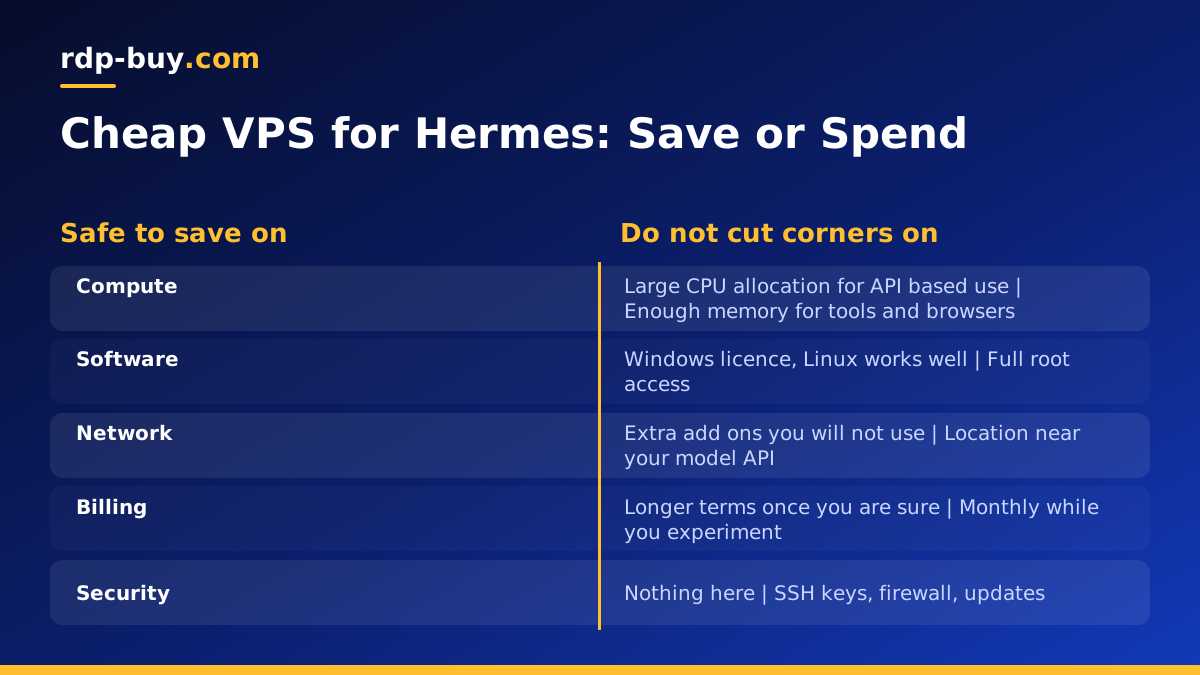
A cheap VPS can be a smart choice for Hermes, as long as you save in the right places. You do not need a large CPU allocation for an agent that mainly calls an API. You do not need a Windows licence, since Hermes is happiest on Linux. And you do not need a big disk unless the agent stores large files.
Billing terms are another place to save. If you already know you will keep the agent running for a long time, a half-yearly or yearly term is usually better value than paying month to month. If you are still experimenting, start monthly so you can resize or cancel easily.
Where Not to Cut Corners
Some savings cost more than they save. A host that oversells its servers can leave your agent stalling at busy times. A plan with no root access stops you installing the tools Hermes needs. And a server far away from your model provider adds delay to every single step the agent takes.
Security is the other area not to skimp on. Your agent holds API keys and may hold access to email, chat or code. Treat the server as sensitive from day one.
- Choose a host that gives full root access and a dedicated IPv4 address.
- Pick a location near the APIs your agent calls.
- Use SSH keys, a firewall and automatic security updates.
- Store API keys in environment files with tight permissions, never in shared folders.
Setting Up Hermes Agent on Your VPS
The exact commands depend on the release you install, so follow the official instructions, but the overall flow looks like this. First, secure the server: create a sudo user, add your SSH key, enable a firewall and apply updates. Our guide VPS How to Setup covers those steps.
Next, install Hermes with the method the project recommends, add your model provider API key, and run the agent once in the terminal to confirm it answers. Then connect any messaging gateway you want to use, so you can talk to the agent from your phone.
Finally, make it survive reboots. Run the agent inside a terminal multiplexer such as tmux for quick tests, but for long term use set it up as a systemd service or a Docker container with a restart policy. That way the agent comes back on its own after updates or a server restart.
Running Hermes Next to Other Agents
Many people end up running more than one agent. You might keep Hermes for personal tasks, n8n for business workflows and Claude Code (by Anthropic) for coding work. On a single server, give each one its own user or container, its own folder and its own API keys, so a mistake in one cannot affect the others. Our guide on running several agents on one server explains how to split resources cleanly.
As you add agents, keep an eye on memory first. When it stays close to full, it is time for a larger plan rather than squeezing more onto the same machine.
Choosing Your Hermes Server
If you want a ready starting point, our VPS for Hermes Agent page explains the plans that suit it best. For a wider view of agent setups, browse our hosting for AI agents, which covers n8n, OpenClaw, Claude Code and more.
Every rdp-buy.com server includes full root access, a dedicated IPv4 address and a choice of 33 server locations, with 24/7 support. Servers are ready in minutes, and you can pay monthly, half-yearly or yearly, so you can start small and grow the plan as your agent takes on more work.
