 Sign in
Dedicated Server for Website Hosting: When Your Site Needs One
Most websites start on shared hosting or a VPS, and many never need more. But busy stores, membership sites and apps eventually reach a point where reserved resources make a real difference. This guide explains how to tell when you need a dedicated server for your website and how to set it up well.
What a Dedicated Server for Website Hosting Means
Website hosting comes in layers. Shared hosting puts many sites on one server with one control panel, and you get a folder and a database. A VPS gives you your own virtual machine with root access, but the CPU is often shared with other tenants. A dedicated server reserves processing power for you alone, so your site gets consistent performance no matter what anyone else is doing.
For a website, that consistency is the main benefit. Page generation, database queries, search indexing, image resizing and checkout logic all need CPU time. When that time is guaranteed, pages render at a steady speed during your busiest hours, not just at quiet times.
A dedicated server also gives you the freedom to tune the whole stack. You choose the web server, the PHP or Node.js version, the database settings, the caching layers and the security tools, without the limits a shared host imposes.
Signs Your Website Has Outgrown Its Current Hosting
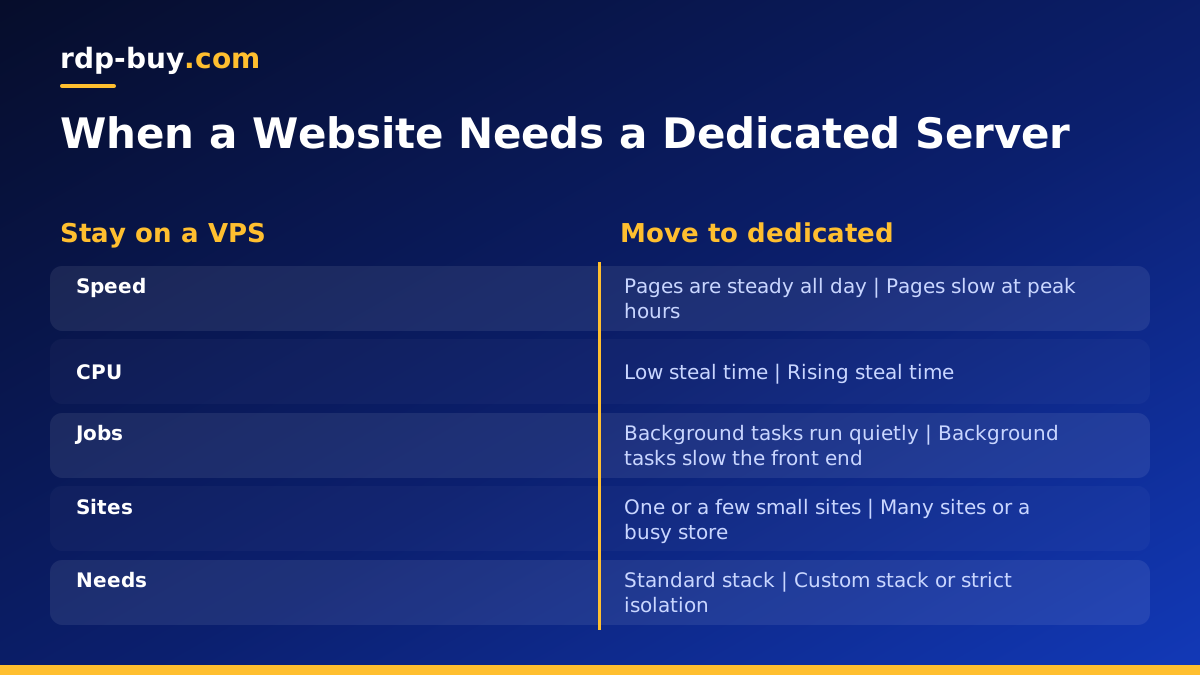
There is no single traffic number that tells you to upgrade. Instead, look for patterns that repeat. If you see several of these, a dedicated server is worth considering.
- Slow pages at peak times: the site is fine at night but sluggish during busy hours, even after caching.
- Resource limit warnings: your shared host throttles or suspends the site for using too much CPU.
- CPU steal on a VPS: top or htop shows rising steal time, meaning other tenants are taking CPU.
- Heavy background jobs: imports, feeds, backups or search indexing slow the front end while they run.
- Many sites on one server: you host client sites or a network and they compete for the same resources.
- Strict requirements: you need custom software, special configuration or stronger isolation for compliance.
Shared Hosting vs VPS vs Dedicated Server for a Website
Shared hosting is the easiest place to start, with almost no server work, but you accept tight limits and neighbours you cannot see. A VPS gives you root access and room to grow, which suits most small and medium sites. A dedicated server gives you reserved resources and full control for sites where speed and stability directly affect revenue or reputation.
If you want the full comparison between the two server options, read our guide Dedicated Server vs VPS. If you are still on shared hosting, a Linux VPS is usually the first step up.
Setting Up a Dedicated Server for Your Website
A dedicated server gives you a clean Linux or Windows install. Here is a practical order of work for a typical Linux web stack.
- Secure access: create a sudo user, add SSH keys, disable password logins and enable a firewall that allows only SSH, HTTP and HTTPS.
- Install the stack: Nginx or Apache, your language runtime such as PHP or Node.js, and a database such as MariaDB, MySQL or PostgreSQL.
- Add HTTPS: use Certbot with Let's Encrypt, or a web server such as Caddy that handles certificates automatically.
- Add caching: an object cache such as Redis and a page cache cut database load sharply for most content sites.
- Move the site: copy files and database, test using a hosts file entry, then switch DNS once everything works.
- Set up monitoring and backups: alerts for downtime, disk space and failed services, plus off server backups.
Tuning for Speed and Stability
With reserved CPU, the next bottlenecks are usually configuration. Give your database enough memory for its buffers, so frequent queries come from RAM rather than disk. Set PHP-FPM or your app server to a worker count that matches your cores and memory, not the default. Turn on HTTP compression and long cache headers for static files.
A content delivery network can sit in front of the server to serve images, scripts and styles from locations near your visitors, which reduces load on your origin. Your dedicated server then focuses on what only it can do: generating dynamic pages, handling logins and processing orders.
Finally, pick the right location. Put the server close to most of your visitors or the payment and shipping APIs your store calls. rdp-buy.com offers 33 server locations, which you can compare on our server locations page.
Security for a Website on a Dedicated Server
With full control comes full responsibility for security. Keep the operating system and every part of the stack updated. Use automatic security updates where you can, and review other updates weekly. Run fail2ban or similar to block repeated failed logins, and protect admin areas such as wp-admin with strong passwords and two factor authentication.
Separate your sites if you host more than one. Give each its own system user and database user, so a problem in one site cannot read another site's files. A dedicated IPv4 address also helps with allowlisting admin access and with services that need a fixed origin, such as payment gateways.
Running More Than a Website on the Same Server
A dedicated server often has room for more than the site itself. Many owners run a staging copy of the site, a search engine such as Meilisearch, background workers, or automation tools such as n8n on the same machine. Docker makes this tidy, with each service in its own container and resource limits so the live site always comes first.
Just be careful not to overload the server you rely on for revenue. Keep heavy experiments, such as AI agents that run browsers all day, on a separate VPS so they cannot slow your customers down. Our AI agent hosting hub covers those setups.
Choosing a Dedicated Server for Your Website
Size the server for your busiest hour, not your average day, and leave headroom for growth. Content sites with good caching need less than stores with live search and checkout. If you are unsure, start with a plan that comfortably covers your current peak and watch the graphs for a few weeks.
When you are ready, compare our dedicated CPU server plans. Each comes with full root or admin access, a dedicated IPv4 address, a choice of 33 locations and 24/7 support. Servers are ready in minutes, with monthly, half-yearly or yearly billing, so you can set up and test your new home before you switch DNS.
