 Sign in
Cheap RDP Buying Guide: What to Cut and What to Keep
Searching for cheap RDP usually means one of two things: you want a Windows server that costs as little as possible, or you have been burned by a cheap offer that turned out to be a shared desktop with no admin rights. This guide covers both: what genuinely makes an RDP plan cheaper, what should never be cut to get there, and how to pick a low cost plan from the Windows RDP plans that will actually do the job.
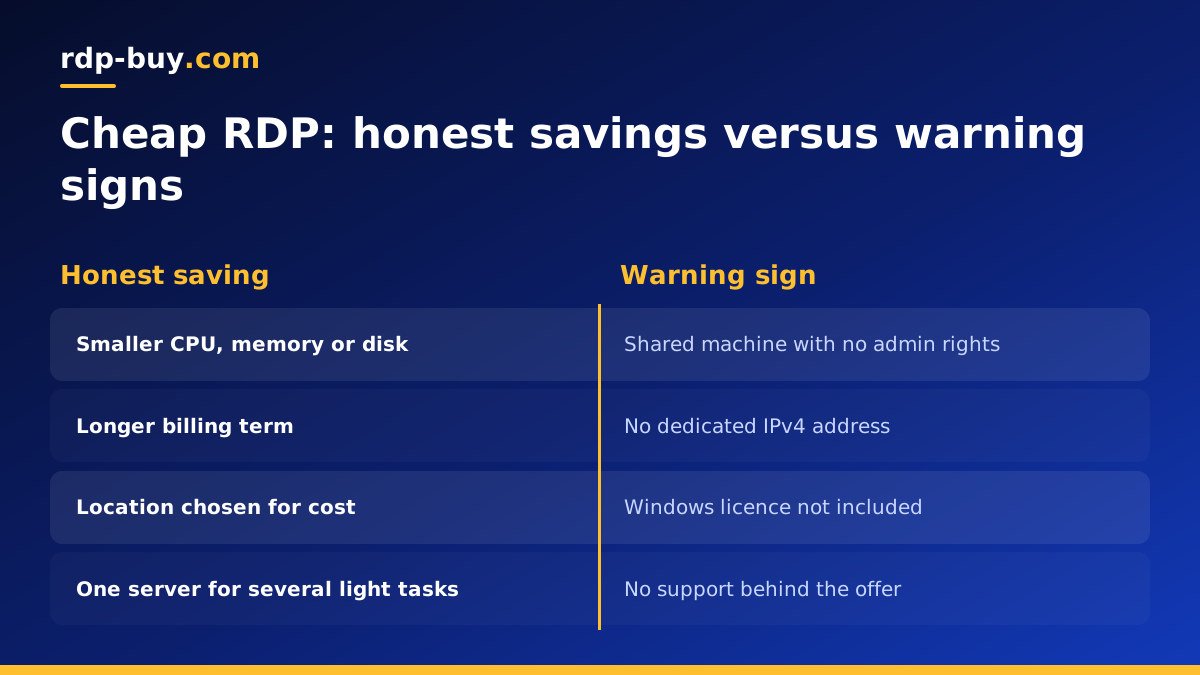
What makes a cheap RDP plan cheaper
The price of a Windows RDP plan comes from a short list of inputs, and understanding them tells you where the savings are real and where they are hiding a problem.
- CPU cores. Fewer virtual cores cost less. For light work, a small core count is enough; the desktop does not feel slow until you ask it to do several heavy things at once.
- Memory. RAM is the resource small plans run out of first, because Windows itself uses some, and every browser tab and application adds to it.
- Disk. Smaller SSD storage is cheaper. Windows needs room for itself and its updates, so the question is how much space your own files and applications need beyond that.
- Shared versus dedicated resources. Some sellers offer desktops where CPU and memory are shared across many customers, or even many users on one machine. That is cheap because you are not getting a server of your own.
- Billing term. Paying for a longer term up front costs less than paying month by month for the same server. rdp-buy.com offers monthly, half-yearly and yearly billing.
- Location. Data centre costs vary by country, so the same specification can be priced differently across the 33 locations.
What should never be cut, even on a cheap RDP server
The first three inputs are honest savings: a smaller server costs less because it is a smaller server. The fourth is where cheap offers go wrong, and the last two are levers you can pull without giving anything up.
A low cost plan should be a smaller version of a good plan, not a different and worse product. Four things are not negotiable, whatever the price.
- Full administrator access. Without admin you cannot install software, change settings, add users or fix problems. A desktop where someone else holds admin is a rented seat, not a server.
- A dedicated IPv4 address. Shared IPs get flagged by websites, trading platforms, email services and anything that rate limits or blocks by IP. Your server's reputation should be yours alone.
- A Windows licence included in the price. If the licence is not included, you either pay again or run an unlicensed system. Every Windows plan on rdp-buy.com includes the licence.
- Real support. Cheap is only cheap if the server works. 24/7 support is part of the product, not an upgrade.
Which uses fit a small plan
Every plan on the cheap RDP page keeps all four of those. The savings come from size and term, not from stripping the product down.
Plenty of real work fits comfortably on the smallest Windows plans. The common thread is a single task that runs steadily rather than many tasks that spike together.
- Light browsing and web apps: checking dashboards, managing a store back end, using web-based tools from a fixed IP that never changes.
- A single trading terminal: one MT4 or MT5 instance with a handful of charts and an expert advisor, left running around the clock.
- A small bot or script: a Telegram bot, a scheduled scraper, a price monitor, a posting tool, as long as it is one and not a fleet.
- A virtual assistant desktop: email, spreadsheets, a CRM in a browser, document editing. One person's office work on a machine that stays on.
- Light n8n automation: a self hosted n8n with a modest number of workflows that trigger on schedules or webhooks rather than processing large files.
- A lightweight AI agent loop: a scheduled Claude Code (by Anthropic) task or a similar agent that calls APIs and waits, where the heavy computing happens on the API side, not on your server.
Which uses do not fit, and what to buy instead
What those tasks share is low concurrent load. The CPU is mostly idle, memory use is stable, and the disk is not being hammered. That is exactly what a small plan is built for.
Buying cheap and then fighting a slow desktop every day is a false saving. These workloads need a mid-sized or large plan from the start.
- Video rendering or editing. These need many cores and a lot of memory, and a small plan will take hours over what a larger one finishes quickly.
- Many browser profiles at once. Each profile is a separate browser with its own memory. Anti-detect browsers, multi-account social tools and parallel scraping sessions eat RAM quickly.
- Heavy automation. Dozens of workflows, image processing, large file transfers, or a bot fleet rather than a single bot.
- Several trading terminals with many indicators, or backtesting, which is CPU intensive for long stretches.
- Development with Docker, large builds or local AI models. For headless versions of these, a Linux VPS is often the better and cheaper fit.
When a cheap Linux VPS is the cheaper answer
For any of the workloads above, start from the guide to which RDP plan you need and size up. If the task has no desktop requirement at all, read on before buying Windows.
The cheapest Windows RDP is rarely the cheapest server for a headless job. Windows includes a licence and a full desktop, and both use resources. A task that only needs a terminal, such as an n8n container, a Python script, a Discord bot or a Docker stack, runs on a Linux VPS with no desktop, no licence, and lower memory needs.
The trade is comfort. On Linux you work over SSH and a command line; on Windows you have a desktop you can see and click. If you need to watch a browser, run a Windows-only program like a trading terminal, or you simply prefer a desktop, buy Windows RDP. If the task is a service that runs in the background, look at the cheap VPS plans. The guide to the RDP vs VPS difference walks through the decision in more depth.
How to buy Windows RDP cheap without regret
You can pay less for a Windows server without compromising the four essentials. The savings come from how you buy, not from what you accept.
- Pick a longer term. Half-yearly and yearly billing cost less than paying month by month for the same server. If you know the server will still be needed in six months, the longer term is the easiest saving available.
- Right-size, then adjust. Start with the smallest plan that fits your workload from the lists above. If it struggles, upgrade. Starting large and never using the headroom is the most common waste.
- Run several light tasks on one server. A trading terminal, a small bot and a VA desktop can share one modest machine if none of them spikes. One server is cheaper than three.
- Choose the location on purpose. Pick the location closest to the services your server talks to rather than the one you assume is best. The RDP server locations page lists all 33.
- Do not pay for Windows if you do not need Windows. Covered above, but it is the biggest saving of all for headless work.
Warning signs of an offer that is too cheap
Some offers are cheap because they are not really selling a server. Here is how to spot them before you pay.
- Shared RDP with no admin. You get a user login on a machine shared with strangers. You cannot install software, and another user's activity can slow or compromise your session.
- No dedicated IP, or an IP shared across many customers. Expect blocks, captchas and flagged logins on every service that checks IP reputation.
- Licence not included or not mentioned. Either an extra charge appears later or the system is not legitimately licensed.
- No support, or support only by a ticket that goes unanswered. A server with no one behind it is not a product.
- Vague specifications. If the listing does not say how many cores, how much RAM and how much disk you get, you are not buying something you can compare.
- Resold access to someone else's machine. If the seller cannot tell you where the server physically is, they probably do not operate it.
How to upgrade later, and picking your cheap RDP plan
A good cheap plan passes all of those checks. It names the specification, the location, the IP type, the licence and the support, and the only thing small about it is the size.
Starting small is low risk because you are not locked in. If the server runs out of memory or CPU as your work grows, you can move to a larger plan; contact support to arrange the upgrade and keep your setup. That is the right way to buy: the smallest plan that fits today, with a clear step up when you need it.
To choose: list what the server will run, check it against the fits and does-not-fit lists above, decide on a location near the services you use, and pick the longest billing term you are confident about. Then open the buy RDP page, choose the plan that matches, and check out by card, PayPal or crypto. Your Windows desktop, with full admin, its own IPv4 address and the licence included, is ready in minutes.